Note 1: This assumes you’re familiar with L2 and L3 networking and routing. Ideally you should know more about this stuff than I did when I began this project…
I’ve been trying to learn more about networking and of course my focus is on availability. It’s been pretty standard to use STP(Spanning Tree Protocol) to keep things from going off the rails when connecting switches together in a mesh. The mesh is meant to provide redundancy but that means we get loops that data can travel through and that causes disasters. STP figures out which ports to close to keep loops from happening so we’re all good. If a switch dies STP recalculates its solution and connectivity is maintained.
Except STP and Rapid STP are notoriously moody and go off the rails themselves at times. It’s also complicated by the use of VLANs since two links that may belong to separate VLANs will look equivalent to STP and therefor one of them may be shut off. To this end we must use PVST(Per VLAN Spanning Tree) if we want to use STP and VLANs. Network admins don’t seem to like this approach very much. Just look at the efforts put into finding replacements for STP and it’s variations, like TRILL and SPB.
VXLAN is a popular contribution to this mess but doesn’t really do anything about redundancy in the underlying network. It is however fully compatible with running on a routed IP network. So you could set up your network with a bunch of routers that run OSPF or BGP and then add VXLAN to make your network seem like a set of L2 networks.
Long story made slightly shorter, I thought I’d create a virtual network to test this stuff. OpenVSwitch kicked me hard in the shins by locking up whenever I tried to simulate a link or node going down. Not ideal. I ended up creating lots of bridges on a host to simulate links between routers and servers running as LXC containers.
Setup
AS65128 is a gateway that does NAT because this “data center” is just running inside a virtual machine on a server on my local network. So all these devices must appear like they have an IP-adress in the range used on my local network if they’re going to download data from the internet, like apt install does for instance.
The following script creates and activates the links if need be:
#!/bin/bash

for LNK in $(cat links.txt | cut -d '#' -f 1); do
ip link | awk '{ print $2}' | grep $LNK -q || ip link add $LNK type bridge;
ip link set $LNK up;
done
Config files for all nodes – both which node uses what link and the interface/router config – can be found in the files in this archive: vxlan_conf_rc01.tar.gz
Walk-through
Free Range Routing(FRR) is used throughout to set things up. I had almost no idea what I was doing when setting things up initially, which might explain why this has taken a couple of months. Let’s first look at the routers, like DC01Router01. First we need to enable bgpd in /etc/frr/daemons:
# The watchfrr and zebra daemons are always started.
#
bgpd=yes
ospfd=no
Then we establish that this is a BGP router with AS 65001:
interface lo
ip address 10.0.1.128/32

# DC01GW01
interface eth0
ip address 10.0.1.128 peer 10.0.128.128/32

# DC01Router02
interface eth1
ip address 10.0.1.128 peer 10.0.2.128/32

# DC02Router021
interface eth2
ip address 10.0.1.128 peer 10.0.3.128/32

# DC01Switch01
interface eth3
ip address 10.0.1.128 peer 10.0.1.1/32

# DC01Switch02
interface eth4
ip address 10.0.1.128 peer 10.0.2.1/32

# DC01RR01
interface eth5
ip address 10.0.1.128 peer 10.0.1.129/32

# Any routes not resolved by other means need to be handled by the gateway
ip route 0.0.0.0/0 10.0.128.128 eth0

router bgp 65001 # This is a router in AS65001
  bgp router-id 10.0.1.128 # Its ID is its IP-address
  bgp default ipv4-unicast # Activate IPv4 BGP
  no bgp ebgp-requires-policy # No untrusted routers in use, so we can skip policy
  neighbor 10.0.128.128 remote-as 65128 # Connect to gateway AS65128
  neighbor 10.0.3.128 remote-as 65003 # Connect to DC02 AS65003

  neighbor fabric peer-group # This is a grouping of routers we want to talk to
  neighbor fabric remote-as 65001 # They all belong with AS65001
  neighbor fabric capability extended-nexthop # We might use IPv6 to talk to them
  neighbor fabric next-hop-self all # Offer to route traffic to those who ask
  neighbor 10.0.1.128 peer-group fabric # This node
  neighbor 10.0.2.128 peer-group fabric # DC01Router02
  bgp listen range 10.0.0.0/16 peer-group fabric # Let any 10.0.X.X router connect
  !
  address-family ipv4 unicast
    network 10.0.1.0/24 # We offer access to 10.0.1.X
    network 10.0.2.0/24 # We offer access to 10.0.2.X
    neighbor 10.0.128.128 activate # Connect to gateway
    neighbor fabric activate # Connect to local as routers
  exit-address-family
  !
exit
Some of this stuff are leftovers from a different setup where I tried to let VXLAN BGP information be handled alongside regular IPv4 BGP routing. bgp listen range 10.0.0.0/16 peer-group fabric was meant to make it easy to add new switches to send VXLAN data to the routers but I couldn’t make that work. bgp default ipv4-unicast is the default but I include it for my own sanity.
I’ll let you look through the frr.conf-files for the other routers to see the pattern. If I haven’t made it abundantly clear already: I don’t understand what I’m doing. This is me copy-pasting stuff from tutorials, reading manuals and then brute-forcing stuff until it works. I’m sure there’s more wrong that right with these configs. But it works in my lab environment.
So let’s talk VTEPs! That’s Virtual Terminal End Point I think. Basically a VXLAN “port”. In this setup the switches contain the VTEPs. Currently I only have one VXLAN and I set it up through this script:
ip link del lan100
ip link del vxlan100
ip link add vxlan100 type vxlan id 100 dstport 4789 local 10.0.1.1 nolearning
ip link add lan100 type bridge
ip link set vxlan100 master lan100
ip link set eth2 master lan100
ip link set eth3 master lan100
ip link set vxlan100 up
ip link set lan100 up
eth2 and eth3 are the ports to which the servers connect. The following config on DC01Switch01 sends this information to the Route Reflectors that we will soon take a look at:
router bgp 65127 # Unique AS for VXLAN data
bgp router-id 10.0.1.1 # I call this node a switch but it's really kind of a router
no bgp default ipv4-unicast # Can't figure out how to get VXLAN+IPv4 in one node
neighbor central peer-group # Peer group for Route Reflectors
neighbor central remote-as 65127 # Same AS as this node
neighbor 10.0.3.129 peer-group central # Other RR
neighbor 10.0.1.129 peer-group central # This node
!
address-family l2vpn evpn # Send MAC information
  neighbor central activate # For my peer group
  advertise-all-vni # Send virtual network information
exit-address-family
!
exit
The line address-family l2vpn evpn needs some explanation as it goes to the heart of what this does. l2vpn refers to us setting up a L2 network and somehow this means we also need to establish that this is an ethernet VPN? Basically that stanza says “tell the route reflectors in the peer group central of any MAC-adresses you see related to a VXLAN interface”. That way other switches will know to send a VXLAN packet to your IP-adress whenever someone is trying to send an L2 packet to one of your interfaces.
Let’s look at the FRR conf for DC01RR01 before testing things out:
router bgp 65127 # Special L2VPN-info AS
  bgp router-id 10.0.1.129 # IP of this Route Reflector
  bgp cluster-id 10.0.1.129 # Same, used to manage the fact that there are 2 RR
  no bgp default ipv4-unicast
  neighbor central peer-group
  neighbor central remote-as 65127
  neighbor central capability extended-nexthop
  neighbor 10.0.3.129 peer-group central
  neighbor 10.0.1.129 peer-group central
  bgp listen range 10.0.0.0/16 peer-group central
  !
  address-family l2vpn evpn
   neighbor central activate
   neighbor central route-reflector-client
  exit-address-family
  !
exit
!
The big thing here is that we don’t advertise-all-vni but rather neighbor central route-reflector-client. So switches advertise VNI and L2 data and the Route Reflectors collect this data and provide it to all the switches.
Test
Let’s look at DC01Server02 which has a single IP-adress 10.1.0.102 on eth1(connected to DC01Switch02):
3: eth1@if179: mtu 1500 qdisc noqueue state UP group default qlen 1000
link/ether 8e:bf:63:02:53:9f brd ff:ff:ff:ff:ff:ff link-netnsid 0
inet 10.1.0.102/24 brd 10.1.0.255 scope global eth1
valid_lft forever preferred_lft forever
inet6 fe80::8cbf:63ff:fe02:539f/64 scope link
valid_lft forever preferred_lft forever
Note the hardware address above. Is it visible in DC01Switch01:s Forwarding Database(FDB)?
Nope. Well, no worries. Let’s ping 10.1.0.102 from DC01Server01 with IP-adress 10.1.0.101 which is attached to DC01Switch01:
root@DC01Server01:~# ping 10.1.0.102
PING 10.1.0.102 (10.1.0.102) 56(84) bytes of data.
64 bytes from 10.1.0.102: icmp_seq=1 ttl=64 time=0.165 ms
64 bytes from 10.1.0.102: icmp_seq=2 ttl=64 time=0.181 ms
^C
--- 10.1.0.102 ping statistics ---
2 packets transmitted, 2 received, 0% packet loss, time 1005ms
rtt min/avg/max/mdev = 0.165/0.173/0.181/0.008 ms
That worked just fine. It’s almost as if DC01Switch01 learned the necessary information automatically from the Route Reflectors?
root@DC01Switch01:~# bridge fdb | grep "8e:bf"
8e:bf:63:02:53:9f dev vxlan100 vlan 1 extern_learn master lan100
8e:bf:63:02:53:9f dev vxlan100 extern_learn master lan100
8e:bf:63:02:53:9f dev vxlan100 dst 10.0.2.1 self extern_learn
root@DC01Switch01:~#
Indeed it did! But ICMP ping is a two-way thing. So did DC01Switch02 learn the MAC-adress of DC01Server01?
2: eth0@if176: mtu 1500 qdisc noqueue state UP group default qlen 1000 link/ether ce:d9:c4:af:e6:88 brd ff:ff:ff:ff:ff:ff link-netnsid 0 inet 10.1.0.101/24 brd 10.1.0.255 scope global eth0 valid_lft forever preferred_lft forever inet6 fe80::ccd9:c4ff:feaf:e688/64 scope link valid_lft forever preferred_lft forever
And the FDB on DC01Switch02:
root@DC01Switch02:~# bridge fdb | grep "ce:d9"
ce:d9:c4:af:e6:88 dev vxlan100 vlan 1 extern_learn master lan100
ce:d9:c4:af:e6:88 dev vxlan100 extern_learn master lan100
ce:d9:c4:af:e6:88 dev vxlan100 dst 10.0.1.1 self extern_learn
Success! Let’s try something fancier. Let’s see if we can get DC02Server01 to ping DC01Server02:
root@DC02Server01:~# ping 10.1.0.102
PING 10.1.0.102 (10.1.0.102) 56(84) bytes of data.
64 bytes from 10.1.0.102: icmp_seq=1 ttl=64 time=0.591 ms
64 bytes from 10.1.0.102: icmp_seq=2 ttl=64 time=0.210 ms
64 bytes from 10.1.0.102: icmp_seq=3 ttl=64 time=0.210 ms
64 bytes from 10.1.0.102: icmp_seq=4 ttl=64 time=0.200 ms
^C
--- 10.1.0.102 ping statistics ---
4 packets transmitted, 4 received, 0% packet loss, time 3052ms
rtt min/avg/max/mdev = 0.200/0.302/0.591/0.166 ms
Indeed. So is DC02Switch01 aware of the interfaces connected to the VXLAN interface on DC01Switch02?
root@DC02Switch01:~# bridge fdb | grep "8e:bf"
8e:bf:63:02:53:9f dev vxlan100 vlan 1 extern_learn master lan100
8e:bf:63:02:53:9f dev vxlan100 extern_learn master lan100
8e:bf:63:02:53:9f dev vxlan100 dst 10.0.2.1 self extern_learn
Nicely done. Note that none of these servers know about or have access to 10.0.1.128 or 10.0.1.1 or any of those devices. Not even the switches they are connected to “physically”:
root@DC02Server01:~# ping 10.0.1.2
PING 10.0.1.2 (10.0.1.2) 56(84) bytes of data.
From 10.1.0.103 icmp_seq=1 Destination Host Unreachable
From 10.1.0.103 icmp_seq=2 Destination Host Unreachable
From 10.1.0.103 icmp_seq=3 Destination Host Unreachable
^C
--- 10.0.1.2 ping statistics ---
4 packets transmitted, 0 received, +3 errors, 100% packet loss, time 3066ms
pipe 3
As far as the servers are concerned they are connected to the same switch. They have no way of knowing that the switch is actually four separate switches distributed over two datacenters. Pretty neat! But let’s try some availability-related stuff.
Switching over
Let’s try to ping DC01Server01 from DC02Server02 like before and then tell DC01Server01 to stop using eth0(connected to DC01Switch01) and instead start using eth1 which is connected to DC01Switch02. What does the switch used by DC02Server02 know about DC01Server01 before we start?
root@DC02Switch02:~# bridge fdb | grep "ce:d9"
ce:d9:c4:af:e6:88 dev vxlan100 vlan 1 extern_learn master lan100
ce:d9:c4:af:e6:88 dev vxlan100 extern_learn master lan100
ce:d9:c4:af:e6:88 dev vxlan100 dst 10.0.1.1 self extern_learn
Right, DC01Server01 is reached through DC01Switch01 which has IP-adress 10.0.1.1. Let’s start pinging:
root@DC02Server02:~# ping 10.1.0.101
PING 10.1.0.101 (10.1.0.101) 56(84) bytes of data.
64 bytes from 10.1.0.101: icmp_seq=1 ttl=64 time=0.197 ms
64 bytes from 10.1.0.101: icmp_seq=2 ttl=64 time=0.210 ms
64 bytes from 10.1.0.101: icmp_seq=3 ttl=64 time=0.205 ms
64 bytes from 10.1.0.101: icmp_seq=4 ttl=64 time=0.305 ms
Switching over to eth1 on DC01Server01… Let’s see what happens to the ping. It get’s stuck after ping 26:
64 bytes from 10.1.0.101: icmp_seq=5 ttl=64 time=0.202 ms 64 bytes from 10.1.0.101: icmp_seq=6 ttl=64 time=0.196 ms 64 bytes from 10.1.0.101: icmp_seq=7 ttl=64 time=0.201 ms 64 bytes from 10.1.0.101: icmp_seq=8 ttl=64 time=0.181 ms 64 bytes from 10.1.0.101: icmp_seq=9 ttl=64 time=0.208 ms 64 bytes from 10.1.0.101: icmp_seq=10 ttl=64 time=0.203 ms 64 bytes from 10.1.0.101: icmp_seq=11 ttl=64 time=0.190 ms 64 bytes from 10.1.0.101: icmp_seq=12 ttl=64 time=0.200 ms 64 bytes from 10.1.0.101: icmp_seq=13 ttl=64 time=0.206 ms 64 bytes from 10.1.0.101: icmp_seq=14 ttl=64 time=0.227 ms 64 bytes from 10.1.0.101: icmp_seq=15 ttl=64 time=0.214 ms 64 bytes from 10.1.0.101: icmp_seq=16 ttl=64 time=0.199 ms 64 bytes from 10.1.0.101: icmp_seq=17 ttl=64 time=0.200 ms 64 bytes from 10.1.0.101: icmp_seq=18 ttl=64 time=0.256 ms 64 bytes from 10.1.0.101: icmp_seq=19 ttl=64 time=0.201 ms 64 bytes from 10.1.0.101: icmp_seq=20 ttl=64 time=0.200 ms 64 bytes from 10.1.0.101: icmp_seq=21 ttl=64 time=0.198 ms 64 bytes from 10.1.0.101: icmp_seq=22 ttl=64 time=0.198 ms 64 bytes from 10.1.0.101: icmp_seq=23 ttl=64 time=0.236 ms 64 bytes from 10.1.0.101: icmp_seq=24 ttl=64 time=0.201 ms 64 bytes from 10.1.0.101: icmp_seq=25 ttl=64 time=0.192 ms 64 bytes from 10.1.0.101: icmp_seq=26 ttl=64 time=0.207 ms 64 bytes from 10.1.0.101: icmp_seq=60 ttl=64 time=0.481 ms 64 bytes from 10.1.0.101: icmp_seq=61 ttl=64 time=0.212 ms 64 bytes from 10.1.0.101: icmp_seq=62 ttl=64 time=0.207 ms 64 bytes from 10.1.0.101: icmp_seq=63 ttl=64 time=0.216 ms 64 bytes from 10.1.0.101: icmp_seq=64 ttl=64 time=0.203 ms 64 bytes from 10.1.0.101: icmp_seq=65 ttl=64 time=0.205 ms 64 bytes from 10.1.0.101: icmp_seq=66 ttl=64 time=0.255 ms 64 bytes from 10.1.0.101: icmp_seq=67 ttl=64 time=0.217 ms 64 bytes from 10.1.0.101: icmp_seq=68 ttl=64 time=0.207 ms 64 bytes from 10.1.0.101: icmp_seq=69 ttl=64 time=0.241 ms 64 bytes from 10.1.0.101: icmp_seq=70 ttl=64 time=0.209 ms 64 bytes from 10.1.0.101: icmp_seq=71 ttl=64 time=0.215 ms 64 bytes from 10.1.0.101: icmp_seq=72 ttl=64 time=0.235 ms 64 bytes from 10.1.0.101: icmp_seq=73 ttl=64 time=0.228 ms 64 bytes from 10.1.0.101: icmp_seq=74 ttl=64 time=0.197 ms 64 bytes from 10.1.0.101: icmp_seq=75 ttl=64 time=0.201 ms 64 bytes from 10.1.0.101: icmp_seq=76 ttl=64 time=0.210 ms 64 bytes from 10.1.0.101: icmp_seq=77 ttl=64 time=0.249 ms 64 bytes from 10.1.0.101: icmp_seq=78 ttl=64 time=0.216 ms 64 bytes from 10.1.0.101: icmp_seq=79 ttl=64 time=0.205 ms 64 bytes from 10.1.0.101: icmp_seq=80 ttl=64 time=0.195 ms 64 bytes from 10.1.0.101: icmp_seq=81 ttl=64 time=0.205 ms 64 bytes from 10.1.0.101: icmp_seq=82 ttl=64 time=0.204 ms 64 bytes from 10.1.0.101: icmp_seq=83 ttl=64 time=0.204 ms 64 bytes from 10.1.0.101: icmp_seq=84 ttl=64 time=0.200 ms ^C — 10.1.0.101 ping statistics — 84 packets transmitted, 51 received, 39.2857% packet loss, time 84979ms rtt min/avg/max/mdev = 0.181/0.216/0.481/0.042 ms
You might say that this isn’t very good. We lost plenty of pings! But if we had lost DC01Switch01 and DC01Server01 failed over like this then a brief interruption is to be expected. At the end of the day the network reconfigured itself automatically to restore connectivity.
I suspect this kind of switch-over can be made to happen faster by configuring things differently but I’ll leave it here for now.
Caveats and things I can’t get to work
I tried using active-backup bonding on servers with this setup and it was a disaster with bridges on switches sending packets on the wrong port. Can’t figure out why but I’ll try it again at some point.
It seems like you have to have VTEPs and Route Reflectors on the same AS. I couldn’t get it to work any other way.
FRR says you can have multiple AS:s in a single bgpd process by using Virtual Routing and Forwarding(VRF) but I couldn’t get that to click. Ideally switches would be part of the routers’ AS to get routes easily but whenever I try to run L2VPN in a non-default VRF nothing happens. Maybe the VXLAN interface must be assigned the same VRF?
FRR:s VRRP implementation is awkward so I’d use Keepalived for that purpose to be honest.
But no. In the end I had to shut down the VM and restart it to make enforce the new memory limit. Not a big deal really but interesting. Just one more example of why we should set things up in such a way as to tolerate reboots. In this particular case it was my local network file share which is just fine to have down for two minutes but I do also have a read-only backup to take over when the primary is down.
Noticed that a thin volume had weird data usage according to LVM. 94% of data space was being used. But inside the VM it said 25%. Learned of a command called fstrim which sends “discard” commands to the underlying storage while going through a filesystem to tell the storage what isn’t actually being used. Didn’t work. Not sure if remount was sufficient or if it was that MariaDB was shut down or maybe that I removed the noatime setting for the FS, but after some tinkering it worked:
root@cluster1:~# fstrim -av
/var/lib/mysql: 0 B (0 bytes) trimmed on /dev/sdb
/boot: 0 B (0 bytes) trimmed on /dev/sda2
/: 74.8 MiB (78364672 bytes) trimmed on /dev/mapper/ubuntu--vg-ubuntu--lv
root@cluster1:~# fsck
fsck         fsck.btrfs   fsck.cramfs  fsck.ext2    fsck.ext3    fsck.ext4    fsck.fat     fsck.minix   fsck.msdos   fsck.vfat    fsck.xfs
root@cluster1:~# fsck.ext4 /var/lib/mysql/
e2fsck 1.45.5 (07-Jan-2020)
fsck.ext4: Is a directory while trying to open /var/lib/mysql/

The superblock could not be read or does not describe a valid ext2/ext3/ext4
filesystem.  If the device is valid and it really contains an ext2/ext3/ext4
filesystem (and not swap or ufs or something else), then the superblock
is corrupt, and you might try running e2fsck with an alternate superblock:
    e2fsck -b 8193 <device>
 or
    e2fsck -b 32768 <device>

root@cluster1:~# fsck.ext4 /dev/sdb
e2fsck 1.45.5 (07-Jan-2020)
/dev/sdb is mounted.
e2fsck: Cannot continue, aborting.

root@cluster1:~# systemctl stop mysql
root@cluster1:~# umount /var/lib/mysql
root@cluster1:~# fsck.ext4 /dev/sdb
e2fsck 1.45.5 (07-Jan-2020)
/dev/sdb: clean, 481/1966080 files, 1872010/7864320 blocks
root@cluster1:~# vim /etc/fstab
root@cluster1:~# mount /var/lib/mysql/
root@cluster1:~# df -h
Filesystem                         Size  Used Avail Use% Mounted on
udev                               415M     0  415M   0% /dev
tmpfs                              170M  1.1M  169M   1% /run
/dev/mapper/ubuntu--vg-ubuntu--lv   20G  7.4G   12G  40% /
tmpfs                              459M     0  459M   0% /dev/shm
tmpfs                              5.0M     0  5.0M   0% /run/lock
tmpfs                              459M     0  459M   0% /sys/fs/cgroup
/dev/loop0                          56M   56M     0 100% /snap/core18/1997
/dev/sda2                          976M  199M  711M  22% /boot
/dev/loop5                          71M   71M     0 100% /snap/lxd/19647
/dev/loop4                          68M   68M     0 100% /snap/lxd/20326
/dev/loop7                          56M   56M     0 100% /snap/core18/2066
/dev/loop1                          33M   33M     0 100% /snap/snapd/12057
/dev/loop6                          33M   33M     0 100% /snap/snapd/12159
tmpfs                              102M     0  102M   0% /run/user/1000
/dev/sdb                            30G  6.6G   22G  24% /var/lib/mysql
root@cluster1:~# fstrim -v /var/lib/mysql
/var/lib/mysql: 22.9 GiB (24544501760 bytes) trimmed
root@cluster1:~# systemctl restart mysql
But still no change in lvdisplay:
root@pve1:~# lvdisplay pve/vm-109-disk-1
  --- Logical volume ---
  LV Path                /dev/pve/vm-109-disk-1
  LV Name                vm-109-disk-1
  VG Name                pve
  LV UUID                ATDHHH-DXGG-KqtR-sLA6-XeUW-xa51-HLXxId
  LV Write Access        read/write
  LV Creation host, time pve1, 2020-09-10 20:25:44 +0200
  LV Pool name           data
  LV Status              available
  # open                 1
  LV Size                30.00 GiB
  Mapped size            93.87%
  Current LE             7680
  Segments               1
  Allocation             inherit
  Read ahead sectors     auto
  - currently set to     256
  Block device           253:11
Damn it… This took a while. Apparently the big issue was that the VM definition in ProxMox had “discard=0” configured for that hard drive. So I had to change that, and then fstrim -av worked a lot better. It ran way slower of course since it actually ended up doing work.
root@cluster1:~# fstrim -av
/var/lib/mysql: 22.9 GiB (24514723840 bytes) trimmed on /dev/sdb
/boot: 676.1 MiB (708972544 bytes) trimmed on /dev/sda2
/: 11.9 GiB (12730437632 bytes) trimmed on /dev/mapper/ubuntu--vg-ubuntu--lv
And result:
root@pve1:~# lvdisplay pve/vm-109-disk-1
  --- Logical volume ---
  LV Path                /dev/pve/vm-109-disk-1
  LV Name                vm-109-disk-1
  VG Name                pve
  LV UUID                ATDHHH-DXGG-KqtR-sLA6-XeUW-xa51-HLXxId
  LV Write Access        read/write
  LV Creation host, time pve1, 2020-09-10 20:25:44 +0200
  LV Pool name           data
  LV Status              available
  # open                 1
  LV Size                30.00 GiB
  Mapped size            23.40%
  Current LE             7680
  Segments               1
  Allocation             inherit
  Read ahead sectors     auto
  - currently set to     256
  Block device           253:11
Some of us don’t particularly like using the computer mouse. It’s partly a matter of ergonomics – stretching out your arm to grab something wears thin after a couple of hours even if it’s just a few inches – and also a matter of keeping your fingers aligned on the keyboard so as to maintain touch typing. This has led to window managers like ratpoison which go in for completely removing the need for using a mouse.
I prefer i3 though it has a big problem with screen tearing so I only use it for non-graphical stuff. So video and games get to run in KDE and I have a separate VM where I do tech-stuff that’s heavy on text, terminals and so on. Some say the compositing… something-manager compton solves the issue but not for me.
We need more than just a keyboard-centric window manager to make it work. One of the most important missing pieces is browsing the web without a mouse. You could use something like w3m or lynx which is necessarily keyboard-centric as they are terminal-based. w3m can actually show images but that is obviously heresy. My solution of choice is Google Chrome with vimium. You can use Firefox with vimperator if you are so inclined.
In vimium you can press v once to start moving a caret around and another press of v starts marking a continous segment of text. Then it’s y to copy to clipboard. If you wonder why the characters vim appear so often in this context, it’s because the text editor vim is how hard core terminal junkies edit text files. It’s great but if you accidentally start vim you’ll feel like you’ve gone to crazy-town( :q and Enter will quit vim. You’re welcome). So maybe have a look at this crash course first: https://gist.github.com/dmsul/8bb08c686b70d5a68da0e2cb81cd857f
Terminal in itself
So what else do we need? Well, copy-pasting is the basis for all communication so it’s not sufficient to be able to copy paste from web browsers to text documents and terminals, but we must also be able to copy from text documents to terminals. Enter tmux! It creates virtual terminals in your terminal, sort of?
You get multiple screens and panes and can copy and paste within them, between them and also out to your system clipboard. Here’s the text copied from the screenshot:
Trying to break MySQL to give my colleagues some stuff to exercise their skills on. But it’s going… so so.
I tried to reduce the size of the file ibdata1:
innodb_data_file_path = ibdata1:1M
No go. Turns out the minimum size is 5M.
2021-03-26 22:49:37 0 [ERROR] InnoDB: Tablespace size must be at least 5 MB
innodb_data_file_path = ibdata1:5M
Nope:
2021-03-26 22:50:08 0 [ERROR] InnoDB: The innodb_system data file './ibdata1' is of a different size 768 pages than the 320 pages specified in the .cnf file!
Well yeah… I want it to be smaller. Seems I have to enable autoextend again: https://dev.mysql.com/doc/refman/5.7/en/innodb-system-tablespace.html. Sounds weird. Well, yeah. That only makes MariaDB ignore my 5MB limit and go with the old value of 12M. Nice.
Oh, I also encountered a problem with MariaDB wanting to have 32000 open files with a small tablespace:
22:49:25 0 [Warning] Could not increase number of max_open_files to more than 16384 (request: 32184)
Sigh… Had to modify the systemd file /etc/systemd/system/mysql.service to say
LimitNOFILE=65536
And then reload systemd:
systemctl daemon-reload
systemctl restart mysql
Then I realized it was innodb_log_file_size that I wanted to change. Good times.
Need to find out what’s drawing 10 Mbit/s on my WAN. Thank God I figured out that port mirroring is a thing before constructing that 3 node keepalived cluster idea to make a redundant virtual router through which all traffic would have to go.
Source is port 1 which goes to the router and port 23 is eno4 on pve3. It may have been sufficient to run “ip link set ens19 promisc on” inside the VM that I connected to the correspond bridge in Proxmox and turn off the firewall for the interface. That last bit was a tricky thing because I have no firewall rules in Proxmox. But apparently just having firewalling enabled kicks my plans of pushing all internet-related packets to my testmonitor right in the shins.
Along the way I switched standard Linux bridging for OpenvSwitch. Not sure if that was necessary but this configuration worked:
With Proxmox 7 it was sufficient to turned of firewall and run this command:
brctl setageing vmbr1 0
Some more notes
Linux bridges can have STP support:
root@pve3:~# brctl showstp vmbr0
vmbr0
 bridge id              8000.ac1f6bb1dd89
 designated root        8000.ac1f6bb1dd89
 root port                 0                    path cost                  0
 max age                  20.00                 bridge max age            20.00
 hello time                2.00                 bridge hello time          2.00
 forward delay             0.00                 bridge forward delay       0.00
 ageing time             300.00
 hello timer               0.00                 tcn timer                  0.00
 topology change timer     0.00                 gc timer                  83.72
 flags


bond0 (1)
 port id                8001                    state                forwarding
 designated root        8000.ac1f6bb1dd89       path cost                  4
 designated bridge      8000.ac1f6bb1dd89       message age timer          0.00
 designated port        8001                    forward delay timer        0.00
 designated cost           0                    hold timer                 0.00
 flags

fwpr103p0 (2)
 port id                8002                    state                forwarding
 designated root        8000.ac1f6bb1dd89       path cost                  2
 designated bridge      8000.ac1f6bb1dd89       message age timer          0.00
 designated port        8002                    forward delay timer        0.00
 designated cost           0                    hold timer                 0.00
 flags
I did not know that.
Here’s a really good idea if you have an internal authoritative DNS server for your domain and you use short TTL values so that changes will propagate quickly: DON’T SET THE PDNS SERVICE TO DISABLED. If you are an idiot like me, run this:
systemctl enable pdns
systemctl start pdns
I guess having your authoritative DNS server autostart is good no matter what your TTL values but it got real obvious real fast that something had gone to hell in a handbasket. At least I know now why things went all bananas the last time I rebooted the physical server where authdns01 runs…
I have a systemd service for a Docker-based PowerDNS GUI by the way:
That was a properly gatekeeping title. If you’re not in the know: UEFI = Latest system for getting computers to start VM = Virtual Machine Qemu = Basis for Linux runs virtual machines using its own VM-speed-up-thing
So this is about how to boot virtual machines running on Qemu as if though the virtual machine had UEFI support. Which is a bit wonky… I was trying to set up Arch Linux on a Proxmox VM and it took a bit more time than initial projected.
You need to add a special EFI disk to a virtual machine if you want to be able to save UEFI entries but it maybe works sometimes. It might have been that I added and erased a bunch of entries while troubleshooting that broke it. Anyway, now I can add EFI entries and they show up just fine in efibootmgr-printouts but when I reboot only the default boot entries are available.
This turned out to give me a ground course in UEFI stuff, and make me go all little bit unhinged. Kind of like what happens when you try to understand how a company like Juicero could come to exist. Anyway, UEFI works on the principle of there being a EFI storage space on a connected hard drive. Note that this is not the same as the Proxmox EFI disk. Yeah, kind of complicated huh?
EFI needs to store lots of data about the operating systems that are available to boot on a computer. For Linux this is just a Linux kernel image and maybe an initramfs(which I needed because I thought I’d make my Arch VM use LVM for its root partition, because of course I did) but it can be other stuff as well. So the EFI disk you always need – even on a physical computer – is for operating system stuff and should be a few hundred megabytes in size.
The extra EFI disk you need to add for Proxmox is just a place to store things like “which Linux kernel to boot for Arch Linux”. That’s the part that seems to be kind of wonky. Anyway, the “real” EFI disk needs to be FAT32 formatted and throughout UEFI folders are separated from each other using backslashes like in Windows, not with forward slashes like in Linux. Not two things I choose when I have a choice.
All in all UEFI isn’t a bad step forward from BIOS as it replaces boot loaders in most aspects. That’s what I learned during all of this. Every UEFI implementation should have some fallback environment that it can start if nothing else works and there you can do basic command line stuff. Here’s how I got Arch Linux booting on my Proxmox VM finally:
I just realized I can’t copy-paste from the Proxmox UEFI shell… Well then. Okey, I guess I remember most of it and the script used to boot is available in the file system now.
Shell> FS0:
FS0>arch.nsh
I don’t know why it’s not “cd FS0” but it isn’t… Anyway, UEFI let’s you write and execute scripts, in this case arch.nsh:
I made a proof of concept right in the UEFI shell:
Shell> FS0:
FS0>edit arch.nsh
There I could test different commands. Should it be \EFI\arch\vmlinuz-linux or EFI\arch\vmlinuz-linux(no leading backslash) ? Should it be initrd=\EFI\arch\initramfs-linux.img or initrd=”\EFI\arch\initramfs-linux.img” ? Using root=PARTUUID=LONGUUID was apparently not one of the right things but good old fashioned /dev/vgname/lvname worked fine.
I’m still not sure if scripts need to have the .nsh file ending but probably not. Anyway, now to figure out how to make Arch Linux autostart the network. And then another restart and booting using an EFI script!
Disaster recovery is a huge topic and if you’re General Electric or even a huge successful company then it’s really complicated. On the one hand you have so much data in so many places that needs to be preserved but just telling people to put in on their personal Dropbox is neither reliable nor secure. It’s a bit easier for smaller businesses since they have one web site and ten laptops to consider.
This is going to focus on the internet-related part, so web sites and email. For the love of God, please make backups of your laptops as well. It’s just not the point of this… well, whatever this is. Windows has good built-in backups nowadays so you only need a NAS and that’ll set you back like a few hundred Kajiggers even if you buy a pretty good one with multiple disks.
What I describe are tools which are readily available but not necessarily easy to use. One-click solutions to Disaster Recovery are expensive and often sketchy*. Unless you know how it works and why it will work even in a disaster, don’t trust it.
* Wow! I see Cloudflare has stopped offering a 1000% uptime guarantee for Enterprise Plans. Now it’s 100% with a 25x penalty-thing. I’m almost sad to see it go, it was such a great example of promising things that you know you can’t deliver but which you know you can afford to pay penalties for.
Web sites
So how to safeguard a web site? If you have your web site with a hosting company then they probably make backups but you had best check that. Don’t just ask them if they make backups. Test the backups. Download them and see if you can get your website up and running somewhere else. This serves multiple purposes:
Verifies that backup are in fact made.
Verifies that backups are available.
Makes sure you know what to do with them in an emergency.
Note that you shouldn’t rely entirely on the backups made by your hosting company even if everything checks out. Disaster recovery isn’t about surviving a broken hard drive somewhere, that’s just your average monday. A company being unable to get their entire storage system to work properly for weeks is where we need DR. There are quite a few companies in Sweden as I’m writing this that have been waiting to access their email accounts for weeks. It took that provider a week just to get their customers back to the point where they could send and receive emails again.
My personal favorites are legal problems. Like a group of people not bothering to transfer assets of a bankrupt company(by buying it from the estate) but instead keep operating them saying simply “Hey, we got all the login credentials we need to run this stuff. Why would be go all out of our way to make sure it’s owned by the right legal entity?”. Yeah, that doesn’t work out too well for their customers in the end. If you are told that the next step for you to get your ecommerce site back online is to contact the retired lawyer who precided over a bankruptcy case several years ago, you’re looking at a serious piece of downtime.
So don’t just have backups with the same company that hosts your web site. Keep stuff off site as well. If you get FTP or SSH access to your hosting account then you could script it, as demonstrated in this post that shows how to get all the data necessary to run a web site over from a hosting account to a virtual server so that downtime can be minutes rather than 17 weeks of legal wrangling.
If you don’t want to spend money on a virtual server 365 days a year just to have a backup that you can switch over to super-fast then downloading the information locally and making sure your know roughly how to bring a site back online is a way to go. Disaster recovery can be allowed to take time because disasters are not expected to happen often. It’s about getting things back in less than weeks or months or about getting things back at all.
Email
The IMAP protocol is great as it allows us to access email from multiple devices simultaneously. If configured correctly you can even see which emails have been sent from an account on a smart phone even when accessed from a different device(folder mapping can be kind of wonky out of the box though). It is however very much an online system, IMAP. If the email server goes down you may not even be able to read the old emails in your inbox. That depends on how much your email client is storing locally.
What can really be a kick in the pants when there’s a big failure for an email provider is that if your email clients can connect to the server using the IMAP protocol and the server is empty, IMAP will dutifully empty your inbox. Yeah, that’s not great but would your rather have old copies of deleted emails lying around on various devices just so that you can avoid this corner-case in a disaster recovery situation?
Anyway, what I do is use Imapsync to keep a set of local copies of important email accounts. Note that I have Google Workspace as my email provider and that I don’t trust them enough with my completely unimportant emails to let them be the only safeguard against data loss. Of course Imapsync is kind of not-so-user-friendly. It’s meant for situations where you need to move thousands of email accounts between providers or when making automated backups.
Since I have a virtual machine doing backup tasks generally I installed Dovecot on it so as to not have to pay someone to hold my email backups that are just there for disaster recovery situations. On Ubuntu it’s really easy:
apt install dovecot-imapd
Then create local users that will serve as destination email accounts:
useradd myemailbackup
useradd anotherbackup
I don’t like mbox or mdbox much, at least not for these applications and that was the one change I had to make to the default dovecot setup. Maildir is my kind of format:
mail_location = maildir:~/Maildir:LAYOUT=fs
Dovecot uses the local user’s home directory by default and accepts whatever password the user has for logging on to the computer.
Knocking it up a notch
I can’t get by without Btrfs snapshots. Like in the case of email backups for instance. The maildir folders mentioned above? Stored on a Btrfs partition on my backup server.
root@backup:~# ls -lh /srv/storage/Snapshots/myemailbackup/
drwxr-xr-x 1 myemailbackup myemailbackup 284 Dec 16 23:40 myemailbackup@auto-2020-12-16-2352_14d
drwxr-xr-x 1 myemailbackup myemailbackup 284 Dec 16 23:40 myemailbackup@auto-2020-12-17-0500_14d
drwxr-xr-x 1 myemailbackup myemailbackup 324 Dec 18 01:09 myemailbackup@auto-2020-12-18-0500_14d
drwxr-xr-x 1 myemailbackup myemailbackup 324 Dec 18 01:09 myemailbackup@auto-2020-12-19-0500_14d
drwxr-xr-x 1 myemailbackup myemailbackup 324 Dec 19 14:42 myemailbackup@auto-2020-12-20-0500_14d
drwxr-xr-x 1 myemailbackup myemailbackup 324 Dec 19 14:42 myemailbackup@auto-2020-12-20-0830_4w
drwxr-xr-x 1 myemailbackup myemailbackup 324 Dec 19 14:42 myemailbackup@auto-2020-12-21-0500_14d
drwxr-xr-x 1 myemailbackup myemailbackup 324 Dec 19 14:42 myemailbackup@auto-2020-12-22-0500_14d
drwxr-xr-x 1 myemailbackup myemailbackup 324 Dec 19 14:42 myemailbackup@auto-2020-12-23-0500_14d
drwxr-xr-x 1 myemailbackup myemailbackup 324 Dec 19 14:42 myemailbackup@auto-2020-12-24-0500_14d
drwxr-xr-x 1 myemailbackup myemailbackup 324 Dec 19 14:42 myemailbackup@auto-2020-12-25-0500_14d
drwxr-xr-x 1 myemailbackup myemailbackup 324 Dec 19 14:42 myemailbackup@auto-2020-12-26-0500_14d
This takes care of the scenario mentioned above, where you run IMAP against a server that thinks you have no email and all your local copies are deleted. Each snapshot shows the state of each account at that point but uses only the amount of storage necessary for the difference between other snapshots. To go completely off the rails I also send these snapshots to a secondary server. Mostly because I already coded that functionality into the script and that this is just a few gigabytes of data. My script is a horror that makes programmer’s intentionally blind themselves but there are better variants: https://ownyourbits.com/2017/12/27/schedule-btrfs-snapshots-with-btrfs-snp/
In either case, you have all your emails stored locally in case of disaster striking your email provider. You can get a new email provider and Imapsync your data from your local server up to their servers. In a couple of hours you’ll be back up and running and not having to worry about how long it will take your previous provider to sort out their problems. As mentioned earlier I’ve seen that take weeks for companies that I thankfully don’t work for.
Large scale data storage
Some web sites have huge amounts of data even though the company running it is quite small. News- and fashion sites seems to be keen on lots of high resolution pictures and video. It might not be viable to store that on your own network. Or maybe you simply want a safer storage solution. Amazon S3 is pretty great for these applications. While I use my own network as a sort of offsite backup location for email hosted externally, I can’t very well be the offsite backup location for my own house. Therefore I use Amazon S3 whenever that need arises.
You can get the aws command line tool for most operating system to easily copy data to S3(and access their other services):
curl "https://awscli.amazonaws.com/awscli-exe-linux-x86_64.zip" -o "awscliv2.zip"
unzip awscliv2.zip
cd aws/
less install
 # <-- Read what it does
./install
You will need to add some credentials that have access to the right S3 buckets in the aws config file:
What I really like is that I can assign life-cycle rules that push data out to their Glacier storage tier after a while:
I currently have some 1,4 TB of data in Amazon S3 with the vast majority being in Glacier. This costs me around $20 a month which is a very reasonable price for offsite backups. It’s easier than tapes and offsite is obviously way better than simple nearline(term used for not immediately accessible storage). I really like tapes but they are way more of a hassle so now that I have a 100 Mbit fiber connection I mostly use that. I got the bulk of data on tape anyway which will speed up restores. The only data I have to get from S3 in case of all my servers shorting out at the same time is the last few months.
The downside of Glacier is that it takes time to restore but consider – if you will – that you put a backup of your 5 GB database into S3 every day. Which SQL-dump are you most likely to need? One from the 7 days that are immediately available or one from the X backups that take a few hours to get? Either way, you get your data back and disaster recovery is successful.
By the way, I don’t trust Amazon’s encryption. Not their server-side encrypted, not their client-side encryption. I do the encryption using tools I have installed and that have nothing to do with Amazon:
This give me a filename.tar.gz.gpg file that can be sent to S3 as is. Note that this isn’t some specific gripe I have against Amazon, it’s the same with all American companies. Well, it would apply to Russian and Chinese companies as well but for obvious reasons they aren’t on the table. My data is not super sensitive but I’d rather encrypt it than not.
This is a follow-up to HA WooCommerce on a budget. Now we add monitoring using Zabbix so that we can keep track of services failing, load, queries per second. Installing Zabbix can be a bit of a hassle the first time around and I succeeded in having a big hassle the… What is this? Fourth time I install it? Using the RHEL repo for installing Fedora 33 seems to not work great. On Ubuntu it’s easy:
You’ll have to enter the right information in /etc/zabbix/zabbix_server.conf for how to connect to the database, as defined when you created the database:
MariaDB [(none)]> create database zabbix character set utf8 collate utf8_bin;
MariaDB [(none)]> create user zabbix@'%' IDENTIFIED BY 'SECRETPASSWORD';
That database also needs to be populated with the right tables:
zcat /usr/share/doc/zabbix-server-mysql/create.sql.gz | mysql -h 192.168.1.209 -u zabbix -p zabbix
192.168.1.209 is the virtual IP for the MariaDB master in my temporary Pacemaker cluster. Needed a way to write data to it continuously so I could test switchover and why not kill two birds with one stone?
VPN
To make my life easier I expanded the VPN for the primary/backup pair to include the monitor server. On primary the /etc/wireguard/wg0.conf looks like this:
We need to be able to access MariaDB’s status variables for a thing later on so we need to add something to cat /etc/zabbix/zabbix_agentd.d/userparameter_mysql.conf :
UserParameter=mysql.variables[*], mysql -h"$1" -P"$2" -sNX -e "show variables"
Zabbix agents
The easiest way to monitor servers is to install Zabbix Agent on them. SNMP and other methods are available but when you can use the Agent-method then that’s typically easier. Install on RHEL:
Both need their /etc/zabbix/zabbix_agentd.conf edited so that Server, ServerActive and Hostname are set correctly. Server and ServerActive should be the IP address of the monitor, in this case 10.0.0.3. Hostname should reflect the nodes own name.
Customization
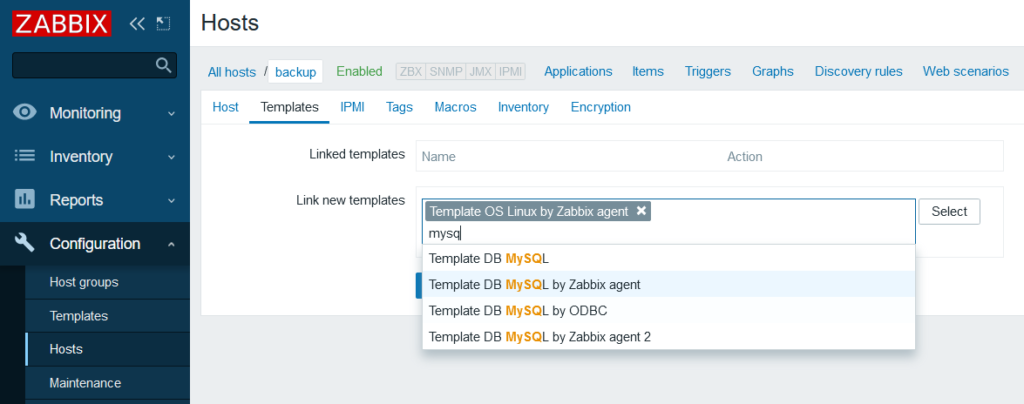
Adding the nodes to Zabbix is easy enough so I won’t demonstrate that but adding templates isn’t necessary all that obvious(like that you pretty much have to add them to make Zabbix do anything). Here I’m adding some standard templates for Linux servers and also MySQL. I added Nginx as well.
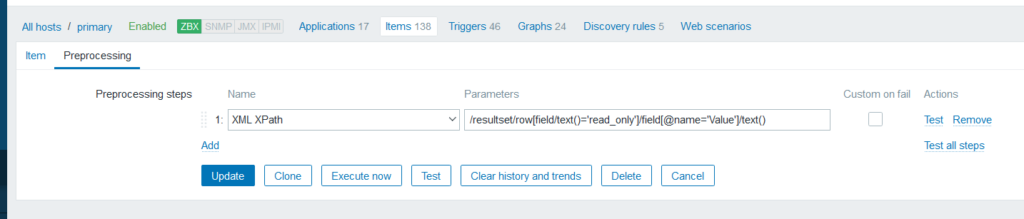
Now let’s create two items manually, one for primary and one for backup. They’ll do the same thing, get status variables and extract the “read_only” variable that tells us if the node is accepting MariaDB writes:
We need to process the output to get a readable value using Preprocessing:
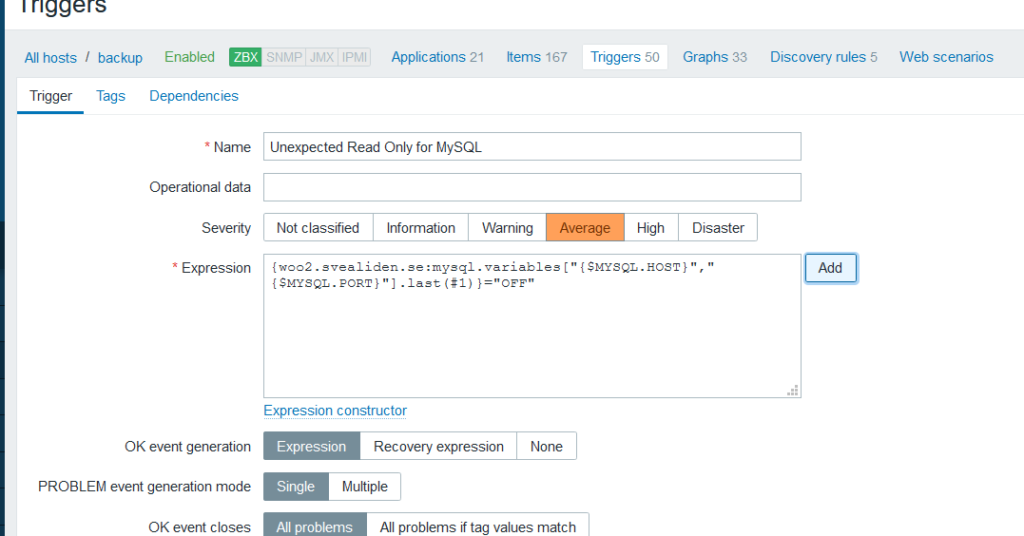
We can then add triggers. primary should normally be read-write so if it is read-only. That should trigger a warning. The opposite is true for backup:
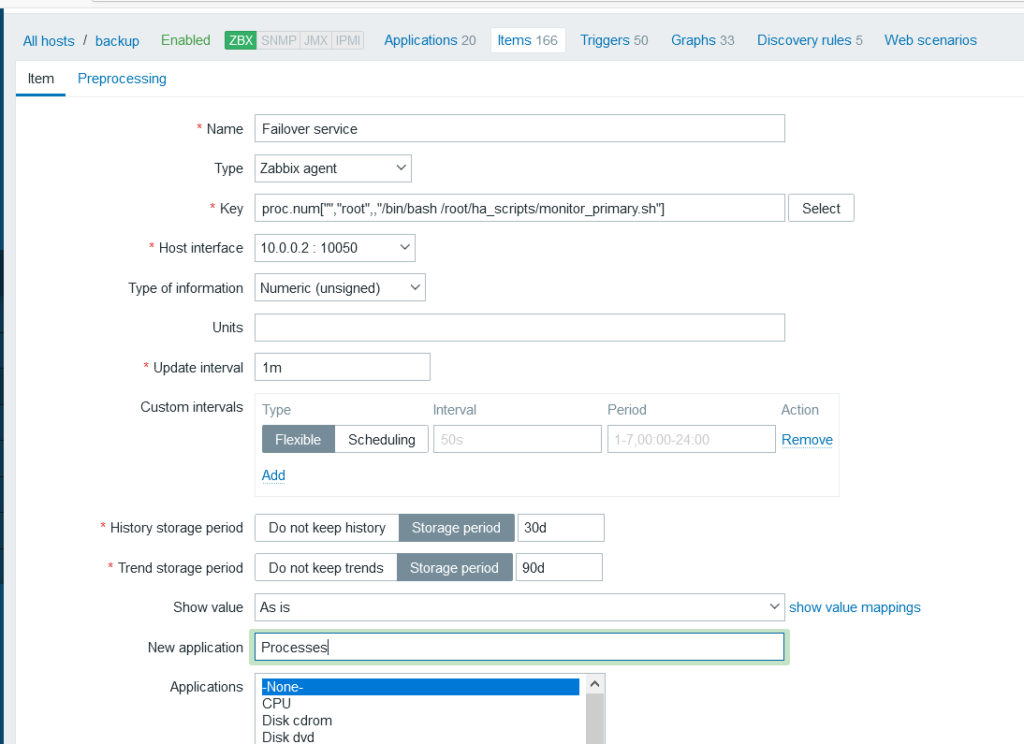
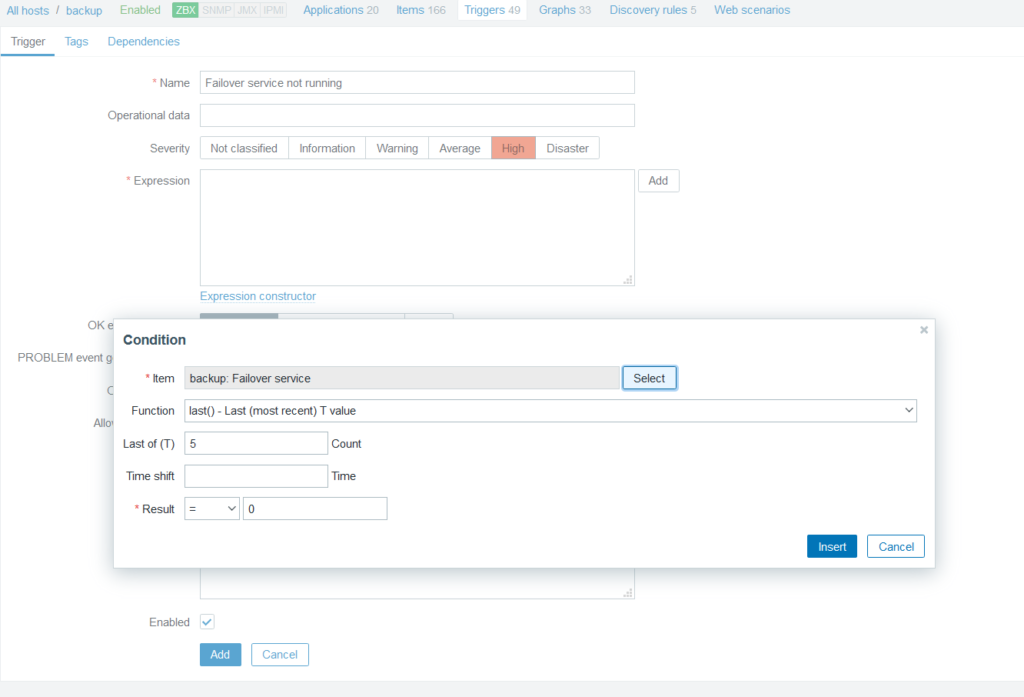
It also became clear that I should have a check for backup server running the failover service:
And a trigger to go along with that of course:
Zero running failover daemon is bad you see. Don’t ask me what prompted me to realize the necessity of having an automated warning for this.
You’ll probably want to customize the MySQL by Zabbix Agent template in this sort of situation.
Set replication discovery to run every 5 minutes.
Make it possible to manually close the warning about a server not replicating from a master(since we will be switching master/slave roles these warnings can be spurious).
Disable warnings about InnoDB pool utlization:
Dashboards
It’s easy to create dashboards with information you find particularly useful:
Warnings
You’ll want to go to the Administration->Media Types section to enable ways for Zabbix to alert you to things going wrong. I use email only for my own network but for a production setup you’d probably want PushOver or OpsGenie to alert you more forcefully when things go south.
There is a draft on this website called “HA WordPress on a slightly bigger budget” and details the futility of trying to use Keepalived and Cloudflare Load Balancer to make a working primary/backup high availability server setup. I do not consider this to be any failing on the part of Keepalived as it quite clearly isn’t meant to be used for things like databases where split brain is a concern.
Cloudflare could have been a bit more helpful by providing a “no failback” option so that if traffic was ever directed to the backup, traffic wouldn’t go over to the primary automatically if that server came back online again. But I’ve implemented that using their REST API instead. So it’s still Cloudflare Load Balancer, MariaDB, Nginx, PHP-FPM, lsyncd and some janky bash scripts. It’s just that Keepalived isn’t being asked to do the work of Pacemaker/Corosync.
A planned switchover
Important numbers:
Thu 24 Dec 2020 11:37:11 PM CET Read worked. | Write worked. 185.20.12.24 Thu 24 Dec 2020 11:37:30 PM CET Read worked. | Write worked. 172.31.35.57
We had 19 seconds during which writes didn’t work due to the switchover process. Reads worked throughout. Full log:
cjp@util:~$ ./wootest.sh
Thu 24 Dec 2020 11:36:53 PM CET Read worked. | Write worked. 185.20.12.24

Thu 24 Dec 2020 11:36:54 PM CET Read worked. | Write worked. 185.20.12.24

Thu 24 Dec 2020 11:36:56 PM CET Read worked. | Write worked. 185.20.12.24

Thu 24 Dec 2020 11:36:58 PM CET Read worked. | Write worked. 185.20.12.24

Thu 24 Dec 2020 11:36:59 PM CET Read worked. | Write worked. 185.20.12.24

Thu 24 Dec 2020 11:37:01 PM CET Read worked. | Write worked. 185.20.12.24

Thu 24 Dec 2020 11:37:03 PM CET Read worked. | Write worked. 185.20.12.24

Thu 24 Dec 2020 11:37:04 PM CET Read worked. | Write worked. 185.20.12.24

Thu 24 Dec 2020 11:37:06 PM CET Read worked. | Write worked. 185.20.12.24

Thu 24 Dec 2020 11:37:07 PM CET Read worked. | Write worked. 185.20.12.24

Thu 24 Dec 2020 11:37:09 PM CET Read worked. | Write worked. 185.20.12.24

Thu 24 Dec 2020 11:37:11 PM CET Read worked. | Write worked. 185.20.12.24

Thu 24 Dec 2020 11:37:12 PM CET Read worked. | Write failed. 185.20.12.24

Thu 24 Dec 2020 11:37:14 PM CET Read worked. | Write failed. 185.20.12.24

Thu 24 Dec 2020 11:37:15 PM CET Read worked. | Write failed. 185.20.12.24

Thu 24 Dec 2020 11:37:17 PM CET Read worked. | Write failed. 185.20.12.24

Thu 24 Dec 2020 11:37:19 PM CET Read worked. | Write failed. 185.20.12.24

Thu 24 Dec 2020 11:37:20 PM CET Read worked. | Write failed. 185.20.12.24

Thu 24 Dec 2020 11:37:22 PM CET Read worked. | Write failed. 185.20.12.24

Thu 24 Dec 2020 11:37:23 PM CET Read worked. | Write failed. 172.31.35.57

Thu 24 Dec 2020 11:37:25 PM CET Read worked. | Write failed. 172.31.35.57

Thu 24 Dec 2020 11:37:27 PM CET Read worked. | Write failed. 172.31.35.57

Thu 24 Dec 2020 11:37:30 PM CET Read worked. | Write worked. 172.31.35.57

Thu 24 Dec 2020 11:37:32 PM CET Read worked. | Write worked. 172.31.35.57

Thu 24 Dec 2020 11:37:34 PM CET Read worked. | Write worked. 172.31.35.57

Thu 24 Dec 2020 11:37:36 PM CET Read worked. | Write worked. 172.31.35.57

Thu 24 Dec 2020 11:37:38 PM CET Read worked. | Write worked. 172.31.35.57

Thu 24 Dec 2020 11:37:40 PM CET Read worked. | Write worked. 172.31.35.57

Thu 24 Dec 2020 11:37:42 PM CET Read worked. | Write worked. 172.31.35.57

Thu 24 Dec 2020 11:37:44 PM CET Read worked. | Write worked. 172.31.35.57
Yes, I _am_ an idiot. But not for the reasons that I thought…
Installing Zabbix Agent on RHEL was difficult for me somehow
Failover test
Okey, so now for the (hopefully) more rare case of the primary going down all of a sudden:
Sat 26 Dec 2020 06:44:18 PM CET Read worked. | Write worked. 172.31.35.57

Sat 26 Dec 2020 06:44:21 PM CET Read worked. | Write worked. 172.31.35.57

Sat 26 Dec 2020 06:44:23 PM CET Read worked. | Write worked. 172.31.35.57

Sat 26 Dec 2020 06:44:26 PM CET Read worked. | Write worked. 172.31.35.57

Sat 26 Dec 2020 06:44:27 PM CET Read failed. | Write failed. <html>
<head><title>521 Origin Down</title></head>
<body bgcolor="white">
<center><h1>521 Origin Down</h1></center>
<hr><center>cloudflare-nginx</center>
</body>
</html>

Sat 26 Dec 2020 06:44:28 PM CET Read failed. | Write failed. <html>
<head><title>521 Origin Down</title></head>
<body bgcolor="white">
<center><h1>521 Origin Down</h1></center>
<hr><center>cloudflare-nginx</center>
</body>
</html>

Sat 26 Dec 2020 06:45:30 PM CET Read failed. | Write failed. 185.20.12.24

Sat 26 Dec 2020 06:45:32 PM CET Read worked. | Write failed. 185.20.12.24

Sat 26 Dec 2020 06:45:33 PM CET Read worked. | Write failed. 185.20.12.24

Sat 26 Dec 2020 06:45:35 PM CET Read worked. | Write failed. 185.20.12.24

Sat 26 Dec 2020 06:45:36 PM CET Read worked. | Write failed. 185.20.12.24

Sat 26 Dec 2020 06:45:38 PM CET Read worked. | Write failed. 185.20.12.24

Sat 26 Dec 2020 06:45:39 PM CET Read worked. | Write failed. 185.20.12.24

Sat 26 Dec 2020 06:45:40 PM CET Read worked. | Write failed. 185.20.12.24

Sat 26 Dec 2020 06:45:42 PM CET Read worked. | Write failed. 185.20.12.24

Sat 26 Dec 2020 06:45:43 PM CET Read worked. | Write failed. 185.20.12.24

Sat 26 Dec 2020 06:45:45 PM CET Read worked. | Write failed. 185.20.12.24

Sat 26 Dec 2020 06:45:46 PM CET Read worked. | Write failed. 185.20.12.24

Sat 26 Dec 2020 06:45:48 PM CET Read worked. | Write failed. 185.20.12.24

Sat 26 Dec 2020 06:45:49 PM CET Read worked. | Write failed. 185.20.12.24

Sat 26 Dec 2020 06:45:50 PM CET Read worked. | Write failed. 185.20.12.24

Sat 26 Dec 2020 06:45:52 PM CET Read worked. | Write failed. 185.20.12.24

Sat 26 Dec 2020 06:45:53 PM CET Read worked. | Write failed. 185.20.12.24

Sat 26 Dec 2020 06:45:55 PM CET Read worked. | Write failed. 185.20.12.24

Sat 26 Dec 2020 06:45:56 PM CET Read worked. | Write worked. 185.20.12.24

Sat 26 Dec 2020 06:45:58 PM CET Read worked. | Write worked. 185.20.12.24

Sat 26 Dec 2020 06:45:59 PM CET Read worked. | Write worked. 185.20.12.24

Sat 26 Dec 2020 06:46:00 PM CET Read worked. | Write worked. 185.20.12.24

Sat 26 Dec 2020 06:46:02 PM CET Read worked. | Write worked. 185.20.12.24

Sat 26 Dec 2020 06:46:03 PM CET Read worked. | Write worked. 185.20.12.24

Sat 26 Dec 2020 06:46:04 PM CET Read worked. | Write worked. 185.20.12.24

Sat 26 Dec 2020 06:46:06 PM CET Read worked. | Write worked. 185.20.12.24

Sat 26 Dec 2020 06:46:07 PM CET Read worked. | Write worked. 185.20.12.24
Important numbers:
Sat 26 Dec 2020 06:44:26 PM CET Read worked. | Write worked. 172.31.35.57 Sat 26 Dec 2020 06:45:32 PM CET Read worked. | Write failed. 185.20.12.24 Sat 26 Dec 2020 06:45:56 PM CET Read worked. | Write worked. 185.20.12.24
So a minute with site being down for reads and writes, and another half a minute during which only writes didn’t work. Not too shabby. And Zabbix is suitably concerned:
Crashed server rehabilitation
Problems getting a crashed primary to sync with backup:
[root@ip-172-31-35-57 ~]# mysql -e "SHOW SLAVE STATUS\G;"
*************************** 1. row ***************************
                Slave_IO_State:
                   Master_Host: backup
                   Master_User: replication_user
                   Master_Port: 3306
                 Connect_Retry: 60
               Master_Log_File:
           Read_Master_Log_Pos: 4
                Relay_Log_File: woo1-relay-log.000001
                 Relay_Log_Pos: 4
         Relay_Master_Log_File:
              Slave_IO_Running: No
             Slave_SQL_Running: Yes
               Replicate_Do_DB:
           Replicate_Ignore_DB:
            Replicate_Do_Table:
        Replicate_Ignore_Table:
       Replicate_Wild_Do_Table:
   Replicate_Wild_Ignore_Table:
                    Last_Errno: 0
                    Last_Error:
                  Skip_Counter: 0
           Exec_Master_Log_Pos: 4
               Relay_Log_Space: 256
               Until_Condition: None
                Until_Log_File:
                 Until_Log_Pos: 0
            Master_SSL_Allowed: No
            Master_SSL_CA_File:
            Master_SSL_CA_Path:
               Master_SSL_Cert:
             Master_SSL_Cipher:
                Master_SSL_Key:
         Seconds_Behind_Master: NULL
 Master_SSL_Verify_Server_Cert: No
                 Last_IO_Errno: 1236
                 Last_IO_Error: Got fatal error 1236 from master when reading data from binary log: 'Error: connecting slave requested to start from GTID 0-1-58257, which is not in the master's binlog. Since the master's binlog contains GTIDs with higher sequence numbers, it probably means that the slave has diverged due to executing extra erroneous transactions'
                Last_SQL_Errno: 0
                Last_SQL_Error:
   Replicate_Ignore_Server_Ids:
              Master_Server_Id: 2
                Master_SSL_Crl:
            Master_SSL_Crlpath:
                    Using_Gtid: Current_Pos
                   Gtid_IO_Pos: 0-1-58257
       Replicate_Do_Domain_Ids:
   Replicate_Ignore_Domain_Ids:
                 Parallel_Mode: conservative
                     SQL_Delay: 0
           SQL_Remaining_Delay: NULL
       Slave_SQL_Running_State: Slave has read all relay log; waiting for the slave I/O thread to update it
              Slave_DDL_Groups: 2
Slave_Non_Transactional_Groups: 14585
    Slave_Transactional_Groups: 8746
Oh, dear! What have we missed? I.e. what happened on primary when it was disconnected from the backup and _should_ have been read-only?
[root@ip-172-31-35-57 ~]# mysqlbinlog /var/lib/mysql/woo1-bin.000054 | less
<snip>
#201225 17:32:10 server id 1  end_log_pos 8224049 CRC32 0x780272cf      GTID 0-1-58257

/*!100001 SET @@session.gtid_seq_no=58257*//*!*/;
START TRANSACTION
/*!*/;
# at 8224049
#201225 17:32:10 server id 1  end_log_pos 8224198 CRC32 0x07e3910e      Query   thread_id=3456  exec_time=0     error_code=0
SET TIMESTAMP=1608917530/*!*/;
DELETE FROM `wp9k_options` WHERE `option_name` = '_transient_doing_cron'
/*!*/;
# at 8224198
#201225 17:32:10 server id 1  end_log_pos 8224281 CRC32 0xb1ecec93      Query   thread_id=3456  exec_time=0     error_code=0
SET TIMESTAMP=1608917530/*!*/;
COMMIT
/*!*/;
DELIMITER ;
# End of log file
ROLLBACK /* added by mysqlbinlog */;
/*!50003 SET COMPLETION_TYPE=@OLD_COMPLETION_TYPE*/;
/*!50530 SET @@SESSION.PSEUDO_SLAVE_MODE=0*/;
Oh, DELETE _transient_doing_cron… Well that’s no biggie. I was feigning concern that somehow lots of orders to my entirely not-real web shop had somehow happened to be written to the wrong database.
Well MariaDB is very stubborn about these sorts of things. The only way I know how to get primary back in sync with backup is:
[root@ip-172-31-35-57 ~]# systemctl stop mariadb
[root@ip-172-31-35-57 ~]# rm -rf /var/lib/mysql/* # <--- EXTREMELY DANGER IF YOU DON'T KNOW PRECISELY WHAT YOU ARE DOING. Lost hours of work doing this on the wrong server once...
[root@ip-172-31-35-57 ~]# mysql_install_db
Installing MariaDB/MySQL system tables in '/var/lib/mysql' ...
OK

To start mysqld at boot time you have to copy
support-files/mysql.server to the right place for your system


PLEASE REMEMBER TO SET A PASSWORD FOR THE MariaDB root USER !
To do so, start the server, then issue the following commands:

'/usr/bin/mysqladmin' -u root password 'new-password'
'/usr/bin/mysqladmin' -u root -h ip-172-31-35-57.eu-north-1.compute.internal password 'new-password'

Alternatively you can run:
'/usr/bin/mysql_secure_installation'

which will also give you the option of removing the test
databases and anonymous user created by default.  This is
strongly recommended for production servers.

See the MariaDB Knowledgebase at http://mariadb.com/kb or the
MySQL manual for more instructions.

You can start the MariaDB daemon with:
cd '/usr' ; /usr/bin/mysqld_safe --datadir='/var/lib/mysql'

You can test the MariaDB daemon with mysql-test-run.pl
cd '/usr/mysql-test' ; perl mysql-test-run.pl

Please report any problems at http://mariadb.org/jira

The latest information about MariaDB is available at http://mariadb.org/.
You can find additional information about the MySQL part at:
http://dev.mysql.com
Consider joining MariaDB's strong and vibrant community:
https://mariadb.org/get-involved/

[root@ip-172-31-35-57 ~]# systemctl restart mariadb
Job for mariadb.service failed because the control process exited with error code.
See "systemctl status mariadb.service" and "journalctl -xe" for details.
[root@ip-172-31-35-57 ~]# journalctl -u mariadb
-- Logs begin at Wed 2020-12-23 00:40:59 UTC, end at Fri 2020-12-25 17:55:55 UTC. --
Dec 23 00:44:22 ip-172-31-35-57.eu-north-1.compute.internal systemd[1]: Starting MariaDB 10.3 database server...
Dec 23 00:44:22 ip-172-31-35-57.eu-north-1.compute.internal mysql-check-socket[1506]: Socket file /var/lib/mysql/mysql.sock exists.
Dec 23 00:44:22 ip-172-31-35-57.eu-north-1.compute.internal mysql-check-socket[1506]: No process is using /var/lib/mysql/mysql.sock, which means it is a garbage, so it will be removed automatically.
Dec 23 00:44:22 ip-172-31-35-57.eu-north-1.compute.internal mysql-prepare-db-dir[1535]: Database MariaDB is probably initialized in /var/lib/mysql already, nothing is done.
Dec 23 00:44:22 ip-172-31-35-57.eu-north-1.compute.internal mysql-prepare-db-dir[1535]: If this is not the case, make sure the /var/lib/mysql is empty before running mysql-prepare-db-dir.
Dec 23 00:44:23 ip-172-31-35-57.eu-north-1.compute.internal mysqld[1573]: 2020-12-23  0:44:23 0 [Note] /usr/libexec/mysqld (mysqld 10.3.27-MariaDB-log) starting as process 1573 ...
Dec 23 00:44:23 ip-172-31-35-57.eu-north-1.compute.internal systemd[1]: Started MariaDB 10.3 database server.
Dec 25 17:55:26 ip-172-31-35-57.eu-north-1.compute.internal systemd[1]: Stopping MariaDB 10.3 database server...
Dec 25 17:55:28 ip-172-31-35-57.eu-north-1.compute.internal systemd[1]: mariadb.service: Succeeded.
Dec 25 17:55:28 ip-172-31-35-57.eu-north-1.compute.internal systemd[1]: Stopped MariaDB 10.3 database server.
Dec 25 17:55:55 ip-172-31-35-57.eu-north-1.compute.internal systemd[1]: Starting MariaDB 10.3 database server...
Dec 25 17:55:55 ip-172-31-35-57.eu-north-1.compute.internal mysql-prepare-db-dir[66558]: Database MariaDB is probably initialized in /var/lib/mysql already, nothing is done.
Dec 25 17:55:55 ip-172-31-35-57.eu-north-1.compute.internal mysql-prepare-db-dir[66558]: If this is not the case, make sure the /var/lib/mysql is empty before running mysql-prepare-db-dir.
Dec 25 17:55:55 ip-172-31-35-57.eu-north-1.compute.internal mysqld[66596]: 2020-12-25 17:55:55 0 [Note] /usr/libexec/mysqld (mysqld 10.3.27-MariaDB-log) starting as process 66596 ...
Dec 25 17:55:55 ip-172-31-35-57.eu-north-1.compute.internal mysqld[66596]: /usr/libexec/mysqld: Can't create file './woo1.err' (errno: 13 "Permission denied")
Dec 25 17:55:55 ip-172-31-35-57.eu-north-1.compute.internal mysqld[66596]: 2020-12-25 17:55:55 0 [ERROR] mysqld: File './woo1-bin.index' not found (Errcode: 13 "Permission denied")
Dec 25 17:55:55 ip-172-31-35-57.eu-north-1.compute.internal mysqld[66596]: 2020-12-25 17:55:55 0 [ERROR] Aborting
Dec 25 17:55:55 ip-172-31-35-57.eu-north-1.compute.internal systemd[1]: mariadb.service: Main process exited, code=exited, status=1/FAILURE
Dec 25 17:55:55 ip-172-31-35-57.eu-north-1.compute.internal systemd[1]: mariadb.service: Failed with result 'exit-code'.
Dec 25 17:55:55 ip-172-31-35-57.eu-north-1.compute.internal systemd[1]: Failed to start MariaDB 10.3 database server.
[root@ip-172-31-35-57 ~]# ls -lh /var/lib/
total 4.0K
drwxr-xr-x. 2 root    root      85 Dec 18 20:17 alternatives
drwxr-xr-x. 3 root    root     209 Oct 31 05:07 authselect
drwxr-xr-x. 2 chrony  chrony    19 Dec 25 17:49 chrony
drwxr-xr-x. 8 root    root     105 Dec 23 00:41 cloud
drwx------. 2 apache  apache     6 Jun 15  2020 dav
drwxr-xr-x. 2 root    root      24 Oct 31 05:02 dbus
drwxr-xr-x. 2 root    root       6 May  7  2020 dhclient
drwxr-xr-x. 4 root    root     115 Dec 25 16:32 dnf
drwxr-xr-x. 2 root    root       6 Apr 23  2020 games
drwx------. 2 apache  apache     6 Jun 15  2020 httpd
drwxr-xr-x. 2 root    root       6 Aug  4 12:03 initramfs
drwxr-xr-x. 2 root    root      30 Dec 25 03:51 logrotate
drwxr-xr-x. 2 root    root       6 Apr 23  2020 misc
drwxr-xr-x. 5 mysql   mysql    264 Dec 25 17:55 mysql
drwxr-xr-x. 4 root    root      45 Dec 18 22:13 net-snmp
drwx------. 2 root    root     169 Dec 25 17:51 NetworkManager
drwxrwx---. 3 nginx   root      33 Dec 18 23:20 nginx
drwxr-xr-x. 2 root    root       6 Aug 12  2018 os-prober
drwxr-xr-x. 6 root    root      68 Dec 18 21:37 php
drwxr-x---. 3 root    polkitd   28 Oct 31 05:02 polkit-1
drwx------. 2 root    root       6 Oct 31 05:02 portables
drwx------. 2 root    root       6 Oct 31 05:02 private
drwxr-x---. 6 root    root      71 Oct 31 05:03 rhsm
drwxr-xr-x. 2 root    root    4.0K Dec 23 00:51 rpm
drwxr-xr-x. 3 root    root      21 Dec 18 20:30 rpm-state
drwx------. 2 root    root      29 Dec 25 17:55 rsyslog
drwxr-xr-x. 5 root    root      46 Oct 31 05:03 selinux
drwxr-xr-x. 9 root    root     105 Oct 31 05:03 sss
drwxr-xr-x. 5 root    root      70 Nov  6 13:06 systemd
drwx------. 2 tss     tss        6 Jun 10  2019 tpm
drwxr-xr-x. 2 root    root       6 Oct  2 16:12 tuned
drwxr-xr-x. 2 unbound unbound   22 Dec 25 00:00 unbound
[root@ip-172-31-35-57 ~]# ls -lh /var/lib/mysql/
total 109M
-rw-rw---- 1 root root  16K Dec 25 17:55 aria_log.00000001
-rw-rw---- 1 root root   52 Dec 25 17:55 aria_log_control
-rw-rw---- 1 root root  972 Dec 25 17:55 ib_buffer_pool
-rw-rw---- 1 root root  12M Dec 25 17:55 ibdata1
-rw-rw---- 1 root root  48M Dec 25 17:55 ib_logfile0
-rw-rw---- 1 root root  48M Dec 25 17:55 ib_logfile1
drwx------ 2 root root 4.0K Dec 25 17:55 mysql
drwx------ 2 root root   20 Dec 25 17:55 performance_schema
drwx------ 2 root root   20 Dec 25 17:55 test
-rw-rw---- 1 root root  28K Dec 25 17:55 woo1-bin.000001
-rw-rw---- 1 root root   18 Dec 25 17:55 woo1-bin.index
-rw-rw---- 1 root root    7 Dec 25 17:55 woo1-bin.state
-rw-rw---- 1 root root  642 Dec 25 17:55 woo1.err
[root@ip-172-31-35-57 ~]# chown -R mysql:mysql /var/lib/mysql/
[root@ip-172-31-35-57 ~]# systemctl restart mariadb
[root@ip-172-31-35-57 ~]# journalctl -u mariadb
-- Logs begin at Wed 2020-12-23 00:40:59 UTC, end at Fri 2020-12-25 17:56:22 UTC. --
Dec 23 00:44:22 ip-172-31-35-57.eu-north-1.compute.internal systemd[1]: Starting MariaDB 10.3 database server...
Dec 23 00:44:22 ip-172-31-35-57.eu-north-1.compute.internal mysql-check-socket[1506]: Socket file /var/lib/mysql/mysql.sock exists.
Dec 23 00:44:22 ip-172-31-35-57.eu-north-1.compute.internal mysql-check-socket[1506]: No process is using /var/lib/mysql/mysql.sock, which means it is a garbage, so it will be removed automatically.
Dec 23 00:44:22 ip-172-31-35-57.eu-north-1.compute.internal mysql-prepare-db-dir[1535]: Database MariaDB is probably initialized in /var/lib/mysql already, nothing is done.
Dec 23 00:44:22 ip-172-31-35-57.eu-north-1.compute.internal mysql-prepare-db-dir[1535]: If this is not the case, make sure the /var/lib/mysql is empty before running mysql-prepare-db-dir.
Dec 23 00:44:23 ip-172-31-35-57.eu-north-1.compute.internal mysqld[1573]: 2020-12-23  0:44:23 0 [Note] /usr/libexec/mysqld (mysqld 10.3.27-MariaDB-log) starting as process 1573 ...
Dec 23 00:44:23 ip-172-31-35-57.eu-north-1.compute.internal systemd[1]: Started MariaDB 10.3 database server.
Dec 25 17:55:26 ip-172-31-35-57.eu-north-1.compute.internal systemd[1]: Stopping MariaDB 10.3 database server...
Dec 25 17:55:28 ip-172-31-35-57.eu-north-1.compute.internal systemd[1]: mariadb.service: Succeeded.
Dec 25 17:55:28 ip-172-31-35-57.eu-north-1.compute.internal systemd[1]: Stopped MariaDB 10.3 database server.
Dec 25 17:55:55 ip-172-31-35-57.eu-north-1.compute.internal systemd[1]: Starting MariaDB 10.3 database server...
Dec 25 17:55:55 ip-172-31-35-57.eu-north-1.compute.internal mysql-prepare-db-dir[66558]: Database MariaDB is probably initialized in /var/lib/mysql already, nothing is done.
Dec 25 17:55:55 ip-172-31-35-57.eu-north-1.compute.internal mysql-prepare-db-dir[66558]: If this is not the case, make sure the /var/lib/mysql is empty before running mysql-prepare-db-dir.
Dec 25 17:55:55 ip-172-31-35-57.eu-north-1.compute.internal mysqld[66596]: 2020-12-25 17:55:55 0 [Note] /usr/libexec/mysqld (mysqld 10.3.27-MariaDB-log) starting as process 66596 ...
Dec 25 17:55:55 ip-172-31-35-57.eu-north-1.compute.internal mysqld[66596]: /usr/libexec/mysqld: Can't create file './woo1.err' (errno: 13 "Permission denied")
Dec 25 17:55:55 ip-172-31-35-57.eu-north-1.compute.internal mysqld[66596]: 2020-12-25 17:55:55 0 [ERROR] mysqld: File './woo1-bin.index' not found (Errcode: 13 "Permission denied")
Dec 25 17:55:55 ip-172-31-35-57.eu-north-1.compute.internal mysqld[66596]: 2020-12-25 17:55:55 0 [ERROR] Aborting
Dec 25 17:55:55 ip-172-31-35-57.eu-north-1.compute.internal systemd[1]: mariadb.service: Main process exited, code=exited, status=1/FAILURE
Dec 25 17:55:55 ip-172-31-35-57.eu-north-1.compute.internal systemd[1]: mariadb.service: Failed with result 'exit-code'.
Dec 25 17:55:55 ip-172-31-35-57.eu-north-1.compute.internal systemd[1]: Failed to start MariaDB 10.3 database server.
Dec 25 17:56:22 ip-172-31-35-57.eu-north-1.compute.internal systemd[1]: Starting MariaDB 10.3 database server...
Dec 25 17:56:22 ip-172-31-35-57.eu-north-1.compute.internal mysql-prepare-db-dir[66636]: Database MariaDB is probably initialized in /var/lib/mysql already, nothing is done.
Dec 25 17:56:22 ip-172-31-35-57.eu-north-1.compute.internal mysql-prepare-db-dir[66636]: If this is not the case, make sure the /var/lib/mysql is empty before running mysql-prepare-db-dir.
Dec 25 17:56:22 ip-172-31-35-57.eu-north-1.compute.internal mysqld[66675]: 2020-12-25 17:56:22 0 [Note] /usr/libexec/mysqld (mysqld 10.3.27-MariaDB-log) starting as process 66675 ...
Dec 25 17:56:22 ip-172-31-35-57.eu-north-1.compute.internal mysql-check-upgrade[66707]: The datadir located at /var/lib/mysql needs to be upgraded using 'mysql_upgrade' tool. This can be done using the following steps:
Dec 25 17:56:22 ip-172-31-35-57.eu-north-1.compute.internal mysql-check-upgrade[66707]:   1. Back-up your data before with 'mysql_upgrade'
Dec 25 17:56:22 ip-172-31-35-57.eu-north-1.compute.internal mysql-check-upgrade[66707]:   2. Start the database daemon using 'service mariadb start'
Dec 25 17:56:22 ip-172-31-35-57.eu-north-1.compute.internal mysql-check-upgrade[66707]:   3. Run 'mysql_upgrade' with a database user that has sufficient privileges
Dec 25 17:56:22 ip-172-31-35-57.eu-north-1.compute.internal mysql-check-upgrade[66707]: Read more about 'mysql_upgrade' usage at:
Dec 25 17:56:22 ip-172-31-35-57.eu-north-1.compute.internal mysql-check-upgrade[66707]: https://mariadb.com/kb/en/mariadb/documentation/sql-commands/table-commands/mysql_upgrade/
Dec 25 17:56:22 ip-172-31-35-57.eu-north-1.compute.internal systemd[1]: Started MariaDB 10.3 database server.
[root@ip-172-31-35-57 ~]# mysql_upgrade
Phase 1/7: Checking and upgrading mysql database
Processing databases
mysql
mysql.column_stats                                 OK
mysql.columns_priv                                 OK
mysql.db                                           OK
mysql.event                                        OK
mysql.func                                         OK
mysql.gtid_slave_pos                               OK
mysql.help_category                                OK
mysql.help_keyword                                 OK
mysql.help_relation                                OK
mysql.help_topic                                   OK
mysql.host                                         OK
mysql.index_stats                                  OK
mysql.innodb_index_stats                           OK
mysql.innodb_table_stats                           OK
mysql.plugin                                       OK
mysql.proc                                         OK
mysql.procs_priv                                   OK
mysql.proxies_priv                                 OK
mysql.roles_mapping                                OK
mysql.servers                                      OK
mysql.table_stats                                  OK
mysql.tables_priv                                  OK
mysql.time_zone                                    OK
mysql.time_zone_leap_second                        OK
mysql.time_zone_name                               OK
mysql.time_zone_transition                         OK
mysql.time_zone_transition_type                    OK
mysql.transaction_registry                         OK
mysql.user                                         OK
Phase 2/7: Installing used storage engines... Skipped
Phase 3/7: Fixing views
Phase 4/7: Running 'mysql_fix_privilege_tables'
Phase 5/7: Fixing table and database names
Phase 6/7: Checking and upgrading tables
Processing databases
information_schema
performance_schema
test
Phase 7/7: Running 'FLUSH PRIVILEGES'
OK
[root@ip-172-31-35-57 ~]# mysql -e "SHOW SLAVE STATUS\G;"
[root@ip-172-31-35-57 ~]# mysql < backup_2020-12-25_1854.sql
[root@ip-172-31-35-57 ~]# grep gtid_slave_pos backup_2020-12-25_1854.sql  | head -1
-- SET GLOBAL gtid_slave_pos='0-2-61170';

Welcome to the MariaDB monitor.  Commands end with ; or \g.
Your MariaDB connection id is 32
Server version: 10.3.27-MariaDB-log MariaDB Server

Copyright (c) 2000, 2018, Oracle, MariaDB Corporation Ab and others.

Type 'help;' or '\h' for help. Type '\c' to clear the current input statement.

MariaDB [(none)]> GRANT ALL PRIVILEGES ON `johante2_wp508`.* TO `johante2_wp508`@`localhost`;
Query OK, 0 rows affected (0.001 sec)

MariaDB [(none)]> GRANT USAGE,REPLICATION CLIENT,PROCESS,SHOW DATABASES,SHOW VIEW ON *.* TO 'zbx_monitor'@'%';
Query OK, 0 rows affected (0.000 sec)


MariaDB [(none)]> SET GLOBAL gtid_slave_pos='0-2-61170';
Query OK, 0 rows affected (0.021 sec)

MariaDB [(none)]> Bye
[root@ip-172-31-35-57 ~]#
Oki, let’s try to get primary to replicate from backup now.
From now on we can start replication by saying master_use_gtid=current_pos; at the end but this time around we had to use slave_pos as the starting point. Because reasons.
Failover test
Whatever system you set up for high availability – even a less janky one – needs to be tested a lot before being used live. Example: did you know that Amazon EC2 will assign a VM a different IP address after it was Stopped? Well I sure didn’t! Nor did I realize that Cloudflare’s Origin Server editing UI can’t handle spaces:
Took me a while to figure out I had copied the string “13.49.145.244 “.
The main issue with this test was that I had forgot to turn on the failover service on backup… But that made it clear there should be a Zabbix item counting the number of failover processes running and a trigger to warn if it is zero.
Trigger only if 5 consequtive measurements indicate that process is down(there can be some noise):
Implementation
So now to the details of how it works. Let’s start with the main script that runs on the backup monitoring the primary:
root@woo2:~/ha_scripts# cat monitor_primary.sh
#!/bin/bash

HTTP_FAIL="0"

while true; do
        mysql -e "SHOW VARIABLES LIKE 'read_only';" | grep -iq off
        if [ $? -eq 0 ]
        then
                # We're apparently accepting writes so we are in the
                # master already, little point in promoting this node.
                exit 1
        fi
        curl --connect-timeout 5 -fks -H "Host: woo.deref.se" https://primary -o /dev/null
        if [ $? -ne 0 ]
        then
                ((HTTP_FAIL=HTTP_FAIL+1))
                echo "Failures: $HTTP_FAIL."
        else
                ((HTTP_FAIL=0))
        fi
        if [ $HTTP_FAIL -gt 3 ]
        then
                ./get_primary_health.sh | grep "healthy" | grep -q "true"
                if [ $? -ne 0 ]
                then

                        # Not sure primary is reachable, but let's try getting it to
                        # stop sending changes to us
                        ssh primary "systemctl stop lsyncd"
                        # If the primary is still ticking along but not reachable
                        # we need to prevent it from overwriting our file system
                        unlink /root/.ssh/authorized_keys
                        ln -s /root/.ssh/authorized_keys_no_primary /root/.ssh/authorized_keys

                        # primary cut off from sending changes to us, we can push changes
                        # in the other direction then. Might work, might not.
                        systemctl start lsyncd

                        # Wait for replication to catch up
                        ./checkslave.sh
                        # We've caught up, stop replicating.
                        mysql -e "STOP SLAVE;"
                        sleep 1
                        mysql -e "RESET SLAVE ALL;"

                        sleep 5
                        # It's now safe to accept writes
                        mysql -e 'SET GLOBAL read_only = OFF;'

                        # Got to tell Cloudflare not to switch back to primary.
                        ./set_backup_alone_in_lb.sh

                        # Let's give it a shot to get the primary to replicate data from us
                        # Started as a background job since it's not critical
                        ./make_primary_slave.sh &
                        exit 0
                else
                        # Okey, if Cloudflare says the server is okey, let's give it another
                        # chance by starting the counting from zero
                        echo "Cloudflare says primary is healthy, even though we failed to reach it. Resetting fail-counter."
                        ((HTTP_FAIL=0))
                fi
        fi
        sleep 5
done
Obviously “curl –connect-timeout 5 -fks -H “Host: woo.deref.se” https://primary -o /dev/null” needs to be modified to your environment.
There are some other scripts being called from this one, checkslave.sh is a chunk of code I copied straight from ocf:heartbeat:mariadb:
#!/bin/bash

# Swiped from ocf:heartbeat:mariadb resource agent
SLAVESTATUS=$(mysql -e "SHOW SLAVE STATUS;" | wc -l)
if [ $SLAVESTATUS -gt 0 ]; then
        tmpfile="/tmp/processlist.txt"
        while true; do
                mysql -e 'SHOW PROCESSLIST\G' > $tmpfile
                if grep -i 'Has read all relay log' $tmpfile >/dev/null; then
                    echo "MariaDB slave has finished processing relay log"
                    break
                fi
                if ! grep -q 'system user' $tmpfile; then
                    echo "Slave not running - not waiting to finish"
                    break
                fi
                echo "Waiting for MariaDB slave to finish processing relay log"
                sleep 1
        done
fi
How best to test if a MariaDB server is busy catching up to the master it was replicating from is tricky. If you can get your hands on the results that worked well for other people in a lot of scenarios then you should use that.
set_backup_alone_in_lb.sh is an API-call to Cloudflare:
It’s not guaranteed that the primary stopped working because it crashed and won’t restart. So we should at least try getting the primary to take on the roll as slave, hence the invocation of make_primary_slave.sh:
#!/bin/bash

source site_vars.sh

# We want the primary to be read only for as much of this process
# as possible because we can't proceed until the backup has caught
# up with all the writes performed on the master
ssh primary "mysql -e 'SET GLOBAL read_only = ON;'"

# Let's try to get the primary to replicate from us
ssh primary "mysql -e 'CHANGE MASTER TO master_host=\"backup\", master_port=3306, master_user=\"replication_user\", master_password=\"$REPLICATION_PASSWORD\", master_use_gtid=current_pos;'"
ssh primary "mysql -e 'START SLAVE;'"
Scripts for switchover
It’s good to sanity check the database of the server we’re trying to promote to master:
#!/bin/bash

tmpfile="/tmp/remoteslavestatus"
ssh $1 "mysql -e 'SHOW SLAVE STATUS\G;'" > $tmpfile

SLAVE_IO_STATE=$(grep -i "slave_io_state" $tmpfile | wc -w)
SLAVE_IO_RUNNING=$?
SLAVE_SQL_RUNNING=$?
SLAVE_SECONDS_BEHIND=$(grep -i seconds_behind_master $tmpfile | awk '{print $2}')

if [ $SLAVE_IO_STATE -lt 2 ]
then
        echo "Slave IO State is empty. Is $1 properly synchronized? Bailing out."
        exit 1
else
        echo "Slave IO state is not null. Good."
fi

if [ $SLAVE_IO_RUNNING -ne 0 ]
then
        echo "Slave IO seems not to be running. Bailing out."
        exit 1
else
        echo "Slave SQL running. Good."
fi

if [ $SLAVE_SQL_RUNNING -ne 0 ]
then
        echo "Slave SQL seems not to be running. Bailing out."
        exit 1
else
        echo "Slave SQL running. Good."
fi

if [ $SLAVE_SECONDS_BEHIND == "NULL" ]
then
        echo "Slave is not processing relay log. Bailing out."
        exit 1
fi

if [ $SLAVE_SECONDS_BEHIND -gt 5 ]
then
        echo "Slave is more than 5 seconds behind master. Won't have time to catch up! Bailing out."
        exit 1
else
        echo "Slave is reasonably caught up, only $SLAVE_SECONDS_BEHIND s behind."
fi
For instance, let’s check if it’s okey to switch over the primary after it rebooted and failover occurred:
root@woo2:~/ha_scripts# ./sanity_check.sh primary
Slave IO State is empty. Is primary properly synchronized? Bailing out.
Nope. Not at all. Have to make it replicate changes first:
root@woo2:~/ha_scripts# ./make_primary_slave.sh
root@woo2:~/ha_scripts# ./sanity_check.sh primary
 Slave IO state is not null. Good.
 Slave SQL running. Good.
 Slave SQL running. Good.
 Slave is reasonably caught up, only 0 s behind.
root@woo2:~/ha_scripts#
Let’s just check how things are going with lsyncd:
root@woo2:~/ha_scripts# systemctl status lsyncd
● lsyncd.service - LSB: lsyncd daemon init script
     Loaded: loaded (/etc/init.d/lsyncd; generated)
     Active: active (exited) since Sat 2020-12-26 18:45:50 CET; 28min ago
       Docs: man:systemd-sysv-generator(8)
    Process: 1081833 ExecStart=/etc/init.d/lsyncd start (code=exited, status=0/SUCCESS)

Dec 26 18:45:50 woo2 systemd[1]: Starting LSB: lsyncd daemon init script...
Dec 26 18:45:50 woo2 lsyncd[1081833]:  * Starting synchronization daemon lsyncd
Dec 26 18:45:50 woo2 lsyncd[1081838]: 18:45:50 Normal: --- Startup, daemonizing ---
Dec 26 18:45:50 woo2 lsyncd[1081833]:    ...done.
Dec 26 18:45:50 woo2 lsyncd[1081838]: Normal, --- Startup, daemonizing ---
Dec 26 18:45:50 woo2 systemd[1]: Started LSB: lsyncd daemon init script.
Dec 26 18:45:50 woo2 lsyncd[1081839]: Normal, recursive startup rsync: /var/www/html/ -> primary:/var/www/html/
Dec 26 18:45:52 woo2 lsyncd[1081839]: Error, Temporary or permanent failure on startup of "/var/www/html/". Terminating since "insist" is not set.
root@woo2:~/ha_scripts# sudo -u www-data date >> /var/www/html/testfile
root@woo2:~/ha_scripts# systemctl restart lsyncd
Testfile didn’t show up on primary so indeed the error message was right about lsyncd having given up on synchronizing to primary. A restart did the trick. So let’s switch over using this script called demote_backup.sh :
#!/bin/bash

source site_vars.sh

ssh primary "systemctl status mariadb"

# If either we couldn't reach primary or mariadb was down
# then we really should switch over
if [ $? -ne 0 ];
then
        echo "Error! Couldn't verify that primary has MariaDB running! Bailing out."
        exit 1
fi

curl -fks -H "Host: woo.deref.se" https://primary/

if [ $? -ne 0 ];
then
        echo "Error! Couldn't verify that primary has Nginx running! Bailing out."
        exit 1
fi

mysql -e "SET GLOBAL read_only = ON;"
systemctl stop lsyncd

# Wait for replication to catch up, if necessary
ssh primary "./checkslave.sh"

# Promote primary in the Load Balancer
# It takes a few seconds
./set_primary_first_in_lb.sh

# Just in case there was replication active on primary
ssh primary "mysql -e 'STOP SLAVE;'"
sleep 1
ssh primary "mysql -e 'RESET SLAVE ALL;'"

# Time for us to stop reading updates from primary
mysql -e "STOP SLAVE;"


# Let's allow primary's SSH key so lsyncd will work
unlink /root/.ssh/authorized_keys
ln -s /root/.ssh/authorized_keys_primary_allowed /root/.ssh/authorized_keys

# primary can start accepting writes now that it's no longer replicating
ssh primary "mysql -e 'SET GLOBAL read_only = OFF;'"
ssh primary "systemctl start lsyncd"

# Time for us to start replicating
mysql -e "CHANGE MASTER TO master_host='primary', master_port=3306, master_user='replication_user', master_password='$REPLICATION_PASSWORD', master_use_gtid=current_pos;"
mysql -e "START SLAVE;"
Again, “curl -fks -H “Host: woo.deref.se” https://primary/” isn’t neatly generated based on the contents of the _vars-files but whatever. Let’s see if it works out. I’ll start the same timing script as before on another server.
cjp@util:~$ ./wootest.sh | tee test_woo_scripted_switchover6.txt
Sat 26 Dec 2020 07:18:28 PM CET Read worked. | Write worked. 185.20.12.24

Sat 26 Dec 2020 07:18:30 PM CET Read worked. | Write worked. 185.20.12.24

Sat 26 Dec 2020 07:18:31 PM CET Read worked. | Write worked. 185.20.12.24

Sat 26 Dec 2020 07:18:33 PM CET Read worked. | Write worked. 185.20.12.24

Sat 26 Dec 2020 07:18:34 PM CET Read worked. | Write worked. 185.20.12.24

Sat 26 Dec 2020 07:18:36 PM CET Read worked. | Write worked. 185.20.12.24

Sat 26 Dec 2020 07:18:37 PM CET Read worked. | Write failed. 185.20.12.24

Sat 26 Dec 2020 07:18:39 PM CET Read worked. | Write failed. 185.20.12.24

Sat 26 Dec 2020 07:18:41 PM CET Read worked. | Write worked. 172.31.35.57

Sat 26 Dec 2020 07:18:43 PM CET Read worked. | Write worked. 172.31.35.57

Sat 26 Dec 2020 07:18:44 PM CET Read worked. | Write worked. 172.31.35.57

Sat 26 Dec 2020 07:18:46 PM CET Read worked. | Write worked. 172.31.35.57
Boy, that was fast.
Output on backup shows that we get a good response from the primary regarding mariadb(just another safety check) followed by the contents of a call to Nginx on the primary, finally showing the new state of the load balancer at Cloudflare:
root@woo2:~/ha_scripts# ./demote_backup.sh
● mariadb.service - MariaDB 10.3 database server
   Loaded: loaded (/usr/lib/systemd/system/mariadb.service; enabled; vendor preset: disabled)
   Active: active (running) since Sat 2020-12-26 18:10:16 UTC; 8min ago
     Docs: man:mysqld(8)
           https://mariadb.com/kb/en/library/systemd/
  Process: 932 ExecStartPost=/usr/libexec/mysql-check-upgrade (code=exited, status=0/SUCCESS)
  Process: 828 ExecStartPre=/usr/libexec/mysql-prepare-db-dir mariadb.service (code=exited, status=0/SUCCESS)
  Process: 779 ExecStartPre=/usr/libexec/mysql-check-socket (code=exited, status=0/SUCCESS)
 Main PID: 870 (mysqld)
   Status: "Taking your SQL requests now..."
    Tasks: 36 (limit: 10984)
   Memory: 120.0M
   CGroup: /system.slice/mariadb.service
           └─870 /usr/libexec/mysqld --basedir=/usr

Dec 26 18:10:15 ip-172-31-35-57.eu-north-1.compute.internal systemd[1]: Starting MariaDB 10.3 database server...
Dec 26 18:10:15 ip-172-31-35-57.eu-north-1.compute.internal mysql-prepare-db-dir[828]: Database MariaDB is probably initialized in /var/lib/mysql already, nothing is done.
Dec 26 18:10:15 ip-172-31-35-57.eu-north-1.compute.internal mysql-prepare-db-dir[828]: If this is not the case, make sure the /var/lib/mysql is empty before running mysql-prepare-db-dir.
Dec 26 18:10:15 ip-172-31-35-57.eu-north-1.compute.internal mysqld[870]: 2020-12-26 18:10:15 0 [Note] /usr/libexec/mysqld (mysqld 10.3.27-MariaDB-log) starting as process 870 ...
Dec 26 18:10:16 ip-172-31-35-57.eu-north-1.compute.internal systemd[1]: Started MariaDB 10.3 database server.

<huge html blog deleted>

MariaDB slave has finished processing relay log
{
  "result": {
    "description": "",
    "created_on": "0001-01-01T00:00:00Z",
    "modified_on": "2020-12-26T18:18:38.282592Z",
    "id": "93ff3SECRETSECRETSECRET9e6ad1ee3d",
    "ttl": 30,
    "proxied": true,
    "enabled": true,
    "name": "woo.deref.se",
    "session_affinity": "none",
    "session_affinity_attributes": {
      "samesite": "Auto",
      "secure": "Auto",
      "drain_duration": 0
    },
    "steering_policy": "off",
    "fallback_pool": "0ef15SECRETSECRETSECRET6686ac1e",
    "default_pools": [
      "5a3cc32SECRETSECRETSECRET7e2d9ce",
      "0ef15SECRETSECRETSECRET6686ac1e"
    ],
    "pop_pools": {},
    "region_pools": {}
  },
  "success": true,
  "errors": [],
  "messages": []
}
promote_backup.sh is good for when primary needs to be rebooted or otherwise undergo maintenance:
#!/bin/bash

source site_vars.sh

# We want the primary to be read only for as much of this process
# as possible because we can't proceed until the backup has caught
# up with all the writes performed on the master
ssh primary "mysql -e 'SET GLOBAL read_only = ON;'"

# Wait for replication to catch up
./checkslave.sh

# We've caught up, stop replicating.
mysql -e "STOP SLAVE;"
sleep 1
mysql -e "RESET SLAVE ALL;"

sleep 5
# It's now safe to accept writes
mysql -e 'SET GLOBAL read_only = OFF;'

# Switch roles for who writes file system updates
# We're the only one expected to see any writes
# but no point in having lsyncd running on the primary
ssh primary "systemctl stop lsyncd"
systemctl start lsyncd


# Time for us to start replicating
ssh primary "mysql -e \"CHANGE MASTER TO master_host='primary', master_port=3306, master_user='replication_user', master_password='$REPLICATION_PASSWORD', master_use_gtid=current_pos;\""
ssh primary "mysql -e \"START SLAVE;\""

# Time to tell Cloudflare that traffic should be routed to this node.
# The primary is left as a fallback to this node just in case.
# We can do this doing an orderly switch. If this was a failover
# we'd have to get the primary out of the load balancer entirely
# until we had time to inspect whether it could safely resume master
# status.
./set_backup_first_in_lb.sh
Settings
It’s going to be useful for the two servers to both believe themselves to be woo.deref.se so that they can make curl-calls to that address to check their own status. Master node /etc/hosts therefore gets two additional rows:
10.0.0.2 backup # VPN IP for backup node
13.53.118.162 woo.deref.se # Public IP of master node, which Amazon EC2 keeps changing on reboot...
The backup node gets something similar:
10.0.0.1 primary
185.20.12.24 woo.deref.se
You will also need passwordless SSH between the root accounts of the two servers.
Default site config file for Nginx on second node:
server {
        listen 80 default_server;
        listen [::]:80 default_server;


        server_name woo.deref.se;
        return 301 https://woo.deref.se$request_uri;
}

server {

        listen 443 ssl default_server;
        listen [::]:443 ssl default_server;

        root /var/www/html;

        # Add index.php to the list if you are using PHP
        index index.php index.html index.htm index.nginx-debian.html;

        server_name woo.deref.se;
        include snippets/cloudflaressl.conf;

        location / {
                # First attempt to serve request as file, then
                # as directory, then fall back to displaying a 404.
                #try_files $uri $uri/ =404;
                try_files $uri $uri/ /index.php?$args ;
        }


        location ~ \.php$ {
                #NOTE: You should have "cgi.fix_pathinfo = 0;" in php.ini
                include fastcgi_params;
                fastcgi_intercept_errors on;
                fastcgi_pass unix:/run/php/php7.4-fpm.sock;
                #The following parameter can be also included in fastcgi_params file
                fastcgi_param  SCRIPT_FILENAME $document_root$fastcgi_script_name;
        }

        location ~* \.(js|css|png|jpg|jpeg|gif|ico)$ {
                expires max;
                log_not_found off;
        }

        location ~ /\.ht {
                deny all;
        }
}
I wonder why I had to add this manually to the first node to get Zabbix calls to /basic_status to work? Maybe it’s enabled by default on Ubuntu?
This was from Ubuntu, on RHEL it says host=”backup” and chown = “www-data:www-data” instead. This is confusing at first until your realize chown is executed on the other host. So it makes sense for RHEL to run “chown www-data:www-data” on the Ubuntu node which is the one that uses the user/group www-data. Not sure that was made super clear but it’s easy enough to test out. Or you can just run a single distro and not have to deal with that.
Why two different Linux distros? I want to minimize common points of faiure. I could have tried this with a RHEL/FreeBSD combo but vulnerabilities that hit all Linux distros are rare. This is my balance between ease-of-use and availability.
Would I use this for real? With some more testing, sure. And keep in mind this isn’t intended to be the ultimate high availability solution for WooCommerce. That would be something like three datacenters with dedicated interconnect running three servers with the Pacemaker cluster manager, MariaDB with Galera for multi-master writes within each data center, LiteSpeed or maybe Nginx+Varnish for high speed serving of data. Though I have a bit of a hard time understanding why someone with that kind of money would use WooCommerce. It has a low barrier for entry – sure – but it’s ecommerce functionality inelegantly taped onto a blogging engine.