MariaDB master/slave monitor

I have some scripts to do switchover and failover between two MariaDB-instances that I use for everything from PowerDNS backend, Grafana configuration data, Zabbix, my own backup program and some more things I can’t remember off the top of my head. I used to use Pacemaker for that but encountered some strange behavior and chose to make my own so that I could follow the logic of the process, something which is difficult in Pacemaker.

The logic here is simple. mutex01 is the intended master and mutex02 is the intended slave. mutex02 runs a script for failover that fences mutex01 if it stops working correctly and then takes over the role of master. mutex01 does not run a similar script or we could end up in a fencing bonanza where both nodes keep killing each other. This could be handled by using three nodes and voting but that adds complexity that I don’t need.

(The names comes from mutual exclusion which is abbreviated mutex. In a MariaDB master/slave setup there can be only one master at any one time. So mutual exclusion must be maintained. This is different from multimaster-systems like MariaDB Galera(which I used to run and yes, these are nested parentheses) and things like Elasticsearch and MongoDB which I run on three servers called multimaster01, multimaster02 and multimaster03.)

The same set of scripts allows for switchover, using some files as flags to indicate that a change is being processed to keep the failover script for instance from going bananas. But this is kind of… not very easy to keep track of. I frequently forget to reset the flags which keeps the failover script from working. Enter my Python/Flask app that exports information about MariaDB and the flags of the scripts for each node and a React-frontend to view the data:

Each panel is its own React component which is given a hostname and intended role as arguments:

Based on this information the data can be highlighted based on how it conforms to the expected state of each server. For instance, after a failover has occurred we see that mutex02 is no longer in read-only mode which mutex01 is in read-only mode and is replicating data from mutex02. This is entirely correct after failover has occurred but it’s still a matter of the system being in a degraded state that I should inspect and fix.

Hmm, I should probably set red markings on Slave IO Running = No and Slave SQL Running = No for the slave node. (Making mental note that I will soon forget)

Anyway, we see that the failover-flag has been set on mutex02 to prevent it from doing any monitoring of mutex01, fencing or even writing to the failover-log(as indicated by the age ofthe log at the bottom of the mutex02-column). I reset the failover flag on mutex02 and check that seconds_behind_master was OK(it is marked as red if it is greater than the time the switchover-script is willing to wait for the nodes to be in sync before giving up) and then ran the switchover_to_here.sh-script on mutex01.

After clearing the maintenance flag on both nodes failover_log_age dropped and stayed low(the failover script runs for like 50 seconds starting once a minute and keeps outputting data so the timestamp of the failover-log is typically no more than 10 seconds during normal operations.

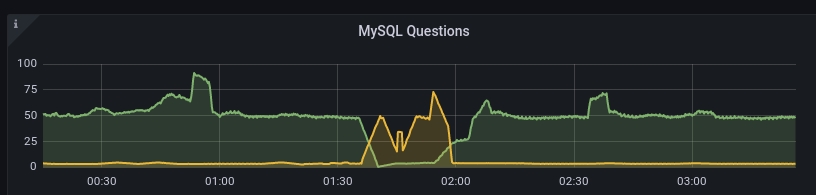
We can see how mutex01(green) stopped processing queries and how mutex02(yellow) took over and then how the switchover restored things in the Grafana graphs of Prometheus data:
All in all I’m pretty pleased with how this worked out. I may publish the failover/switchover scripts and possibly also the Python/Flask-stuff. The React app however is way too hacky. Example:

class ServerStatus extends React.Component {
  constructor(props) {
    super(props)
    this.state = {
      error: null,
      isLoaded: false,
      failover_flag: null,
      gtid_binlog_pos: null,
      exec_master_log_pos: null,
      gtid_position: null,
      gtid_slave_pos: null,
      last_io_errno: null,
      last_sql_errno: null,
      maintenance_flag: null,
      position_type: null,
      read_only: null,
      relay_log_space: null,
      seconds_behind_master: null,
      slave_io_running: null,
      slave_io_state: null,
      slave_sql_running: null,
      slave_transactional_groups: null,
      failover_log_age: null
    }
  }
// {"exec_master_log_pos":5274471,"failover_flag":0,"gtid_binlog_pos":"1-11-40976726","gtid_position":"1-12-38358929",
// "gtid_slave_pos":"1-12-38358929","last_io_errno":0,"last_sql_errno":0,"maintenance_flag":0,"position_type":"Current_Pos",
// "read_only":0,"relay_log_space":309452,"seconds_behind_master":null,"slave_io_running":"No","slave_io_state":"",
// "slave_sql_running":"No","slave_transactional_groups":455}
  fetchData = () => {
    fetch('http://' + this.props.servername + '.svealiden.se:5000/')
      .then((res) => res.json())
      .then(
        (result) => {
          //alert("result:" + JSON.stringify(result));
          this.setState({
            isLoaded: true,
            failover_flag: result['failover_flag'],
            gtid_binlog_pos: result['gtid_binlog_pos'],
            exec_master_log_pos: result['exec_master_log_pos'],
            gtid_position: result['gtid_position'],
            gtid_slave_pos: result['gtid_slave_pos'],
            last_io_errno: result['last_io_errno'],
            last_sql_errno: result['last_sql_errno'],
            maintenance_flag: result['maintenance_flag'],
            position_type: result['position_type'],

I’m pretty sure this isn’t how you’re supposed to do it… But it beats not having continuously updated information on the state of a MariaDB pair with halfway complex rules on what is correct and what isn’t correct.

Note that since I started using this script for my actual “workloads” I’ve had like four or five failures that required me to resynchronize nodes after failover and even switchover! I struggled for hours to deal with extraneous transactions that messed up the GTID-sequences only to finally learn that if you have tables with Engine=MEMORY you always get “DELETE FROM tablename” added at startup of MariaDB. That adds an extra local operation that gets master and slave out of sync. So I’m not using MEMORY tables any more. They were only there to avoid write-tests straining my hard drives which was kind of silly anyway.

But now things seem to have settled down and not even yesterday’s failover required my to resynchronize nodes. That’s otherwise something you should expect, that failover leaves you with the old master node being out of sync with the slave that has now taken over the master-role temporarily. Switchover is different as we are just moving the master role between two functioning systems so we can bail out of the process if something doesn’t work out correctly, keeping the master as master. Example from my script for failover:

  echo "Starting failover from $OTHERNODE to $THISNODE. $(date +%s)"
  echo "1" > "/root/failovermode"
  # Need to demote master if possible
  my
  if OTHERNODE_RO_MODE=$(mysql --connect-timeout=2 -N -s -B -h "$OTHERNODE" -B -N -e "SELECT @@GLOBAL.read_only;");
  then
    # If that worked we can check the return value
    if [ "$OTHERNODE_RO_MODE" = "1" ];
    then
      # We can become master without an issue in an emergency, 
      # but we should ideally wait for this node to catch up.
      echo "Other node is read_only now. Waiting for catchup. $(date +%s)"
      wait_for_catchup
      # Don't really care how we got out of wait for catchup, it's time to become master.
      promote_local
    elif [ "$OTHERNODE_RO_MODE" = "0" ];
    then
      echo "Failed to set $OTHERNODE to set read_only=1. Fencing!"
      if fence_other_node;
      then
        # Can't catch up since we don't know the master GTID
        echo "Fenced other node successfully. $(date +%s)"
        promote_local
        exit 0;
      else
        echo "Failed to fence master. Can't proceed. $(date +%s)"
        exit 1;
      fi # End fence_other_node check
    else
      echo "We received neither read_only=1 _or_ read_only=0. Shouldn't be possible."
    fi # End second OTHERNODE check run after sending read_only=1
  else
    echo "Couldn't check if $OTHERNODE is read_only. Must fence! $(date +%s)"
    if fence_other_node;
    then
      # Can't catch up since we don't know the master GTID
      echo "Fenced other node successfully. $(date +%s)"
      promote_local
      exit 0;
    else
      echo "Failed to fence master. Can't proceed. $(date +%s)"
      exit 1;
    fi # End fence_other_node check
  fi # End of check of return status from other node read_only-status
  exit 1

As you can see in the first nested if-statements we can wait for some time for the slave to catch up to the old master before promoting itself but we’re not going to wait indefinitely. We only failover if the master is slightly wonky so we can’t assume that the slave will always catch up(maybe the master sent back a bad GTID?). Same thing if we can’t even talk to the old master when failing over, we have no choice but to fence it. We wouldn’t know which GTID is the latest so saying “Let the old slave wait until it reaches GTID X before becoming master” makes no sense.

This has been a test of the audience’s patience.

MariaDB slave lag

Just a few notes on MariaDB replication lag. My own backup program is an interesting generator of database traffic as we can see below:

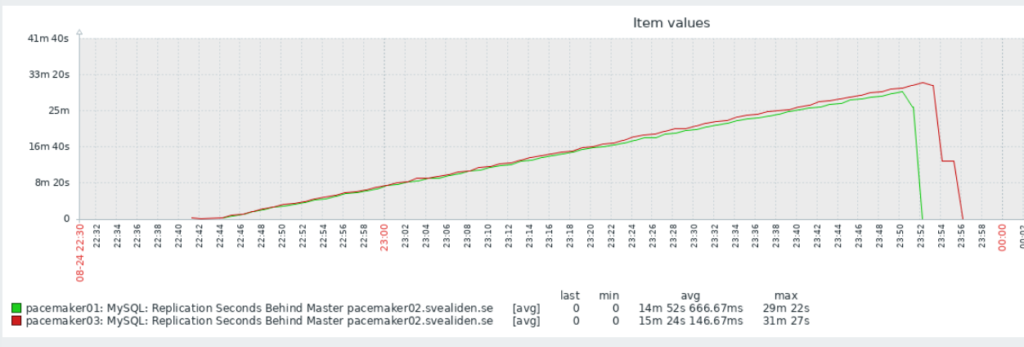
But the slaves catch up in a very jerky fashion:

On the face of it both nodes suddenly fell 1800 seconds behind in a matter of 60 seconds. I argue this would only be possible if 1800 seconds of updates were suddenly sent to or acknowledged by the slaves. The sending theory isn’t entirely unreasonable based on this graph:

Commits on the master are relatively evenly spaced:

And Inserts spread out over the whole intensive period:

I suspect this sudden lag increase is a result of changes being grouped together in “replication transactions”:

Global transaction ID introduces a new event attached to each event group in the binlog. (An event group is a collection of events that are always applied as a unit. They are best thought of as a “transaction”,[…]

Let’s check the relay log on mutex02 to see if this intuition is correct. Beginning of relevant segment:

#211215  2:31:06 server id 11  end_log_pos 674282324 CRC32 0xddf8eb3a   GTID 1-11-35599776 trans
/*!100001 SET @@session.gtid_seq_no=35599776*//*!*/;
START TRANSACTION
/*!*/;
# at 674282625
#211215  2:01:54 server id 11  end_log_pos 674282356 CRC32 0x8e673045   Intvar
SET INSERT_ID=22263313/*!*/;
# at 674282657
#211215  2:01:54 server id 11  end_log_pos 674282679 CRC32 0x9c098efd   Query   thread_id=517313        exec_time=0     error_code=0    xid=0
use `backuptool`/*!*/;
SET TIMESTAMP=1639530114/*!*/;
SET @@session.sql_mode=1411383304/*!*/;
/*!\C utf8mb4 *//*!*/;
SET @@session.character_set_client=224,@@session.collation_connection=224,@@session.collation_server=8/*!*/;
insert into FileObservation (hashsum, indexJob_id, mtime, path, size) values ('e182c2a36d73098ca92aed5a39206de151190a047befb14d2eb9e7992ea8e324', 284, '2018-06-08 22:21:16.638', '/srv/storage/Backup/2018-06-08-20-img-win7-laptop/Info-dmi.txt', 21828)

Ending with:

SET INSERT_ID=22458203/*!*/;
# at 761931263
#211215  2:31:05 server id 11  end_log_pos 761931294 CRC32 0x54704ba3   Query   thread_id=517313        exec_time=0     error_code=0    xid=0
SET TIMESTAMP=1639531865/*!*/;
insert into FileObservation (hashsum, indexJob_id, mtime, path, size) values ('e9b3dc7dac6e9f8098444a5a57cb55ac9e97b20162924cda9d292b10e6949482', 284, '202
1-12-14 08:28:00.23', '/srv/storage/Backup/Lenovo/Path/LENOVO/Configuration/Catalog1.edb', 23076864)
/*!*/;
# at 761931595
#211215  2:31:05 server id 11  end_log_pos 761931326 CRC32 0x584a7652   Intvar
SET INSERT_ID=22458204/*!*/;
# at 761931627
#211215  2:31:05 server id 11  end_log_pos 761931659 CRC32 0x6a9c8f8a   Query   thread_id=517313        exec_time=0     error_code=0    xid=0
SET TIMESTAMP=1639531865/*!*/;
insert into FileObservation (hashsum, indexJob_id, mtime, path, size) values ('84be690c4ff5aaa07adc052b15e814598ba4aad57ff819f58f34ee2e8d61b8a5', 284, '202
1-12-14 08:30:58.372', '/srv/storage/Backup/Lenovo/Path/LENOVO/Configuration/Catalog2.edb', 23076864)
/*!*/;
# at 761931960
#211215  2:31:06 server id 11  end_log_pos 761931690 CRC32 0x98e12680   Xid = 27234912
COMMIT/*!*/;
# at 761931991
#211215  2:31:06 server id 11  end_log_pos 761931734 CRC32 0x90f792f6   GTID 1-11-35599777 cid=27722058 trans
/*!100001 SET @@session.gtid_seq_no=35599777*//*!*/;

So it seems like 1-11-35599776 stretches from 02:01:54 to 2:31:06 and it’s somewhat reasonable for mutex02 to suddenly report a lag of 30 minutes. I wonder what that means for actual data transfer. Could I query intermediate results from 1-11-35599776 before 02:31? :thinking_face:

Bonus:

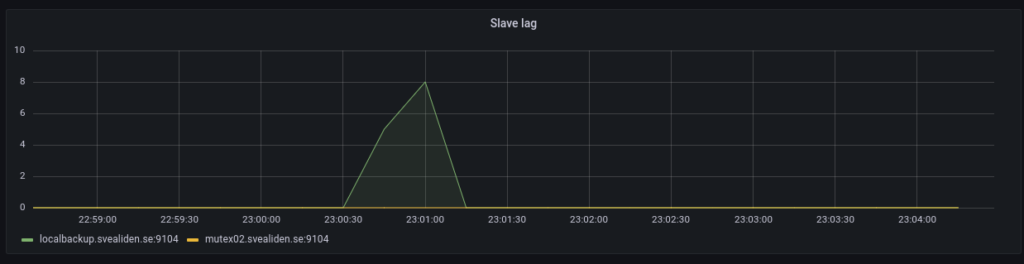
The tiny slave lag caused on the localbackup node when this is run:

 mysql -e "STOP SLAVE;" && sleep 8 && cd $SCRIPT_PATH && source bin/activate && python snapshots.py hourly >> hourly.log && mysql -e "START SLAVE;"

It’s a really hacky way to let the localbackup process any processing of the relay log before making a Btrfs snapshot. Seems to work. Technically you can make snapshots while MariaDB is running full tilt but this seems a bit nicer. Have had some very rare lockups of unknown origin on these kinds of Btrfs snapshot-nodes for database backups.

InnoDB compression and replication

I wrote a backup tool initially called… (looking in files) OffsiteJ because it was an offsite backup tool I made in Java. Then it was called OffsiteBackup and now just backuptool. It’s a great example of how maybe you shouldn’t put of optimization too long. It uses gigabytes of RAM to run and used as much as 5GB of database disk at one point and it basically just handles my own files. Admittedly, that’s like 2 TB of data but I think it could be waay more efficient if not implemented naïvely using Java with Hibernate ORM. But I’ll stick with it for a while yet.

As I switched to a new database cluster I needed to import the associated database and I figured I’d use page compression to make the database smaller. I had already marked the biggest table as using compression:

CREATE TABLE `FileObservation` (
  `id` bigint(20) NOT NULL AUTO_INCREMENT,
  `hashsum` varchar(255) DEFAULT NULL,
  `mtime` datetime(6) DEFAULT NULL,
  `path` varchar(2000) DEFAULT NULL,
  `size` bigint(20) DEFAULT NULL,
  `indexJob_id` bigint(20) DEFAULT NULL,
  PRIMARY KEY (`id`),
  KEY `FKsixox7stuy7q7e3rln32ymn2j` (`indexJob_id`),
  CONSTRAINT `FKsixox7stuy7q7e3rln32ymn2j` FOREIGN KEY (`indexJob_id`) REFERENCES `IndexJob` (`id`)
) ENGINE=InnoDB AUTO_INCREMENT=17966253 DEFAULT CHARSET=utf8mb4 `PAGE_COMPRESSED`=1;

Mmmm, 17 966 253 file observations… Efficient…

Everything in MariaDB was set up by default already so the only thing I changed was to use lzma instead of zlib as a compression algorithm:

SET GLOBAL innodb_compression_algorithm='lzma';

I had to run this on all three nodes, this is not a setting that spreads via replication like CREATE USER or DROP DATABASE. I also set it in the conf-file for each server so that the same setting is present after a restart. All of this was done on a live setup used for my monitoring service first and foremost so I didn’t want to restart things if it could be avoided. (I say about my HA database cluster that exist precisely so that restarting individual nodes isn’t noticeable)

Anyway… It took a long time to do the import but now the database only needs 1.7GB of space!

[root@pacemaker02 ~]# du -sh /var/lib/mysql/data/backuptool/
1.7G /var/lib/mysql/data/backuptool/

It’s probably going to be really slow to read and write from but hey, this is largely for testing purposes. If backuptool becomes entirely unusuable I guess it’s time for me to do the sensible thing and switch back to duplicity. The number one idea of backuptool is that it requires no special tools to restore backups. It’s easier if you have the database if you want to restore a specific file but in a disaster recovery scenario you only need access to the S3-bucket, gpg and tar.

It was interesting to see the slave nodes in the MariaDB cluster struggle to keep up with the more powerful master:

I can’t quite figure out why it dropped so fast at the end though. I expected it to drop at about the same angle only downwards once it reached its peak. But this is partly why I do unnecessary stuff, to see what unexpected things happen!

Galera to pacemaker switch

So I know in theory how to switch a database from one MariaDB server to another with extremely little downtime. It turns out to be trickier than I had thought in reality when the source is a Galera cluster but let’s go through it step by step:

Step 1

Choose a Galera node and make sure it has binary logging activated and log_slaves_updates = ON. Otherwise it won’t log things in a manner that can be sent to a slave that isn’t a Galera node and the log_slaves_updates-thing is to make it actually do send updates to the slave. I added log_slave_updates = ON to the slave as well because it’s not entirely clear how updates from the Galera node is viewed. I mean, in a sense all Galera nodes are both slaves and masters…

Also make sure the server id of the target node(temporary slave) doesn’t match any of the Galera nodes. Otherwise any Galera node will think that server_id = 1 is already caught up! That took me a couple of hours to figure out.

Step 2

Dump the database to be transferred from the Galera node you chose earlier:

mysqldump --single-transaction --master-data=1 --triggers --events --routines zabbix > zabbix.sql

Copy it to the target server.

Step 3

Create the necessary users and an empty database on the target server and then import the SQL-dump.

mysql zabbix < zabbix.sql

Step 4

Extract the replication coordinates from the top of the sql dump:

root@cluster3:~# head -30 zabbix.sql | grep MASTER
CHANGE MASTER TO MASTER_LOG_FILE='mysql-bin.000150', MASTER_LOG_POS=691605499;

Create an SQL-file with the full information required to start streaming updates from the Galera node using this data:

CHANGE MASTER TO MASTER_HOST='cluster3.svealiden.se', MASTER_PORT=3306, MASTER_USER="replication_user", MASTER_PASSWORD="SECRETREPLICATIONPASSWORD", MASTER_LOG_FILE='mysql-bin.000150', MASTER_LOG_POS=691605499;
SET GLOBAL replicate_do_db='zabbix';
START SLAVE;

The SET GLOBAL replicate_do_db=’zabbix’; thing is for situations where there is just one database that you want to bring from a source that has multiple databases.

Step 5

Wait for slave to catch up:

MariaDB [(none)]> SHOW SLAVE STATUS\G 
*************************** 1. row ***************************               
                Slave_IO_State: Waiting for master to send event  
                   Master_Host: cluster3.svealiden.se         
                   Master_User: replication_user                             
                   Master_Port: 3306                                         
                 Connect_Retry: 60                                           
               Master_Log_File: mysql-bin.000150
           Read_Master_Log_Pos: 797684680                                    
                Relay_Log_File: pacemaker01-relay-bin.000002
                 Relay_Log_Pos: 10010385                                     
         Relay_Master_Log_File: mysql-bin.000150
              Slave_IO_Running: Yes                                          
             Slave_SQL_Running: Yes
               Replicate_Do_DB: zabbix                                                                                                                    
           Replicate_Ignore_DB: 
            Replicate_Do_Table:                                              
        Replicate_Ignore_Table:      
       Replicate_Wild_Do_Table: 
   Replicate_Wild_Ignore_Table:                                              
                    Last_Errno: 0    
                    Last_Error: 
                  Skip_Counter: 0                                            
           Exec_Master_Log_Pos: 707563585                                                                                                                 
               Relay_Log_Space: 66709818                                                                                                                  
               Until_Condition: None                                         
                Until_Log_File:                                              
                 Until_Log_Pos: 0                                                                                                                                     Master_SSL_Allowed: No                                           
            Master_SSL_CA_File:       
            Master_SSL_CA_Path:                                              
               Master_SSL_Cert: 
             Master_SSL_Cipher:                                              
                Master_SSL_Key:                                              
         Seconds_Behind_Master: 21398

Note the Seconds_Behind_Master-part that tells you how far the slave has been able to catch up. As you get close to zero, get ready to stop writing data to the Galera cluster.

Step 6

Stop writing data to Galera. In my case this entailed changing two configuration files for Zabbix(zabbix-server and the Zabbix Web UI) and stopping the associated services.

root@monitor:~# systemctl stop zabbix-server && systemctl stop nginx

Then stop replicating data from the Galera cluster. Since I had set the slave to read_only mode I had to disable that as well:

MariaDB [(none)]> STOP SLAVE;
Query OK, 0 rows affected (0.014 sec)

MariaDB [(none)]> SET GLOBAL read_only = false;
Query OK, 0 rows affected (0.001 sec)

Then just start up the services now that they have been told to contact the new database server.

root@monitor:~# systemctl start zabbix-server && systemctl start nginx

Can you spot where the switch happened?

Can you spot where the two failed attempts at making this switch seamlessly happened?

Sidenote: this is an example of a sentence that would stand to gain from English having more syntactic options. Like Can you spot where the two failed attempts at making this switch seamlessly happened. Here it’s more clear that we are talking about X = making a switch seamlessly and how there were two failed attempts at making X happen. Compare that to the more nonsensical Can you spot where the two failed attempts at making this switch seamlessly happened. No, we’re not talking about failures seemlessly happening, the switch was supposed to be seemless.

So anyway… Seconds_Behind_Master is a great piece of data to read when you’re about to switch over to a replica that you think is caught up.

Use cases

This is useful for a lot of situations. Maybe you want to convert a 180GB database from MyISAM to InnoDB? Maybe you need to perform an upgrade where it’s safest to do a mysqldump->import?

The lower limit for how fast this switchover can be is the replication lag. If the slave is always 10 seconds behind, that is the absolute lowest limit for how fast you can make the switch. If you do all the steps manually that adds maybe 20 seconds. Script it and we’re down to a adding a few seconds on top of the replication lag. Short of banks and amazon.com, downtime measured in seconds(maybe multiples of ten seconds) isn’t a cause for great concern.

ProxySQL for MariaDB master/slave

I’ve set up a Pacemaker cluster with MariaDB and fence_pve so that we have 1 writeable master and 2 read-only slaves. But writes are not made to either of them directly, instead all queries are routed through ProxySQL and it distributes queries across the three nodes. I first didn’t understand why the developers of ProxySQL advised against a pure read/write split of queries. Surely we don’t want SELECTs to go to the writeable node? It’s busy with INSERTs and UPDATEs. But now I get it; it’s an issue of replication lag. If a client makes an INSERT and then shortly thereafter a SELECT that needs to display the changes that were just made, things can fall apart if the SELECT goes to a slave that hasn’t received the changes from the master yet. So we only want to send queries that we know aren’t millisecond-sensitive to slaves. Well, the replication lag sets the time element… If your slaves are five seconds behind the master then you should only send queries that can tolerate a five second discrepancy to the slaves.

Update 2021-07-30: I realized it was waaaay better to set read-only=1 in the conf files for MariaDB to avoid situations where proxysql accidentally sends INSERT-operations to a non-master because it happens to start out read-write.

Aaaanyway… So installing ProxySQL is pretty much fire-and-forget so the interesting thing is how to feed it the right data. I let each server in the cluster run ProxySQL and whichever node happens to host the master-instance of MariaDB also gets to route the traffic. You could let one of the slaves host the active ProxySQL instance but this was easier for me to implement. Here’s a diagram of how things work:

The dashed lines indicate replication of data and the solid lines represent database queries. The ellipse shows where the virtual IP for the database cluster is located(always on the master node). So with thus setup I can use the exact same config for all three ProxySQL instances, which I’ve turned into a single SQL-file proxyinit.sql:

INSERT INTO mysql_servers(hostgroup_id,hostname,port) VALUES (1,'192.168.1.181',3306);
INSERT INTO mysql_servers(hostgroup_id,hostname,port) VALUES (1,'192.168.1.182',3306);
INSERT INTO mysql_servers(hostgroup_id,hostname,port) VALUES (1,'192.168.1.183',3306);

-- Since hostgroup 0 is the default it makes sense to make it the writer hostgroup
-- To avoid a situation where INSERTs are accidentally sent to a read-only node
INSERT INTO mysql_replication_hostgroups (writer_hostgroup,reader_hostgroup,comment) VALUES (0,1,'cluster1');

-- These are two queries I've identified that take more time than usual and are safe to run on replicas
INSERT INTO mysql_query_rules (rule_id,active,digest,destination_hostgroup,apply) VALUES (1,1,'0xA1D7DC02F2B414BB',1,1);
INSERT INTO mysql_query_rules (rule_id,active,digest,destination_hostgroup,apply) VALUES (2,1,'0x112A8E68C94FFE30',1,1);

-- By default all queries should go to the master so default hostgroup should be 0
INSERT INTO mysql_users(username,password,default_hostgroup) VALUES ('zabbix','MYZABBIXPASSWORD',0);

-- Now we have to load our data into the active runtime
LOAD MYSQL USERS TO RUNTIME;
LOAD MYSQL SERVERS TO RUNTIME;
LOAD MYSQL QUERY RULES TO RUNTIME;

-- And I don't want to have to enter this data all the time so better save it to disk
SAVE MYSQL USERS TO DISK;
SAVE MYSQL SERVERS TO DISK;
SAVE MYSQL QUERY RULES TO DISK;

To load this into each ProxySQL instance I just run:

mysql -u admin -pMYADMINPASSWORD -h 0.0.0.0 -P6032 < proxyinit.sql

Testing

Let’s try to take pcmk2 out of the cluster so that some other node has to take over the role of primary:

[root@pcmk2 ~]# pcs resource
  * db_primary_ip       (ocf::heartbeat:IPaddr2):        Started pcmk2.svealiden.se
  * Clone Set: mariadb_server-clone [mariadb_server] (promotable):
    * Masters: [ pcmk2.svealiden.se ]
    * Slaves: [ pcmk1.svealiden.se pcmk3.svealiden.se ]
[root@pcmk2 ~]# pcs cluster stop
Stopping Cluster (pacemaker)...
Stopping Cluster (corosync)...
[root@pcmk2 ~]# 

Okey, let’s see who is the new master.

[root@pcmk1 ~]# pcs resource
  * db_primary_ip       (ocf::heartbeat:IPaddr2):        Started pcmk1.svealiden.se
  * Clone Set: mariadb_server-clone [mariadb_server] (promotable):
    * Masters: [ pcmk1.svealiden.se ]
    * Slaves: [ pcmk3.svealiden.se ]
    * Stopped: [ pcmk2.svealiden.se ]

Okey, pcmk1. Let’s see if we see writes being made from ProxySQL to pcmk1:

[root@pcmk1 ~]# tcpdump -nnX -i lo port 3306 | grep -i insert
 dropped privs to tcpdump
 tcpdump: verbose output suppressed, use -v[v]… for full protocol decode
 listening on lo, link-type EN10MB (Ethernet), snapshot length 262144 bytes
         0x0030:  54af e6dc 9500 0000 0369 6e73 6572 7420  T……..insert.
         0x0030:  54af e31e 4d01 0000 0369 6e73 6572 7420  T…M….insert.
         0x0030:  54af e83e 8302 0000 0369 6e73 6572 7420  T..>…..insert.
         0x0030:  54af ee9f 1b01 0000 0369 6e73 6572 7420  T……..insert.
         0x0030:  54af f287 5401 0000 0369 6e73 6572 7420  T…T….insert.
         0x0030:  54af eac0 ff01 0000 0369 6e73 6572 7420  T……..insert.
         0x0030:  54af f3f9 1601 0000 0369 6e73 6572 7420  T……..insert.
         0x0030:  54af eabc a900 0000 0369 6e73 6572 7420  T……..insert.
         0x0030:  54af f29f c301 0000 0369 6e73 6572 7420  T……..insert.
         0x0030:  54af f6b0 a501 0000 0369 6e73 6572 7420  T……..insert.
         0x0030:  54af fa9b 0b02 0000 0369 6e73 6572 7420  T……..insert.

Seems about right. We can check that ProxySQL correctly identifies pcmk1 as master now:

ProxySQL Admin> SELECT hostgroup_id,hostname,status FROM mysql_servers;
+--------------+---------------+--------+
| hostgroup_id | hostname      | status |
+--------------+---------------+--------+
| 0            | 192.168.1.181 | ONLINE | <-- Yes, pcmk1 is the only writable node
| 1            | 192.168.1.183 | ONLINE |
| 1            | 192.168.1.182 | ONLINE |
| 1            | 192.168.1.181 | ONLINE |
+--------------+---------------+--------+
4 rows in set (0.001 sec)

Let’s see what happens when I bring pcmk2 back up again. It should be a slave.

[root@pcmk1 ~]# pcs resource
  * db_primary_ip       (ocf::heartbeat:IPaddr2):        Started pcmk1.svealiden.se
  * Clone Set: mariadb_server-clone [mariadb_server] (promotable):
    * mariadb_server    (ocf::heartbeat:mariadb):        Starting pcmk2.svealiden.se
    * Masters: [ pcmk1.svealiden.se ]
    * Slaves: [ pcmk3.svealiden.se ]
[root@pcmk1 ~]# pcs resource
  * db_primary_ip       (ocf::heartbeat:IPaddr2):        Started pcmk1.svealiden.se
  * Clone Set: mariadb_server-clone [mariadb_server] (promotable):
    * Masters: [ pcmk1.svealiden.se ]
    * Slaves: [ pcmk2.svealiden.se pcmk3.svealiden.se ]

So far so good. Let’s just double-check to see that pcmk2 isn’t out of sync and emitting errors:

MariaDB [(none)]> SHOW SLAVE STATUS\G
*************************** 1. row ***************************
                Slave_IO_State: Waiting for master to send event
                   Master_Host: pcmk1
                   Master_User: replication_user
                   Master_Port: 3306
                 Connect_Retry: 60
               Master_Log_File: pcmk1-bin.000005
           Read_Master_Log_Pos: 931920
                Relay_Log_File: pcmk2-relay-bin.000002
                 Relay_Log_Pos: 932262
         Relay_Master_Log_File: pcmk1-bin.000005
              Slave_IO_Running: Yes
             Slave_SQL_Running: Yes
               Replicate_Do_DB:
           Replicate_Ignore_DB:
            Replicate_Do_Table:
        Replicate_Ignore_Table:
       Replicate_Wild_Do_Table:
   Replicate_Wild_Ignore_Table:
                    Last_Errno: 0
                    Last_Error:
                  Skip_Counter: 0
           Exec_Master_Log_Pos: 931920
               Relay_Log_Space: 932571
               Until_Condition: None
                Until_Log_File:
                 Until_Log_Pos: 0
            Master_SSL_Allowed: No
            Master_SSL_CA_File:
            Master_SSL_CA_Path:
               Master_SSL_Cert:
             Master_SSL_Cipher:
                Master_SSL_Key:
         Seconds_Behind_Master: 0
 Master_SSL_Verify_Server_Cert: No
                 Last_IO_Errno: 0
                 Last_IO_Error:
                Last_SQL_Errno: 0
                Last_SQL_Error:
   Replicate_Ignore_Server_Ids:
              Master_Server_Id: 1
                Master_SSL_Crl:
            Master_SSL_Crlpath:
                    Using_Gtid: Current_Pos
                   Gtid_IO_Pos: 0-1-309263
       Replicate_Do_Domain_Ids:
   Replicate_Ignore_Domain_Ids:
                 Parallel_Mode: optimistic
                     SQL_Delay: 0
           SQL_Remaining_Delay: NULL
       Slave_SQL_Running_State: Slave has read all relay log; waiting for more updates
              Slave_DDL_Groups: 0
Slave_Non_Transactional_Groups: 0
    Slave_Transactional_Groups: 1512
1 row in set (0.000 sec)

All good!

Purpose

I think this is pretty attractive as a way of merging high-availability with load balancing. I started tinkering with this when fiddling with Kubernetes and WordPress. No point in having multiple pods spread out over multiple servers if you can’t run multiple database-instances. Well, not in my book anyway. So we’re left to choose between Galera multi-master or the more traditional master-slave setup. There are constraints placed on what can be run in Galera(like a hard primary key requirement) so I think master-slave is more reliable when you yourself might not have complete control over database schemas. ProxySQL would work just fine with Galera too but I wanted to test out the slightly more challenging setup.

A big downside to ProxySQL is that it doesn’t do pass-through authentication. So user added to MariaDB and any user password changed would also need to be made to all ProxySQL instances. That’s fine when the setup is meant for a large WordPress webshop which has one(1) database user that you as an admin manage but for a shared hosting setup it’s a nightmare.

MariaDB MaxScale is an alternative to ProxySQL that solves the issue of replication lag using some fancy footwork and therefore claims to be able to do read/write split automagically and it offers pass-through authentication. Not sure if it has the fancy statistics function that ProxySQL has though.

Behind the scenes

I had to have data to test out this setup and that’s not trivial. Lots of data is sent to my Galera-cluster from Zabbix though… Hmm… Can’t ProxySQL do data mirroring? Indeed it can! First we need to add both the usual database cluster virtual IP and the new testing-cluster’s virtual IP as separate hostgroups:

ProxySQL Admin> SELECT hostgroup_id,hostname,port,status FROM mysql_servers;
+--------------+---------------+------+--------+
| hostgroup_id | hostname      | port | status |
+--------------+---------------+------+--------+
| 0            | 192.168.1.62  | 3306 | ONLINE |
| 1            | 192.168.1.180 | 6033 | ONLINE |
+--------------+---------------+------+--------+
2 rows in set (0.000 sec)

And then a query rule that sends all traffic for the zabbix-user to both hostgroups(not load-balanced, every query goes to both):

ProxySQL Admin> SELECT rule_id,active,username,destination_hostgroup,mirror_hostgroup,apply FROM mysql_query_rules;
+---------+--------+----------+-----------------------+------------------+-------+
| rule_id | active | username | destination_hostgroup | mirror_hostgroup | apply |
+---------+--------+----------+-----------------------+------------------+-------+
| 1       | 1      | zabbix   | 0                     | 1                | 1     |
+---------+--------+----------+-----------------------+------------------+-------+
1 row in set (0.000 sec)