I wrote a backup tool initially called… (looking in files) OffsiteJ because it was an offsite backup tool I made in Java. Then it was called OffsiteBackup and now just backuptool. It’s a great example of how maybe you shouldn’t put of optimization too long. It uses gigabytes of RAM to run and used as much as 5GB of database disk at one point and it basically just handles my own files. Admittedly, that’s like 2 TB of data but I think it could be waay more efficient if not implemented naïvely using Java with Hibernate ORM. But I’ll stick with it for a while yet.
As I switched to a new database cluster I needed to import the associated database and I figured I’d use page compression to make the database smaller. I had already marked the biggest table as using compression:
CREATE TABLE `FileObservation` (
  `id` bigint(20) NOT NULL AUTO_INCREMENT,
  `hashsum` varchar(255) DEFAULT NULL,
  `mtime` datetime(6) DEFAULT NULL,
  `path` varchar(2000) DEFAULT NULL,
  `size` bigint(20) DEFAULT NULL,
  `indexJob_id` bigint(20) DEFAULT NULL,
  PRIMARY KEY (`id`),
  KEY `FKsixox7stuy7q7e3rln32ymn2j` (`indexJob_id`),
  CONSTRAINT `FKsixox7stuy7q7e3rln32ymn2j` FOREIGN KEY (`indexJob_id`) REFERENCES `IndexJob` (`id`)
) ENGINE=InnoDB AUTO_INCREMENT=17966253 DEFAULT CHARSET=utf8mb4 `PAGE_COMPRESSED`=1;
Mmmm, 17 966 253 file observations… Efficient…
Everything in MariaDB was set up by default already so the only thing I changed was to use lzma instead of zlib as a compression algorithm:
SET GLOBAL innodb_compression_algorithm='lzma';
I had to run this on all three nodes, this is not a setting that spreads via replication like CREATE USER or DROP DATABASE. I also set it in the conf-file for each server so that the same setting is present after a restart. All of this was done on a live setup used for my monitoring service first and foremost so I didn’t want to restart things if it could be avoided. (I say about my HA database cluster that exist precisely so that restarting individual nodes isn’t noticeable)
Anyway… It took a long time to do the import but now the database only needs 1.7GB of space!
[root@pacemaker02 ~]# du -sh /var/lib/mysql/data/backuptool/
1.7G /var/lib/mysql/data/backuptool/
It’s probably going to be really slow to read and write from but hey, this is largely for testing purposes. If backuptool becomes entirely unusuable I guess it’s time for me to do the sensible thing and switch back to duplicity. The number one idea of backuptool is that it requires no special tools to restore backups. It’s easier if you have the database if you want to restore a specific file but in a disaster recovery scenario you only need access to the S3-bucket, gpg and tar.
It was interesting to see the slave nodes in the MariaDB cluster struggle to keep up with the more powerful master:
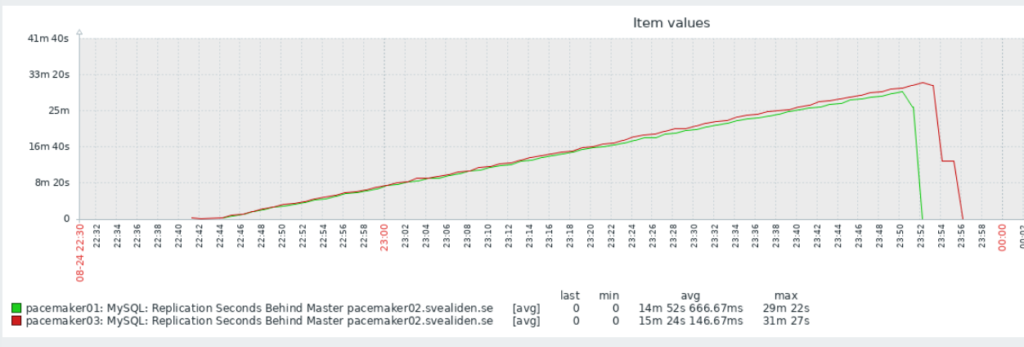
I can’t quite figure out why it dropped so fast at the end though. I expected it to drop at about the same angle only downwards once it reached its peak. But this is partly why I do unnecessary stuff, to see what unexpected things happen!