Email login failures

An email provider will want to prevent brute force hacking attempts against their servers. Otherwise it will be too easy for hackers to keep guessing which passwords are used for various accounts and eventually break into them. Are there tools for this in the Linux ecosystem? Sure, there’s the Login Failure Daemon(lfd) that’s part of the ConfigServer Security & Firewall(csf). It counts how many failed login attempts are made from an IP address and when a certain limit has been reached within a certain time it blocks the IP address, for a certain time. There’s also OSSEC which is closer to my heart as well as the up-and-coming Imunify.

Before looking at how these measure up it’s worth to point out a few things:

  1. People choose bad passwords
  2. People screw things
  3. Email clients are often extremely badly coded

Depending on your environment you can enforce some password complexity to deal with item 1. Item 2 is impossible to guard yourself again. People will connect multiple devices to a single IMAP accounts in 2016 and upon changing the password in 2019 have no clue that they have the account connected to anything but their smartphone. At which point the detective work begins: what’s trying to log in to my email account and getting me blocked every fifteen minutes?

The third point is the most aggravating. Why would anyone write an email client that keeps sending login attempts to an email account thousands and thousands of times while being constantly told by the server: “Login credentials invalid”. It’s not like a programmer has to guess what the magical error message from the server is going to be because that’s standardized! See: https://tools.ietf.org/html/rfc5530

But developers big and small continue making email clients that just keep spamming the server with the same login credentials, sometimes at a rate of once a second. So how do we deal with this at the server level? Ideally we would never block actual customers trying to login to their own accounts even when they keep sending the wrong password. But the correct username and password combination is precisely how we distinguish between valid users and everyone else.

The obvious answer is to block those IP-addresses that keep guessing new passwords all the time and not block those that just keep using the same credentials over and over again. In Dovecot the setting auth_verbose_passwords=sha1 can be used to display the sha1 hashsum of passwords used in failed login attempts. Courier has DEBUG_LOGIN=2 though that logs the password in plain text. Login failure daemon can only be made to use this information by rewriting the Perl script that is lfd.

OSSEC might be possible to configure this way but I’m not sure. There’s no ready-made field “password” that you can include and no rule “not same password”. There is for source IP and a rule “same_srcip”, but not for password. I’m not necessarily blaming the developers of lfd and OSSEC for not writing their software to handle a world in which email clients are written by monkeys. But given the whole monkeys-writing-software situation we’re in, they fall short.

Imunify doesn’t try to factor in the password used in a failed login attempt either but does at least have some intelligent alternatives. Most notably that a customer logging on to something like cPanel whitelists their IP address. I would propose that a successful login to any email account on a server should also lead the IP address to be whitelisted on that server.

If successful login to an email account from IP address A, ignore failed logins for 1 day.

This does leave open the possibility of a valid customer trying to hack other accounts on the server with his own account on it. This seems to me a very small risk but one could be more restrictive:

If successful login to any email account x@y.z from IP address A, ignore any failed login attempts to email accounts ending with @y.z.

That wouldn’t work with Imunify white lists because it doesn’t have that kind of granularity. I think we must conclude that we have little choice but to write our own code for handling email login failures and if we’re going to do that then we might as well do it right and analyze a log file with information of the password used.

Offsite backup solution

I want an offsite backup solution, specifically one that can upload to Amazon S3 so that I can put stuff in Amazon Glacier using that Life cycle management tool. So Duplicati? Uhm… It’s built on C# for CLR ported to Linux and… Just look at the dependencies when installing it! So that’s not happening. I tried but it filled up my disk with cached files and things were just terrible.

So maybe Bacula? Would have been great but I couldn’t quite set it up. There are commercial tools but that’s not my style. I wrote a Python script but that fell apart. Let’s not get into the details but the fact that I can’t write proper software without Java-style constraints and type checking may have played a part.

So I rewrote it using Java and Hibernate to be able to store the data in an SQL database. Because that’s my style. It leaves something to be desired in terms off efficiency. See if you can spot the moment where I started two consecutive runs of the offsite backup software.

And now I got this:

Exception in thread “main” java.lang.OutOfMemoryError: Java heap space

Oh, ffs… I ran the VM with 1 GB of RAM. That probably wasn’t a good move. 3 GB should be okey though. Yes! That worked.

So the neat thing about this solution is that it has great disaster recovery properties. All you need to get your data back is access to the files stored in Glacier, the encryption password and the tar and gpg utilities. No custom storage formats. There’s a file in each tar.gz that lists which files that had been deleted between the current backup run and the one previously. So it’s not hard to bring back the data to exactly the state it was in when a backup ran(deletions included) or to recover every single file that has ever been present in the backups.

Downsides? Well, making a MySQL instance struggle to keep up with all the queries and inserts is not a plus. It stores data on an SSD after all. And the fact that the code is a horrendous mess also has some drawbacks. There’s no facility for compaction of snapshots… Well, it’s not for everyone.

One additional benefit though is that it is very straight forward to verify that chunks of backups can be restored to exactly the format they had when indexed. Because there’s a hashsum stored for each file for every indexing run(new hashsums are only generated for new and modified files or my computers would run hot all day long). I’ll have to get around to implementing that verification feature one of these days.

Changing email provider – low downtime version

This is a method of switching email provider for a domain designed to minimize downtime. It was originally meant for IT people but not necessarily those who spend all week moving web hosting accounts. I realized thought that it was going to have to be a bit more complex than that. So there will be a weird mix of _inside baseball_ and stuff that only a noob would need to be told.

Let’s make up some addresses to use as placeholders and use my domain as an example of a domain to be moved.

Source provider(referred to as old provider)

IMAP serverimap.host-a.com
SMTP serversmtp.host-a.com
DNS servers:dns1.host-a.com, dns2.host-a.com

Destination provider(referred to as new provider)

IMAP servermail.xhost.com
SMTP servermail.xhost.com
DNS servers:ns1.xhost.com, dns2.xhost.com

Switching email provider

First we create two subdomains for deref.se called imap.deref.se and smtp.deref.se.

imap.deref.seCNAMEimap.host-a.com
smtp.deref.seCNAMEsmtp.host-a.com

The point of this is to move users with @deref.se-email addresses away from the old hosting providers names. We can’t keep using *.host-a.com for fetching emails once we’ve moved so sooner or later every device fetching and sending email using the deref.se domain name will have to be updated with a new IMAP server and a new SMTP server. By having these two records that lead back to the same place as the old records we can slowly move one user after another over to the new server names.

The standard approach is often to make a mad dash at some specific moment in time to switch all email-enabled devices from imap.host-a.com to mail.xhost.com so as to make the jump to the new hosting provider. But that’s error prone and stressful at best. Use server names decoupled from the source provider to make updating email clients workable.

Caveats so far

  • If you use SSL or TLS encryption at the old hosting provider you are going to want to issue certificates for these new subdomains( imap.deref.se and smtp.deref.se in this example ) before modifying any email clients. Otherwise big warnings and connection errors will affect email clients that use the new subdomains for fetching and sending email.
  • If you don’t know the password for all email accounts, set new ones when re-configuring the email clients. Sit down with Alice, set a new password for her email account and enter it into her phone and computer along with the new server names. Then go and do the same for Bob and so on.

Actual move

You should now have no email clients configured to connect to any host-a.com servers directly. They should all go via the new server names imap.deref.se and smtp.deref.se. You should also have a list of all the passwords used for the email accounts. If you use SSL/TLS you need to copy the SSL certificates used at the old hosting provider to the new one. You can test that they work correctly by changing your computer’s hosts file( https://www.howtogeek.com/howto/27350/beginner-geek-how-to-edit-your-hosts-file/ )

  1. Set the DNS-records imap.deref.se and smtp.deref.se to a TTL-value as close to 300 seconds as possible. Technically you could go lower but a five minute switch is typically fine. Do this at least X seconds before the actual move of the site where X is the old TTL-value.
  2. Create all the email accounts at the new hosting provider using the passwords from your list.
  3. Copy over the contents of each email account from the old provider to the new empty accounts over at the new provider. Consider using a tool like imapsync.
  4. Change the new records to the settings below:
imap.deref.seCNAMEmail.xhost.com
smtp.deref.seCNAMEmail.xhost.com

Congratulations, you have now moved email hosting to the new provider! I’d run imapsync once TTL seconds have passed. So five minutes after the DNS records were changed to point to the xhost.com-servers, running imapsync again will copy over any emails that happened to end up with host-a.com instead of xhost.com as the record-change propagated to DNS-servers across the internet.

Benefits so far

So here the big switch from one hosting provider to another is pretty much invisible to end users. They notice the preparations like re-configuring their email clients but that’s a brief visit from the local tech person, not a mad dash where dozens of people all try to change the settings on their email clients so that their email will work again.

Drawbacks so far

This approach requires more work for the person doing to move. Not creating provider-independent DNS records, leaving the TTL and just sending users a list of new settings and passwords takes less time. If you use the provider’s server names you can usually let them handle the SSL certificates.

On balance

How long is the CEO willing to have email work on his laptop but not his phone? Two weeks? One week? The closer you want to be to an imperceptible blip when switching email providers the more you should favor the benefits of this approach over the drawbacks.

Proxmox packet loss

Started delving into the network data collected via collectd. Noticed that pve3 had pretty serious packet drop. Noticed it on my monitoring Banana Pi as well: each “host is online”-check sends out three pings and sometimes one of the three would fail.

Found some bad configuration with the trunks on my HP switch but that didn’t solve the problem. Maybe some VM on pve3 was using so much bandwidth it caused the host to drop packets? Let’s cap the VMs that can be suspected of using lots of bandwidth in bursts and see what happens.

Yeay!

MariaDB snapshots and recovery

Update 2019-11-02: Yep, I iz dumb! I was apparently working with a snapshot that itself contained a set of crashed tables. So yeah… Btrfs snapshots of MariaDB data directories are just fine backups if you make sure the databases are themselves valid. You can check this for arbitrary snapshots like this:

# cd /var/lib/mysql
# btrfs sub snap Snapshots/sveahadb/sveahadb@auto-2019-08-01-0745_6m/ copy
# /usr/bin/mysqld_safe --defaults-file=/etc/mysql/my.cnf --pid-file=/var/run/mysqld/mysqltestd.pid --socket=/var/run/mysqld/mysqldtest.sock --datadir=/var/lib/mysql/copy --log-error=/var/log/mysql/test.log --user=mysql --bind-address=127.0.0.1 --log-bin=mysqld-bin --port 3307 --skip-slave-start
# mysqlcheck -h localhost -P 3307 --all-databases

So the original mess is below:


I was thinking of renaming this article to “Wait, I iz dumb” but I’m not sure exactly where the boundaries of my dumbness lie so I’ll have to postpone that. First things first: my colleagues at work showed me that it is indeed possible to just run a MySQL instance from a snapshot of files in /var/lib/mysql. What I was missing was that the data needed for a specific database isn’t just kept in /var/lib/mysql/dbname but also in /var/lib/mysql/mysql, /var/lib/mysql/performance_schema and the /var/lib/mysql/ib*-files.

“Oh, silly me!” I said and went home and copied over the entire /var/lib/mysql /Snapshots/snapname folder contents to my dbvm testbed. And… same problem! Google provided me with some clues that the fact that the files come from a replicated setup could cause problems and should be deleted: https://dba.stackexchange.com/questions/111616/innodb-error-table-mysql-innodb-table-stats-not-found/111617

But wait, what about those innodb_* files? They seem like they would be important. What happens if I rsync a snapshot from the DB master? Hmm, same. Well the replication files have different names but the innodb-tables still have to be deleted. Wait, they’re just stats? Well nuts to them then!

But this lead to a new interesting problem, presumably because this snapshot was made from the master which isn’t just committing transactions to disk based on a log – like a slave does – but also decides if and how a transaction can be committed:

InnoDB: Transaction 17653441 was in the XA prepared state.
InnoDB: 1 transaction(s) which must be rolled back or cleaned up
InnoDB: in total 0 row operations to undo
InnoDB: Trx id counter is 17654272
2019-09-06 21:29:19 140285946666112 [Note] InnoDB: 128 rollback segment(s) are active.
2019-09-06 21:29:19 140285380126464 [Note] InnoDB: Starting in background the rollback of recovered transactions
2019-09-06 21:29:19 140285380126464 [Note] InnoDB: Rollback of non-prepared transactions completed
2019-09-06 21:29:19 140285946666112 [Note] InnoDB: Waiting for purge to start
2019-09-06 21:29:19 140285946666112 [Note] InnoDB: Percona XtraDB (http://www.percona.com) 5.6.44-86.0 started; log sequence number 21897778133
2019-09-06 21:29:19 140285275272960 [Note] InnoDB: Dumping buffer pool(s) not yet started
2019-09-06 21:29:19 140285946666112 [Note] Plugin ‘FEEDBACK’ is disabled.
2019-09-06 21:29:19 7f96de049c80 InnoDB: Starting recovery for XA transactions…
2019-09-06 21:29:19 7f96de049c80 InnoDB: Transaction 17653441 in prepared state after recovery
2019-09-06 21:29:19 7f96de049c80 InnoDB: Transaction contains changes to 1 rows
2019-09-06 21:29:19 7f96de049c80 InnoDB: 1 transactions in prepared state after recovery
2019-09-06 21:29:19 140285946666112 [Note] Found 1 prepared transaction(s) in InnoDB
2019-09-06 21:29:19 140285946666112 [ERROR] Found 1 prepared transactions! It means that mysqld was not shut down properly last time and critical recovery information (
last binlog or tc.log file) was manually deleted after a crash. You have to start mysqld with –tc-heuristic-recover switch to commit or rollback pending transactions.
2019-09-06 21:29:19 140285946666112 [ERROR] Aborting

Fair enough… Though I’m curious why this never happens at work. I guess R1Soft might do something different from what a Btrfs snapshot does? Well, I guess it’s kind of obvious that it’s a different technology than a CoW file system but beyond that I think R1Soft might make sure it only stores logs that need no recovery/replay. Strange if that’s the case given how they don’t mind saving completely broken tables in backups… Anyway, let’s just do this the proscribed way:

mysqld_safe --defaults-file=/etc/mysql/my.cnf --basedir=/usr --datadir=/var/lib/mysql/sveatest3/
--user=mysql --bind-address=127.0.0.1 --tc-heuristic-recover=COMMIT
190906 21:30:58 mysqld_safe Logging to syslog.
190906 21:30:58 mysqld_safe Starting mysqld daemon with databases from /var/lib/mysql/sveatest3/

I then stopped the instance and restarted the systemd service. mysqlcheck then verified that all tables were OK. Maybe this approach is more “lossy” than using innodb_force_recovery but it seems like I have asked MySQL to make fewer exceptions this way.

  • Ignore replication because this is recovery on a single node.
  • Ignore the innodb table statistics.
  • Commit any unfinished transactions.

Below tells the story of my first adventures into restoring data from a Btrfs snapshot, not knowing that ibdata and ib_logfile were kind of important:


I’ve been using my Btrfs snapshot-script to take snapshots of my MariaDB databases. This serves merely as what I call Oops-protection. “DROP DATABASE bacula;” kind of sucks after all. But to my dismay data is not stored on disk in a consistent state. This turns out to be an error in my expectations rather than an error on the part of MariaDB. The tables are in a sense stored in a consistent state but ongoing transactions are also stored on disk. So trying to start a database up from files copied from a Btrfs snapshot leads to MariaDB worrying about all the ongoing stuff that it was supposed to do:

2019-07-26 21:07:59 140629359316096 [Note] InnoDB: Starting crash recovery from checkpoint LSN=1795910239

2019-07-26 21:07:59 140629359316096 [ERROR] InnoDB: Attempted to open a previously opened tablespace. Previous tablespace mysql/innodb_table_stats uses space ID: 1 at filepath: ./mysql/i

Innodb_table_stats.ibd. Cannot open tablespace zabbix/acknowledges which uses space ID: 1 at filepath: ./zabbix/acknowledges.ibd

2019-07-26 21:07:59 7fe6d301cc80  InnoDB: Operating system error number 2 in a file operation.

The error means the system cannot find the path specified.
If you are installing InnoDB, remember that you must create
directories yourself, InnoDB does not create them.
Error: could not open single-table tablespace file ./zabbix/acknowledges.ibd
We do not continue the crash recovery, because the table may become
corrupt if we cannot apply the log records in the InnoDB log to it.
To fix the problem and start mysqld:
1) If there is a permission problem in the file and mysqld cannot
open the file, you should modify the permissions.
2) If the table is not needed, or you can restore it from a backup,
then you can remove the .ibd file, and InnoDB will do a normal
crash recovery and ignore that table.
3) If the file system or the disk is broken, and you cannot remove
the .ibd file, you can set innodb_force_recovery > 0 in my.cnf
and force InnoDB to continue crash recovery here

So adding the following to MariaDB’s configuration allows us to start up in recovery mode:

[mysqld]
 innodb_force_recovery=1

Both the mysql and zabbix databases are seriously broken:

root@dbvm:/var/lib/mysql/sveatest# mysqlcheck -A
...
mysql.func                                         OK
 mysql.gtid_slave_pos
 Error    : Table 'mysql.gtid_slave_pos' doesn't exist in engine
 status   : Operation failed
 mysql.help_category                                OK
 mysql.help_keyword                                 OK
 mysql.help_relation                                OK
 mysql.help_topic                                   OK
 mysql.host                                         OK
 mysql.index_stats                                  OK
 mysql.innodb_index_stats
 Error    : Table 'mysql.innodb_index_stats' doesn't exist in engine
 status   : Operation failed
 mysql.innodb_table_stats
 Error    : Table 'mysql.innodb_table_stats' doesn't exist in engine
 status   : Operation failed
 mysql.plugin                                       OK
 mysql.proc                                         OK
...
zabbix.history
 Warning  : InnoDB: Index 'history_1' contains 3058508 entries, should be 3058449.
 error    : Corrupt
 zabbix.history_log                                 OK
 mysqlcheck: Got error: 2013: Lost connection to MySQL server during query when executing 'CHECK TABLE … '

But we can actually dump the data from zabbix which is the one that is interesting here.

mysqldump zabbix > zabbix.sql

Since the mysql-table isn’t interesting here I can just move it out from the MariaDB data directory and install a blank one:

root@dbvm:/var/lib/mysql/sveatest# mysql_install_db                  
Installing MariaDB/MySQL system tables in '/var/lib/mysql/sveatest' …
2019-07-26 21:33:16 140100875676800 [Note] /usr/sbin/mysqld (mysqld 10.1.40-MariaDB-0ubuntu0.18.04.1) starting as process 14528 …

OK                                                                                                                         

Filling help tables…                                                                
2019-07-26 21:33:20 139659493420160 [Note] /usr/sbin/mysqld (mysqld 10.1.40-MariaDB-0ubuntu0.18.04.1) starting as process 14558 …                                                       

OK                                                                                                                        

Creating OpenGIS required SP-s…                                                                                        
2019-07-26 21:33:23 140389584972928 [Note] /usr/sbin/mysqld (mysqld 10.1.40-MariaDB-0ubuntu0.18.04.1) starting as process 14587 …

OK

After dropping the broken zabbix database and disabling innodb_force_recovery the raw SQL can be imported:

mysql -u root zabbix  < zabbix.sql

And we run mysqlcheck -A again:

 zabbix.history_log                                 OK
 zabbix.history_str                                 OK
 zabbix.history_text                                OK
 mysqlcheck: Got error: 2013: Lost connection to MySQL server during query when executing 'CHECK TABLE … '

Wait… What? So it starts without objection but can’t pass a mysqlcheck? I’ll drop the database and import again.

MariaDB [(none)]> DROP DATABASE zabbix;
 ERROR 2013 (HY000): Lost connection to MySQL server during query

Oh, for the love of… Fine. Let’s go nuclear then.

root@dbvm:/var/lib/mysql/sveatest# systemctl stop mysql
root@dbvm:/var/lib/mysql/sveatest# rm -rf zabbix
root@dbvm:/var/lib/mysql/sveatest# systemctl start mysql
# Log in and create empty database zabbix
root@dbvm:/var/lib/mysql/sveatest# mysql zabbix < /root/zabbix.sql

Now what? Table operations not LOCKED with…? What?! So the import won’t work now. What if I drop the database and recreate it and rerun the import?

root@dbvm:/var/lib/mysql/sveatest# mysql zabbix < /root/zabbix.sql
root@dbvm:/var/lib/mysql/sveatest# mysqlcheck -A     
 bacula.BaseFiles                                   OK
 bacula.CDImages                                    OK
 bacula.Client                                      OK
...
 zabbix.users_groups                                OK
 zabbix.usrgrp                                      OK
 zabbix.valuemaps                                   OK
 zabbix.widget                                      OK
 zabbix.widget_field                                OK

Phew, now it worked. Well, this was just a dry run but if importing an SQL-dump doesn’t get you back to where you need to be that would be bad news.

So the points here are:

  • Filesystem snapshots of MariaDB/MySQL data directories do not give you a database snapshot that you can just run.
  • “Recovering” from what is essentially what you would be left if the server crashed can be done but it’s not as easy as running mysqlrepair and then things just work.
  • Backups of databases should be made using database engine-aware software like mysqldump or fancy stuff like xtrabackup or the MariaDB-version of that tool: mariabackup.

Todo

  • Exim for all my nodes. Gotta keep emails from getting on the internet except for a few specific recipient addresses.
  • Kubernetes cluster. Maybe, just maybe I can learn to not hate it with such a burning passion.
  • Give Percona XtraDB Cluster another whack. Use the pcmk cluster to run a three-node setup and then use sysbench to stress it. Would be real nice to have Btrfs snapshots of the data dirs to test recoverability. If I could only find a way to recover from all three nodes disagreeing…
  • Test NixOS on a VM.

Done

  • Master-slave MySQL cluster on cluster1, cluster2, cluster3 to keep database load off Ceph. Pacemaker+Corosync automatically promotes and demotes nodes on failures, fencing if necessary. [ Still testing stability of setup. ]
  • WHM/cPanel testbed available via internet using separate VLAN.
  • Routing, traffic control and firewall lab. I wish VirtualBox VMs could have more network interfaces… Gonna run it on my Windows 10 workstation. [ Set up. Done with static and dynamic routing. ]

Scrapped

  • Setup Clonezilla server. [ Easier to just run Clonezilla from USB when needed. Didn’t particularly like the fact that Clonezilla has to be a DHCP server. ]

Bacula

I got Bacula up and running again. Now also with the Baculum web GUI:

It runs once a day while I’m at work. Well… It runs once a day on weekends as well. Each job runs a script that wakes the nearline server via Wake-on-LAN. The server is wonky like you wouldn’t believe. When the server is started via Wake-on-LAN it can’t be shutdown permanently by calling “shutdown”. It just restarts after a few seconds. But by first calling “reboot” and then “shutdown” it stays off. So I had to create a script and a cron job and it was a whole project.

It works well now and I intend to create some Zabbix tie-in to keep track of how Bacula is doing. Something like “Time since last error free Bacula run” for each job. If the time exceeds 48 hours or something that should trigger an alert. Worst case scenario I’ll have to do it in a separate script on my Banana Pi monitoring machine.

Zabbix

Most of the writes to my database comes from the monitoring solution Zabbix(which is really nice). I first had to modify the SQL file that is used to create the database for Zabbix since Percona XtraDB cluster demands that all tables have a primary key. I similarly had to modify the template used by Zabbix to graph Ceph-data but now I’m feeding that data to InfluxDB and Grafana instead.

I’m a little bit skeptical about using MySQL as a backend for monitoring data generally but apart from that I’m really pleased with Zabbix. I’ve used Nagios, Cacti, OpenNMS and briefly even Zenoss back in the day but don’t miss them. Especially not Cacti…

For most hosts I use Zabbix Agent for data collection but for networking equipment SNMP is used.

I could use IPMI as well for my physical servers but that already goes to Grafana via collectd. I feel like Grafana is good for performance monitoring while Zabbix does better with keeping track of things being up and running. It has great default settings, keeping track of swap space, IO Wait and so on with built-in triggers that generate alerts. Grafana can do lots of that but with more effort.

Having installed zabbix-agent and modified zabbix_agent.conf manually like 50 times in the past two months I’m really starting to pine for Puppet. Same for collectd. I wonder if Puppet can enroll servers in FreeIPA as well? Hmm…

InfluxDB

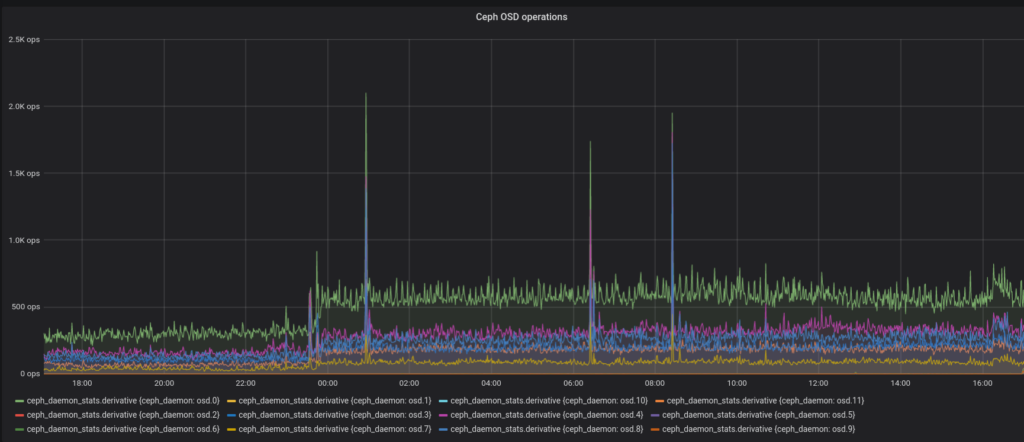
Look at this graph of operation count per 10 seconds in my Ceph cluster and see if you can tell at which point I started installing CollectD on more hosts on my network to feed into InfluxDB.

Yeah…

The bump at the end is where I started moving some things around. After this time series there’s a 1 hour gap in InfluxDB data while I moved its storage from RDB to a local SSD. Also some reboots of the Proxmox nodes to put one network interface per node to a new VLAN.

Anyway, no high availability for my InfluxDB server but also a more reasonable load on Ceph. I’ll consider doing the same to logger(my Elastic Stack VM) because it’s also highly expendable and it’s easy to imagine it also causing a high number of write operations. It’s not like my Ceph cluster can’t handle this amount of writes but I just don’t like performance and log monitoring causing 80% of the load.

FreeIPA

With quite a lot of both physical machines and even more virtual machines it can be tricky to keep file permissions on shared storage like Ceph in sync. Adding two users in the wrong order on a node can give them the wrong UIDs. This was less of a problem when I accessed files via CIFS/Samba but now I only do that for Windows-machines. Linux-machines use CephFS so UIDs and GIDs have to be correct on all nodes. Therefor I use FreeIPA to keep this stuff in sync. I spent what felt like months trying to get a multi-master LDAP cluster to work – though it might have been a weekend – but gave up.

Turns out FreeIPA has built-in support for replication of data. So I have freeipa01 running on a Ceph RBD disk allowing me to keep it running even as physical nodes are rebooted. freeipa02 is run on a local disk on one of my servers and it’s there in case Ceph stops working. FreeIPA also handles DNS which it replicates down to Bind daemons on three virtual machines that are also running on local storage. The DNS function NOTIFY is used to keep replication lag down when syncing down to the bind slaves.

What else does FreeIPA do? Kerberos and single-sign-on, currently only used for SSH. Certificate issuing, standard centralized PAM log on against the central user directory. I’ve come to use it quite a lot.