Interesting graph from my own monitoring of two different Samba file shares I operate:
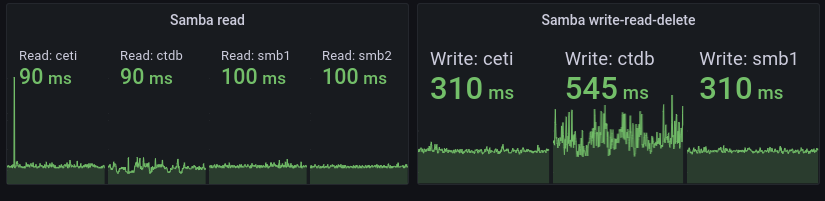
smb1 and smb2 are VMs with direct-attached harddrives – old school HDDs – running Btrfs. ceti is a virtual IP that typically points to smb1 but in the event of some failure or other downtime the IP moves to smb2 which is a read-only copy of smb1. That’s why smb2 isn’t present in the second group of graphs for read-write-delete, it’s read-only…
So ignore ceti, it’s just another name for smb1 in the picture above. That leaves ctdb which is round-robin A-pointer-thing:
cjp@amd:~$ dig ctdb.svealiden.se

;; ANSWER SECTION:
ctdb.svealiden.se.      60      IN      A       192.168.0.232
ctdb.svealiden.se.      60      IN      A       192.168.0.231
ctdb.svealiden.se.      60      IN      A       192.168.0.233
Each ctdb-node runs – you guessed it – CTDB! Which is really just a synchronization-layer for multiple Samba instances providing access to a cluster- or distributed filesystem. I use CephFS. Note how the ctdb-nodes has roughly the same average read time as smb1 and smb2 but much more jitter. It become even more apparent for a write-read-delete cycle where the ctdb nodes have way more jitter and also significantly higher overall delay.
It’s actually surprising that I don’t pay a higher penalty for using CephFS. It’s not that CephFS is bad but generally distributed filesystems have a lot of delays due to the many round-trips over a network that need to be completed for every operation. And while the delay is noticeable in the graphs above(a 6 hour span) it’s not noticeable for me as an end user.
2022-05-24: Had to click on this article and read it to remember what the hell it was about a full 24 days after publishing it. This vacation I’m on was clearly overdue.