God I love the word “shenanigans”. I can’t tell you how many files on my work laptop include that word.
Anway… So I moved some VMs around to upgrade pve2 to get rid of an annoying issue with UEFI where the console won’t work. But I overloaded pve1 which promptly went and died. Well, rebooted… And then mon.pve1 couldn’t join the cluster again. I figured I could take that opportunity to upgrade Ceph and the whole pve1-server actually.
No dice. Okey, delete mon.pve1 and add again? No dice. Proxmox’ Ceph tools don’t like things being wonky. After (looking at the time) an hour and a half? Roughly I’ve deleted and readded mon.pve1 several times and finally got it to work by also running “ceph mon add pve1 192.168.1.21” on one of the quorate nodes.
That might seem obvious but can you find that in the guide for adding and removing mons? https://docs.ceph.com/en/latest/rados/operations/add-or-rm-mons/
I can’t. Also, why is it ceph mon add pve1 192.168.1.21 and not ceph mon add mon.pve1 192.168.1.21? The mon-part is included everywhere else. But this is why I run Ceph at home. To learn this stuff when it’s only me getting annoyed. My bosses are running Ceph in production the poor dears. Obviously not on my rinky-dink setup crammed into a cupboard but still… Nerve-wracking stuff.
Well, I guess I’d better get to upgrading pve2 then… Slightly behind schedule.
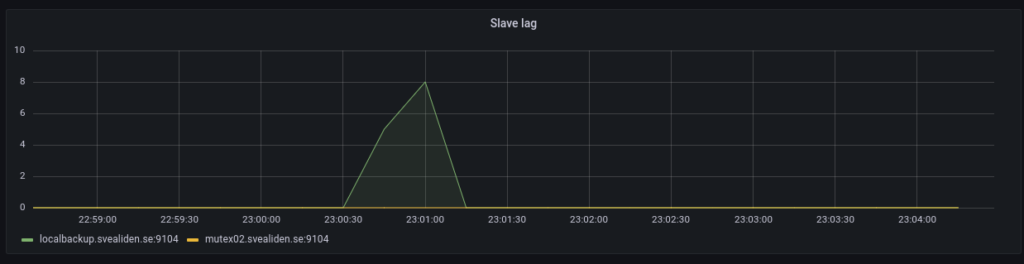
Just a few notes on MariaDB replication lag. My own backup program is an interesting generator of database traffic as we can see below:
But the slaves catch up in a very jerky fashion:
On the face of it both nodes suddenly fell 1800 seconds behind in a matter of 60 seconds. I argue this would only be possible if 1800 seconds of updates were suddenly sent to or acknowledged by the slaves. The sending theory isn’t entirely unreasonable based on this graph:
Commits on the master are relatively evenly spaced:
And Inserts spread out over the whole intensive period:
I suspect this sudden lag increase is a result of changes being grouped together in “replication transactions”:
Global transaction ID introduces a new event attached to each event group in the binlog. (An event group is a collection of events that are always applied as a unit. They are best thought of as a “transaction”,[…]
Let’s check the relay log on mutex02 to see if this intuition is correct. Beginning of relevant segment:
#211215  2:31:06 server id 11  end_log_pos 674282324 CRC32 0xddf8eb3a   GTID 1-11-35599776 trans
/*!100001 SET @@session.gtid_seq_no=35599776*//*!*/;
START TRANSACTION
/*!*/;
# at 674282625
#211215  2:01:54 server id 11  end_log_pos 674282356 CRC32 0x8e673045   Intvar
SET INSERT_ID=22263313/*!*/;
# at 674282657
#211215  2:01:54 server id 11  end_log_pos 674282679 CRC32 0x9c098efd   Query   thread_id=517313        exec_time=0     error_code=0    xid=0
use `backuptool`/*!*/;
SET TIMESTAMP=1639530114/*!*/;
SET @@session.sql_mode=1411383304/*!*/;
/*!\C utf8mb4 *//*!*/;
SET @@session.character_set_client=224,@@session.collation_connection=224,@@session.collation_server=8/*!*/;
insert into FileObservation (hashsum, indexJob_id, mtime, path, size) values ('e182c2a36d73098ca92aed5a39206de151190a047befb14d2eb9e7992ea8e324', 284, '2018-06-08 22:21:16.638', '/srv/storage/Backup/2018-06-08-20-img-win7-laptop/Info-dmi.txt', 21828)
Ending with:
SET INSERT_ID=22458203/*!*/;
# at 761931263
#211215  2:31:05 server id 11  end_log_pos 761931294 CRC32 0x54704ba3   Query   thread_id=517313        exec_time=0     error_code=0    xid=0
SET TIMESTAMP=1639531865/*!*/;
insert into FileObservation (hashsum, indexJob_id, mtime, path, size) values ('e9b3dc7dac6e9f8098444a5a57cb55ac9e97b20162924cda9d292b10e6949482', 284, '202
1-12-14 08:28:00.23', '/srv/storage/Backup/Lenovo/Path/LENOVO/Configuration/Catalog1.edb', 23076864)
/*!*/;
# at 761931595
#211215  2:31:05 server id 11  end_log_pos 761931326 CRC32 0x584a7652   Intvar
SET INSERT_ID=22458204/*!*/;
# at 761931627
#211215  2:31:05 server id 11  end_log_pos 761931659 CRC32 0x6a9c8f8a   Query   thread_id=517313        exec_time=0     error_code=0    xid=0
SET TIMESTAMP=1639531865/*!*/;
insert into FileObservation (hashsum, indexJob_id, mtime, path, size) values ('84be690c4ff5aaa07adc052b15e814598ba4aad57ff819f58f34ee2e8d61b8a5', 284, '202
1-12-14 08:30:58.372', '/srv/storage/Backup/Lenovo/Path/LENOVO/Configuration/Catalog2.edb', 23076864)
/*!*/;
# at 761931960
#211215  2:31:06 server id 11  end_log_pos 761931690 CRC32 0x98e12680   Xid = 27234912
COMMIT/*!*/;
# at 761931991
#211215  2:31:06 server id 11  end_log_pos 761931734 CRC32 0x90f792f6   GTID 1-11-35599777 cid=27722058 trans
/*!100001 SET @@session.gtid_seq_no=35599777*//*!*/;
So it seems like 1-11-35599776 stretches from 02:01:54 to 2:31:06 and it’s somewhat reasonable for mutex02 to suddenly report a lag of 30 minutes. I wonder what that means for actual data transfer. Could I query intermediate results from 1-11-35599776 before 02:31? :thinking_face:
Bonus:
The tiny slave lag caused on the localbackup node when this is run:
mysql -e "STOP SLAVE;" && sleep 8 && cd $SCRIPT_PATH && source bin/activate && python snapshots.py hourly >> hourly.log && mysql -e "START SLAVE;"
It’s a really hacky way to let the localbackup process any processing of the relay log before making a Btrfs snapshot. Seems to work. Technically you can make snapshots while MariaDB is running full tilt but this seems a bit nicer. Have had some very rare lockups of unknown origin on these kinds of Btrfs snapshot-nodes for database backups.
Dang it… Pacemaker wigged out during pacemaker03:s Btrfs snapshots run. Well, it was probably the cleanup job that clears out old snapshots that did it. Yeah, I know. “Don’t run OLTP workloads on CoW-filesystems”
But I’m running like 30 transactions per second with short bursts of a few hundred per second. CoW works fine. But Pacemaker wigged out for some reason and seems to have fiddled with the GTID:
ov 29 04:01:05.616 pacemaker03.svealiden.se pacemaker-based     [1201] (cib_process_request)   info: Completed cib_modify operation for section status: OK (rc=0, origin=pacemaker03.svealiden.se/crmd/49, version=0.173.120)
Nov 29 04:01:05.619 pacemaker03.svealiden.se pacemaker-controld  [1206] (process_lrm_event)     info: Result of monitor operation for mariadb_server on pacemaker03.svealiden.se: Cancelled | call=41 key=mariadb_server_monitor_20000 confirmed=true
Nov 29 04:01:10.624 pacemaker03.svealiden.se pacemaker-based     [1201] (cib_process_ping)      info: Reporting our current digest to pacemaker01.svealiden.se: bfbe319be87955b6424bb9b041600d5e for 0.173.120 (0x5646a9a5eac0 0)
Nov 29 04:01:27.325 pacemaker03.svealiden.se pacemaker-controld  [1206] (throttle_check_thresholds)     notice: High CPU load detected: 4.050000
Nov 29 04:01:27.325 pacemaker03.svealiden.se pacemaker-controld  [1206] (throttle_send_command)         info: New throttle mode: high load (was medium)
Nov 29 04:01:57.327 pacemaker03.svealiden.se pacemaker-controld  [1206] (throttle_check_thresholds)     notice: High CPU load detected: 4.060000
Nov 29 04:02:03  mariadb(mariadb_server)[1456545]:    INFO: MySQL stopped
Nov 29 04:02:03.343 pacemaker03.svealiden.se pacemaker-execd     [1203] (log_finished)  info: mariadb_server stop (call 44, PID 1456545) exited with status 0 (execution time 57728ms, queue time 0ms)
Nov 29 04:02:03.346 pacemaker03.svealiden.se pacemaker-controld  [1206] (process_lrm_event)     notice: Result of stop operation for mariadb_server on pacemaker03.svealiden.se: ok | rc=0 call=44 key=mariadb_server_stop_0 confirmed=true cib-update=50
Nov 29 04:02:03.346 pacemaker03.svealiden.se pacemaker-based     [1201] (cib_process_request)   info: Forwarding cib_modify operation for section status to all (origin=local/crmd/50)
Nov 29 04:02:03.351 pacemaker03.svealiden.se pacemaker-based     [1201] (cib_perform_op)        info: Diff: --- 0.173.120 2
Nov 29 04:02:03.351 pacemaker03.svealiden.se pacemaker-based     [1201] (cib_perform_op)        info: Diff: +++ 0.173.121 (null)
Nov 29 04:02:03.351 pacemaker03.svealiden.se pacemaker-based     [1201] (cib_perform_op)        info: +  /cib:  @num_updates=121
Nov 29 04:02:03.351 pacemaker03.svealiden.se pacemaker-based     [1201] (cib_perform_op)        info: +  /cib/status/node_state[@id='3']/lrm[@id='3']/lrm_resources/lrm_resource[@id='mariadb_server']/lrm_rsc_op[@id='mariadb_server_last_0']:  @transition-magic=0:0;5:3308:0:7c487611-27b4-49ce-b931-c548d64ecc98, @call-id=44, @rc-code=0, @op-status=0, @exec-time=57728
Nov 29 04:02:03.352 pacemaker03.svealiden.se pacemaker-based     [1201] (cib_process_request)   info: Completed cib_modify operation for section status: OK (rc=0, origin=pacemaker03.svealiden.se/crmd/50, version=0.173.121)
Nov 29 04:02:03.890 pacemaker03.svealiden.se pacemaker-controld  [1206] (do_lrm_rsc_op)         notice: Requesting local execution of start operation for mariadb_server on pacemaker03.svealiden.se | transition_key=16:3308:0:7c487611-27b4-49ce-b931-c548d64ecc98 op_key=mariadb_server_start_0
Nov 29 04:02:03.891 pacemaker03.svealiden.se pacemaker-execd     [1203] (log_execute)   info: executing - rsc:mariadb_server action:start call_id:45
Nov 29 04:02:03.891 pacemaker03.svealiden.se pacemaker-based     [1201] (cib_process_request)   info: Forwarding cib_modify operation for section status to all (origin=local/crmd/51)
Nov 29 04:02:03.893 pacemaker03.svealiden.se pacemaker-based     [1201] (cib_perform_op)        info: Diff: --- 0.173.121 2
Nov 29 04:02:03.894 pacemaker03.svealiden.se pacemaker-based     [1201] (cib_perform_op)        info: Diff: +++ 0.173.122 (null)
Nov 29 04:02:03.894 pacemaker03.svealiden.se pacemaker-based     [1201] (cib_perform_op)        info: +  /cib:  @num_updates=122
Nov 29 04:02:03.894 pacemaker03.svealiden.se pacemaker-based     [1201] (cib_perform_op)        info: +  /cib/status/node_state[@id='3']/lrm[@id='3']/lrm_resources/lrm_resource[@id='mariadb_server']/lrm_rsc_op[@id='mariadb_server_last_0']:  @operation_key=mariadb_server_start_0, @operation=start, @transition-key=16:3308:0:7c487611-27b4-49ce-b931-c548d64ecc98, @transition-magic=-1:193;16:3308:0:7c487611-27b4-49ce-b931-c548d64ecc98, @call-id=-1, @rc-code=193, @op-status=-1, @last-rc-change=1638154923, @exec-time=0
Nov 29 04:02:03.894 pacemaker03.svealiden.se pacemaker-based     [1201] (cib_process_request)   info: Completed cib_modify operation for section status: OK (rc=0, origin=pacemaker03.svealiden.se/crmd/51, version=0.173.122)
Nov 29 04:02:04  mariadb(mariadb_server)[1456733]:    INFO: MySQL is not running
Nov 29 04:02:05  mariadb(mariadb_server)[1456733]:    INFO: MySQL is not running
Nov 29 04:02:08.906 pacemaker03.svealiden.se pacemaker-based     [1201] (cib_process_ping)      info: Reporting our current digest to pacemaker01.svealiden.se: 506f4f6824d1cd4857592724a902db4b for 0.173.122 (0x5646a9a5eac0 0)
Nov 29 04:02:09  mariadb(mariadb_server)[1456733]:    INFO: Changing MariaDB configuration to replicate from pacemaker02.svealiden.se.
Nov 29 04:02:10  mariadb(mariadb_server)[1456733]:    ERROR: MariaDB slave io has failed (1236): Got fatal error 1236 from master when reading data from binary log: 'Error: connecting slave requested to start from GTID 1-3-30418952, which is not in the master's binlog. Since the master's binlog contains GTIDs with higher sequence numbers, it probably means that the slave has diverged due to executing extra erroneous transactions'
Nov 29 04:02:10.888 pacemaker03.svealiden.se pacemaker-execd     [1203] (log_op_output)         notice: mariadb_server_start_0[1456733] error output [ ocf-exit-reason:MariaDB slave io has failed (1236): Got fatal error 1236 from master when reading data from binary log: 'Error: connecting slave requested to start from GTID 1-3-30418952, which is not in the master's binlog. Since the master's binlog contains GTIDs with higher sequence numbers, it probably means that the slave has diverged due to executing extra erroneous transactions' ]
So it seems Pacemaker stopped MariaDB and then started it in a wonky state. Haven’t seen that before. But it’s not the first thing to make me go “Is this setup really solid?”
’cause I ran Galera without a hitch for like a year and half at least. Sure, when quorum is lost you’re in a world of hurt but there are recovery methods that work in artifically generated scenarios worst case scenarios at least: https://deref.se/2019/10/29/percona-xtradb-cluster-again/
I’m thinking of writing my own master-slave runner. It sounds almost as bad as writing your own encryption algorithm but I see benefits in creating something that is written with the sole purpose of dealing with MariaDB master-slave setups. Also something that I can debug. That’s a big plus. Now I’m not quite crazy enough to try to implement my own consistency protocol. Obviously corosync or etcd will have to serve as a coordinator for any code I write. I’ll dive into that part right now so I know if this is even halfway workable.
Addendum:
Okey, so that seemed less than ideal. I think I’m going to go with keepalived. It’s not super-safe but if the slave doesn’t get a heartbeat from the master than it can fence the master and start in master mode. If the master won’t fence the slave(why would I give it that ability? If we’re concerned about the slave assuming the master role while the master is still running, the slave fencing the master “solves” that) then we can avoid mutual killing in case of a glitch. The worst case scenario should be that the slave kills the master unnecessarily.
I’ve hated Kubernetes for a long time. Must be nigh on seven years at this point. I got in pretty early when Traefik wasn’t around and it was generally not viable to run a Kubernetes cluster outside the cloud due to the lack of LoadBalancer implementations. StatefulSets weren’t a thing. But everyone else seems to have been crazy for it.
Maybe what made me hostile to Kubernetes was its way of pawning off all the difficult parts of clustering to someone else. When you don’t have to deal with state and mutual exclusion, clustering becomes way easier. But that’s not really solving the underlying problem, just saying “If you figured out the hard parts, feel free to use Kubernetes to simplify the other parts”.
It also doesn’t work in its favor that it is so complex and obtuse. I’ve spent years tinkering with it(on and off naturally, I don’t engage that frequently with things I hate) and over the past few weeks I’ve got a working setup using microk8s and Rook that lets me create persistent volumes in my external Ceph cluster running on Proxmox. I now run my web UI for the pdns authoritative DNS servers in that cluster using a Deployment that can be scaled quite easily:
Yet I have only the flimsiest idea of how it works and how to fix it if something breaks. Maybe I’ll learn how Calico uses vxlan to connect everything magically and why I had to reset my entire cluster on thursday to remove a custom resource definition.
By the way, try to create a custom resource definition not using the beta-API! You’ll have to provide a schema: https://kubernetes.io/docs/tasks/extend-kubernetes/custom-resources/custom-resource-definitions/
I suspect many people will go mad trying to make heads or tails of that. Anyway, if I had to make a decision about how to run a set of microservices in production I’d still go with something like docker containers run as systemd-services and HAProxy to load balance the traffic. Less automation for rolling upgrades, scaling and so on but I wouldn’t be worried about relying entirely on a system where it’s not even clear if I can find a way to describe the malfunction that keeps all services from running! I mean, I added podAntiAffinity to me deployment before:
And this is what all three pods logged when I started the deployment:
  Warning  FailedScheduling  39m   default-scheduler  0/3 nodes are available: 3 node(s) didn't match pod affinity/anti-affinity rules, 3 node(s) didn't match pod anti-affinity rules.
  Warning  FailedScheduling  39m   default-scheduler  0/3 nodes are available: 3 node(s) didn't match pod affinity/anti-affinity rules, 3 node(s) didn't match pod anti-affinity rules.
  Normal   Scheduled         39m   default-scheduler  Successfully assigned default/pdnsadmin-deployment-856dcfdfd8-vmzws to kube01.svealiden.se
  Normal   Pulled            39m   kubelet            Container image "cacher.svealiden.se:5000/pdnsadmin:20210925" already present on machine
  Normal   Created           39m   kubelet            Created container pdnsadmin
  Normal   Started           39m   kubelet            Started container pdnsadmin
Obviously “Successfully assigned default/pdnsadmin-deployment-856dcfdfd8-vmzws to kube01.svealiden.se” was a good thing but Kubernetes telling me that zero nodes were initially available? When the only requirement I set out was that pdns-admin-gui pods shouldn’t be run on the same node? And there are three nodes? And I asked for three pods? That’s the sort of stuff that would make me very nervous if this was used for production. What if Kubernetes gets stuck in the “All pods forbidden because reasons”-mode?
This is also why I’m terrified of running Ceph for production applications. Multiple independent Ceph cluster? Okey, now we’re talking but a single cluster? It’s just a matter of time before Ceph locks up on you and you have a week’s downtime while trying to figure out what the hell is going on.
The keen observer will ask “Aren’t you a massive fan of clusters?” and that’s entirely correct. I’ve run Ceph for my own applications for just over two years and have Elasticsearch, MongoDB and MariaDB clusters set up. But the key point is disaster recovery. Clusters can be great for high availability which is what I’m really a fan of but clusters where there isn’t an override in case the complex logic of the distributed system goes on the fritz are a huge gamble. If MongoDB gets confused I can choose a node and force it to become the primary. If I can get the others to join afterwards that’s fine, otherwise I’ll just have to blank them and rebuild. Same with MariaDB, I can kill the two nodes and make the remaining one a master and take it from there. I don’t need any distributed algorithm to give me permission to bring systems back in a diminished capacity.
By the way, nothing essential runs on my Ceph cluster. Recursive DNS servers, file-shares, backup of file-shares and so on are all running on local storage in a multimaster or master/slave configuration. Ceph going down will disable some convience-functions, my Zabbix monitoring server, Prometheus, Grafana and so on, but I can live without them for a couple of hours while I swear angrily at Ceph. In fairness I haven’t had a serious Ceph-issue now for (checking…) about a year now!
So I know in theory how to switch a database from one MariaDB server to another with extremely little downtime. It turns out to be trickier than I had thought in reality when the source is a Galera cluster but let’s go through it step by step:
Step 1
Choose a Galera node and make sure it has binary logging activated and log_slaves_updates = ON. Otherwise it won’t log things in a manner that can be sent to a slave that isn’t a Galera node and the log_slaves_updates-thing is to make it actually do send updates to the slave. I added log_slave_updates = ON to the slave as well because it’s not entirely clear how updates from the Galera node is viewed. I mean, in a sense all Galera nodes are both slaves and masters…
Also make sure the server id of the target node(temporary slave) doesn’t match any of the Galera nodes. Otherwise any Galera node will think that server_id = 1 is already caught up! That took me a couple of hours to figure out.
Step 2
Dump the database to be transferred from the Galera node you chose earlier:
Create the necessary users and an empty database on the target server and then import the SQL-dump.
mysql zabbix < zabbix.sql
Step 4
Extract the replication coordinates from the top of the sql dump:
root@cluster3:~# head -30 zabbix.sql | grep MASTER
CHANGE MASTER TO MASTER_LOG_FILE='mysql-bin.000150', MASTER_LOG_POS=691605499;
Create an SQL-file with the full information required to start streaming updates from the Galera node using this data:
CHANGE MASTER TO MASTER_HOST='cluster3.svealiden.se', MASTER_PORT=3306, MASTER_USER="replication_user", MASTER_PASSWORD="SECRETREPLICATIONPASSWORD", MASTER_LOG_FILE='mysql-bin.000150', MASTER_LOG_POS=691605499;
SET GLOBAL replicate_do_db='zabbix';
START SLAVE;
The SET GLOBAL replicate_do_db=’zabbix’; thing is for situations where there is just one database that you want to bring from a source that has multiple databases.
Note the Seconds_Behind_Master-part that tells you how far the slave has been able to catch up. As you get close to zero, get ready to stop writing data to the Galera cluster.
Step 6
Stop writing data to Galera. In my case this entailed changing two configuration files for Zabbix(zabbix-server and the Zabbix Web UI) and stopping the associated services.
Can you spot where the two failed attempts at making this switch seamlessly happened?
Sidenote: this is an example of a sentence that would stand to gain from English having more syntactic options. Like Can you spot where the two failed attempts atmaking this switch seamlesslyhappened. Here it’s more clear that we are talking about X = making a switch seamlessly and how there were two failed attempts at making X happen. Compare that to the more nonsensical Can you spot where the two failed attempts atmaking this switch seamlessly happened. No, we’re not talking about failures seemlessly happening, the switch was supposed to be seemless.
So anyway… Seconds_Behind_Master is a great piece of data to read when you’re about to switch over to a replica that you think is caught up.
Use cases
This is useful for a lot of situations. Maybe you want to convert a 180GB database from MyISAM to InnoDB? Maybe you need to perform an upgrade where it’s safest to do a mysqldump->import?
The lower limit for how fast this switchover can be is the replication lag. If the slave is always 10 seconds behind, that is the absolute lowest limit for how fast you can make the switch. If you do all the steps manually that adds maybe 20 seconds. Script it and we’re down to a adding a few seconds on top of the replication lag. Short of banks and amazon.com, downtime measured in seconds(maybe multiples of ten seconds) isn’t a cause for great concern.
I’ve set up a Pacemaker cluster with MariaDB and fence_pve so that we have 1 writeable master and 2 read-only slaves. But writes are not made to either of them directly, instead all queries are routed through ProxySQL and it distributes queries across the three nodes. I first didn’t understand why the developers of ProxySQL advised against a pure read/write split of queries. Surely we don’t want SELECTs to go to the writeable node? It’s busy with INSERTs and UPDATEs. But now I get it; it’s an issue of replication lag. If a client makes an INSERT and then shortly thereafter a SELECT that needs to display the changes that were just made, things can fall apart if the SELECT goes to a slave that hasn’t received the changes from the master yet. So we only want to send queries that we know aren’t millisecond-sensitive to slaves. Well, the replication lag sets the time element… If your slaves are five seconds behind the master then you should only send queries that can tolerate a five second discrepancy to the slaves.
Update 2021-07-30: I realized it was waaaay better to set read-only=1 in the conf files for MariaDB to avoid situations where proxysql accidentally sends INSERT-operations to a non-master because it happens to start out read-write.
Aaaanyway… So installing ProxySQL is pretty much fire-and-forget so the interesting thing is how to feed it the right data. I let each server in the cluster run ProxySQL and whichever node happens to host the master-instance of MariaDB also gets to route the traffic. You could let one of the slaves host the active ProxySQL instance but this was easier for me to implement. Here’s a diagram of how things work:
The dashed lines indicate replication of data and the solid lines represent database queries. The ellipse shows where the virtual IP for the database cluster is located(always on the master node). So with thus setup I can use the exact same config for all three ProxySQL instances, which I’ve turned into a single SQL-file proxyinit.sql:
INSERT INTO mysql_servers(hostgroup_id,hostname,port) VALUES (1,'192.168.1.181',3306);
INSERT INTO mysql_servers(hostgroup_id,hostname,port) VALUES (1,'192.168.1.182',3306);
INSERT INTO mysql_servers(hostgroup_id,hostname,port) VALUES (1,'192.168.1.183',3306);

-- Since hostgroup 0 is the default it makes sense to make it the writer hostgroup
-- To avoid a situation where INSERTs are accidentally sent to a read-only node
INSERT INTO mysql_replication_hostgroups (writer_hostgroup,reader_hostgroup,comment) VALUES (0,1,'cluster1');

-- These are two queries I've identified that take more time than usual and are safe to run on replicas
INSERT INTO mysql_query_rules (rule_id,active,digest,destination_hostgroup,apply) VALUES (1,1,'0xA1D7DC02F2B414BB',1,1);
INSERT INTO mysql_query_rules (rule_id,active,digest,destination_hostgroup,apply) VALUES (2,1,'0x112A8E68C94FFE30',1,1);

-- By default all queries should go to the master so default hostgroup should be 0
INSERT INTO mysql_users(username,password,default_hostgroup) VALUES ('zabbix','MYZABBIXPASSWORD',0);

-- Now we have to load our data into the active runtime
LOAD MYSQL USERS TO RUNTIME;
LOAD MYSQL SERVERS TO RUNTIME;
LOAD MYSQL QUERY RULES TO RUNTIME;

-- And I don't want to have to enter this data all the time so better save it to disk
SAVE MYSQL USERS TO DISK;
SAVE MYSQL SERVERS TO DISK;
SAVE MYSQL QUERY RULES TO DISK;
To load this into each ProxySQL instance I just run:
mysql -u admin -pMYADMINPASSWORD -h 0.0.0.0 -P6032 < proxyinit.sql
Testing
Let’s try to take pcmk2 out of the cluster so that some other node has to take over the role of primary:
I think this is pretty attractive as a way of merging high-availability with load balancing. I started tinkering with this when fiddling with Kubernetes and WordPress. No point in having multiple pods spread out over multiple servers if you can’t run multiple database-instances. Well, not in my book anyway. So we’re left to choose between Galera multi-master or the more traditional master-slave setup. There are constraints placed on what can be run in Galera(like a hard primary key requirement) so I think master-slave is more reliable when you yourself might not have complete control over database schemas. ProxySQL would work just fine with Galera too but I wanted to test out the slightly more challenging setup.
A big downside to ProxySQL is that it doesn’t do pass-through authentication. So user added to MariaDB and any user password changed would also need to be made to all ProxySQL instances. That’s fine when the setup is meant for a large WordPress webshop which has one(1) database user that you as an admin manage but for a shared hosting setup it’s a nightmare.
MariaDB MaxScale is an alternative to ProxySQL that solves the issue of replication lag using some fancy footwork and therefore claims to be able to do read/write split automagically and it offers pass-through authentication. Not sure if it has the fancy statistics function that ProxySQL has though.
Behind the scenes
I had to have data to test out this setup and that’s not trivial. Lots of data is sent to my Galera-cluster from Zabbix though… Hmm… Can’t ProxySQL do data mirroring? Indeed it can! First we need to add both the usual database cluster virtual IP and the new testing-cluster’s virtual IP as separate hostgroups:
ProxySQL Admin> SELECT hostgroup_id,hostname,port,status FROM mysql_servers;
+--------------+---------------+------+--------+
| hostgroup_id | hostname      | port | status |
+--------------+---------------+------+--------+
| 0            | 192.168.1.62  | 3306 | ONLINE |
| 1            | 192.168.1.180 | 6033 | ONLINE |
+--------------+---------------+------+--------+
2 rows in set (0.000 sec)
And then a query rule that sends all traffic for the zabbix-user to both hostgroups(not load-balanced, every query goes to both):
It’s been two days now and I feel like this lady (from an interesting article at cnet who are apparently still in business). But now I got a MariaDB master-slave cluster set up through pacemaker. I thought it was going to be a breeze since I wrote down how to do it for MySQL 5.7 on this very website! But no…
First off, the resource agent which worked for MySQL 5.7 does _not_ seem to work for MariaDB 10.x. And pulling in the latest scripts from the clusterlabs Github repo into the correct folder in an Ubuntu 20.04-install is bananas. So I abandoned my dear testbench and installed Fedora 33 because their resource-agents package seemed to contain the right stuff. And they do!
But the documentation has some catching up to do. For my three nodes pacemaker01, pacemaker02, pacemaker03 the following sets up the cluster correctly once I set the same password for the hacluster-user on all nodes:
Note that this either requires that the hostnames can be resolved to the correct IPs on all three nodes. I did this through /etc/hosts since it’s a testbench.
[mariadb]
log-bin
server_id=1
log-basename=pacemaker01
binlog-format=mixed
expire_logs_days=2
relay_log_purge=0 # I want relay logs in case I need to debug duplicate entries etc.
relay_log_space_limit=1094967295 # But only like 1 GB of relay logs.
read-only=1 # Best to start in read-only mode by default to avoid duplicate entries accidents
I got some weird synchronization errors when the mysql-database was included in the replication so I tried locking replication down to this one database “sysbench”. log_bin=something is important for binary logging to be enabled and that’s a prerequisuite for replication. Obviously server_id needs to be unique to each server and pacemaker01 is replaced by the hostname of the other two servers in their conf-file.
pcs cluster cib mariadb_cfg
pcs -f mariadb_cfg resource create db_primary_ip ocf:heartbeat:IPaddr2 ip=192.168.1.209 cidr_netmask=21 op monitor interval=30s on-fail=restart
pcs -f mariadb_cfg resource create mariadb_server ocf:heartbeat:mariadb binary="/usr/libexec/mysqld" \
replication_user="replication_user" replication_passwd="randompassword" \
node_list="pacemaker01 pacemaker02 pacemaker03" \
op start timeout=120 interval=0 \
op stop timeout=120 interval=0 \
op promote timeout=120 interval=0 \
op demote timeout=120 interval=0 \
op monitor role=Master timeout=30 interval=10 \
op monitor role=Slave timeout=30 interval=20 \
op notify timeout="60s" interval="0s"
pcs -f mariadb_cfg resource promotable mariadb_server master-max=1 master-node-max=1 clone-max=3 clone-node-max=1 notify=true
pcs -f mariadb_cfg constraint colocation add master mariadb_server-clone with db_primary_ip score=INFINITY
pcs -f mariadb_cfg constraint order promote mariadb_server-clone then db_primary_ip symmetrical=true
pcs cluster cib-push mariadb_cfg
Here’s a nice thing: the command for creating a master-slave setup used to be something like “pcs -f mariadb_cfg resource master mariadb_server master-max=1 master-node-max=1 clone-max=3 clone-node-max=1 notify=true“
Yeah, the word master has been replaced by “promotable”. MariaDB are also working to expunge politically incorrect language in case you were wondering. Here was me thinking that slavery was a problem when applied to humans but I guess we’ll just purge these terms no matter what they refer to.
So anyway… What took all sunday was to figure out why pacemaker kept saying that zero nodes participated in the election of a new master. There were clearly three nodes registered as Online in the cluster. After equipping the file /usr/lib/ocf/resource.d/heartbeat/mariadb with some additional debug statements it became clear that the issue was that none of the servers were announcing their gtid_current_pos. Admittedly, that makes it difficult to elect which server is most advanced and should be promoted.
For whatever reason my practice of dumping the master DB like so:
mysqldump --master-data -A > master.sql
is okey but I neglected to consider that Pacemaker assumes that the “gtid_current_pos” value is usable. But this doesn’t get updated until after the replication gets going. So this ended up in the log:
Dec 13 21:14:17 mariadb(mariadb_server)[43240]: INFO: Value to be set as gtid for pacemaker03: 0-1-1
Set r/w permissions for uid=189, gid=189 on /var/log/pacemaker/pacemaker.log
Dec 13 21:14:17 mariadb(mariadb_server)[43240]: INFO: /usr/sbin/attrd_updater -p -N pacemaker03 -n mariadb_server-gtid -Q
Set r/w permissions for uid=189, gid=189 on /var/log/pacemaker/pacemaker.log
Dec 13 21:14:17 mariadb(mariadb_server)[43240]: INFO: Result: name="mariadb_server-gtid" host="pacemaker03" value=""
Set r/w permissions for uid=189, gid=189 on /var/log/pacemaker/pacemaker.log
Dec 13 21:14:17 mariadb(mariadb_server)[43240]: INFO: Query result: name="mariadb_server-gtid" host="pacemaker01" value="0-1-1"
Dec 13 21:14:17 mariadb(mariadb_server)[43240]: INFO: Value in read_gtid: 0-1-1
Set r/w permissions for uid=189, gid=189 on /var/log/pacemaker/pacemaker.log
Dec 13 21:14:17 mariadb(mariadb_server)[43240]: INFO: Query result: name="mariadb_server-gtid" host="pacemaker02" value=""
Dec 13 21:14:17 mariadb(mariadb_server)[43240]: INFO: Value in read_gtid:
Dec 13 21:14:17 mariadb(mariadb_server)[43240]: INFO: No reply from pacemaker02
Set r/w permissions for uid=189, gid=189 on /var/log/pacemaker/pacemaker.log
Dec 13 21:14:17 mariadb(mariadb_server)[43240]: INFO: Query result: name="mariadb_server-gtid" host="pacemaker03" value=""
Dec 13 21:14:17 mariadb(mariadb_server)[43240]: INFO: Value in read_gtid:
Dec 13 21:14:17 mariadb(mariadb_server)[43240]: INFO: No reply from pacemaker03
Dec 13 21:14:17 mariadb(mariadb_server)[43240]: INFO: Not enough nodes (1) contributed to select a master, need 3 nodes.
But by logging in to the slaves and running SET GLOBAL gtid_slave_pos=’0-1-1′; and then “START SLAVE;” did the trick.
A few quick restarts(both pull-the-plug style and orderly) later it seems to work fine. The problem I encountered before was that a master could not rejoin the cluster automatically after it was demoted, even if it was done nicely with “pcs cluster stop pacemaker01“. There would be “Failed to replicate, duplicate entry yada-yada” errors.
Not seeing that now, which is nice! I’ll rewrite my own sysbench script with transactions and “SELECT X FROM Y FOR UPDATE” and things that strain the DB a bit more to work with MariaDB and do some more tests.
Oh, for some reason the ocf:heartbeat:mariadb-script enables semi-synchronous replication for some reason. You might want to edit that segment(search for rpl_semi) if you don’t want that tradeoff.
Update 2021-07-08
Went through this again for some ProxySQL-testing and ended up writing a bash-script for setting up the whole thing with fencing and all:
#!/bin/bash

# Create a virtual IP for the database cluster
pcs -f mariadb_cfg resource create db_primary_ip ocf:heartbeat:IPaddr2 ip=192.168.1.180 cidr_netmask=21 op monitor interval=30s on-fail=restart
# Create the MariaDB clone on all three nodes
pcs -f mariadb_cfg resource create mariadb_server ocf:heartbeat:mariadb binary="/usr/sbin/mysqld" \
replication_user="replication_user" replication_passwd="REPLICATIONPASSWORD" \
node_list="pcmk1.svealiden.se pcmk2.svealiden.se pcmk3.svealiden.se" \
        op start timeout=120 interval=0 \
        op stop timeout=120 interval=0 \
        op promote timeout=120 interval=0 \
        op demote timeout=120 interval=0 \
        op monitor role=Master timeout=30 interval=10 \
        op monitor role=Slave timeout=30 interval=20 \
        op notify timeout="60s" interval="0s"
echo MariaDB Server clone set created

# Indicate that there must only ever be one(1) master among the MariaDB clones
pcs -f mariadb_cfg resource promotable mariadb_server master-max=1 master-node-max=1 clone-max=3 clone-node-max=1 notify=true
# The virtual IP MUST be on the same node as the MariaDB master
pcs -f mariadb_cfg constraint colocation add master mariadb_server-clone with db_primary_ip score=INFINITY
pcs -f mariadb_cfg constraint order promote mariadb_server-clone then db_primary_ip symmetrical=true
echo MariaDB Server clone set constraints set

# Let pcmk1.svealiden.se be fence by the fence_pve agent that needs to connect to
# 192.168.1.21 with the provided credentials to kill VM 139(pcmk1)
pcs -f mariadb_cfg stonith create p_fence_pcmk1 fence_pve \
        ip="192.168.1.21" nodename="pve1.svealiden.se" \
        login="root@pam" password="PROXMOXROOTPASSWORD" plug="139" delay="15" vmtype="qemu" \
        pcmk_host_list="pcmk1.svealiden.se" \
        op monitor interval="60s" \
        meta target-role="Started" is-managed="true"
pcs -f mariadb_cfg stonith create p_fence_pcmk2 fence_pve \
        ip="192.168.1.22" nodename="pve2.svealiden.se" \
        login="root@pam" password="PROXMOXROOTPASSWORD" plug="140" delay="15" vmtype="qemu" \
        pcmk_host_list="pcmk2.svealiden.se" \
        op monitor interval="60s" \
        meta target-role="Started" is-managed="true"
pcs -f mariadb_cfg stonith create p_fence_pcmk3 fence_pve \
        ip="192.168.1.23" nodename="pve3.svealiden.se" \
        login="root@pam" password="PROXMOXROOTPASSWORD" plug="141" delay="15" vmtype="qemu" \
        pcmk_host_list="pcmk3.svealiden.se" \
        op monitor interval="60s" \
        meta target-role="Started" is-managed="true"
echo Fence devices created

# Make sure each fencing device is located away from the node it is supposed to
# fence. It makes no sense to expect a node to be able to fence itself in the event
# of some malfunction.
pcs -f mariadb_cfg constraint location p_fence_pcmk1 avoids pcmk1.svealiden.se=INFINITY
pcs -f mariadb_cfg constraint location p_fence_pcmk2 avoids pcmk2.svealiden.se=INFINITY
pcs -f mariadb_cfg constraint location p_fence_pcmk3 avoids pcmk3.svealiden.se=INFINITY
echo Fence location constraints added

# Activate fencing
pcs -f mariadb_cfg property set stonith-enabled=true
pcs cluster cib-push mariadb_cfg
Had to increase the rights of the replication_user for some reason(I gave it SUPER for the sake of simplicity).
Oh, a nicer mysqldump variant:
mysqldump -A --single-transaction --gtid --master-data=1 --triggers --events --routines > pcmk2.sql
Update 2021-07-30
pcs cluster move for master doesn’t work in the latest Fedora due to promoted/master inconsistency between crm_resource and pcs. How surprising that changing keywords used to describe specific states causes problems… Anyway, this works:
Then chown -R mysql: /var/lib/mysql/data and using the output from the mariabackup command
[00] 2021-08-23 20:40:11         ...done
[00] 2021-08-23 20:40:11 Executing FLUSH NO_WRITE_TO_BINLOG ENGINE LOGS...
[00] 2021-08-23 20:40:11 mariabackup: The latest check point (for incremental): '5352582709'
[00] 2021-08-23 20:40:11 >> log scanned up to (5356297811)
mariabackup: Stopping log copying thread
[00] 2021-08-23 20:40:11 >> log scanned up to (5356297811)
[00] 2021-08-23 20:40:11 Executing BACKUP STAGE END
[00] 2021-08-23 20:40:11 All tables unlocked
[00] 2021-08-23 20:40:11 Streaming ib_buffer_pool to <STDOUT>
[00] 2021-08-23 20:40:11         ...done
[00] 2021-08-23 20:40:11 Backup created in directory '/root/xtrabackup_backupfiles/'
[00] 2021-08-23 20:40:11 MySQL binlog position: filename 'pacemaker01-bin.000007', position '968336', GTID of the last change '0-2-59839204,1-1-176656'
[00] 2021-08-23 20:40:11 Streaming backup-my.cnf
[00] 2021-08-23 20:40:11         ...done
[00] 2021-08-23 20:40:11 Streaming xtrabackup_info
[00] 2021-08-23 20:40:11         ...done
[00] 2021-08-23 20:40:11 Redo log (from LSN 5352582709 to 5356297811) was copied.
[00] 2021-08-23 20:40:11 completed OK!
Then log on to the new slave CHANGE MASTER TO MASTER_HOST=’pacemaker01.svealiden.se’, MASTER_USER=’replication_user’, MASTER_PASSWORD=’SECRETREPLICATIONPASSWORD’, MASTER_PORT=6603, MASTER_LOG_FILE=’pacemaker01-bin.000007′, MASTER_LOG_POS=968336;
Update 2021-08-23 – part 2
Running things and promoting and demoting nodes seems to be working fine. Consistency has thus far been maintained, which was otherwise the big issue the last time I ran an MariaDB Pacemaker cluster. read_only = ON in the config file is probably the number one contributor but maybe the dedicated MariaDB resource agent also plays a role.
Update 2021-08-29
New config for setting up fencing:
pcs cluster cib > conf_old
cp conf_old fence_cfg
# Let pacemaker01.svealiden.se be fence by the fence_pve agent that needs to connect to
# 192.168.1.21 with the provided credentials to kill VM 127(pacemaker01.svealiden.se)
pcs -f fence_cfg stonith create p_fence_pacemaker01 fence_pve \
        ip="192.168.1.21" nodename="pve1" \
        login="root@pam" password="PROXMOXPASSWORD" plug="127" delay="15" vmtype="qemu" \
        pcmk_host_check="static-list" pcmk_host_list="pacemaker01.svealiden.se" \
        op monitor interval="60s" \
        meta target-role="Started" is-managed="true"
pcs -f fence_cfg stonith create p_fence_pacemaker02 fence_pve \
        ip="192.168.1.22" nodename="pve2" \
        login="root@pam" password="PROXMOXPASSWORD" plug="128" delay="15" vmtype="qemu" \
        pcmk_host_check="static-list" pcmk_host_list="pacemaker02.svealiden.se" \
        op monitor interval="60s" \
        meta target-role="Started" is-managed="true"
pcs -f fence_cfg stonith create p_fence_pacemaker03 fence_pve \
        ip="192.168.1.23" nodename="pve3" \
        login="root@pam" password="PROXMOXPASSWORD" plug="129" delay="15" vmtype="qemu" \
        pcmk_host_check="static-list" pcmk_host_list="pacemaker03.svealiden.se" \
        op monitor interval="60s" \
        meta target-role="Started" is-managed="true"
echo Fence devices created

# Make sure each fencing device is located away from the node it is supposed to
# fence. It makes no sense to expect a node to be able to fence itself in the event
# of some malfunction.
pcs -f fence_cfg constraint location p_fence_pacemaker01 avoids pacemaker01.svealiden.se=INFINITY
pcs -f fence_cfg constraint location p_fence_pacemaker02 avoids pacemaker02.svealiden.se=INFINITY
pcs -f fence_cfg constraint location p_fence_pacemaker03 avoids pacemaker03.svealiden.se=INFINITY
echo Fence location constraints added

# Activate fencing
pcs cluster cib-push fence_cfg
Super-important details: the part pcmk_host_list=”pacemaker02.svealiden.se” is how Pacemaker figures out which fencing “device” can fence which node. But this is only done if pcmk_host_check=”static-list” . Otherwise Pacemaker tries to figure things out itself which I don’t necessarily object to but I feel more confident putting in the right values myself. Note for instance that my VMs don’t use FQDN names so pacemaker02.svealiden.se is actually called pacemaker02 in Proxmox.
nodename=”pve2″ has to be the correct name of the Proxmox host as the cluster knows it. More specifically, if you don’t provide nodename at all, Proxmox will try to find an SSL-cert under /etc/pve/nodes/pacemaker02.svealiden.se which is just all kinds of wrong:
root@pve3:~# ls -lh /etc/pve/nodes/pacemaker02.svealiden.se
ls: cannot access '/etc/pve/nodes/pacemaker02.svealiden.se': No such file or directory
Note that I might think of pve3 as pve3.svealiden.se but in the Proxmox GUI it’s just pve3. So nodename has to be exactly pve3. I spent a lot of time figuring out why things weren’t working only to find myself here:
Aug 29 21:49:42 pve3 pveproxy[3137968]: '/etc/pve/nodes/pve3.svealiden.se/pve-ssl.pem' does not exist!
So that was fun!
Now to another problem. The mariadb resource agent doesn’t understand gtids that involve more than one gtid domain for the purposes of figuring out which node should be elected master:
Aug 29 22:01:30 pacemaker02 pacemaker-attrd[80247]: notice: Setting mariadb_server-gtid[pacemaker02.svealiden.se]: 0-2-59851595,1-1-1672237 -> 0-2-59851595,1-1-1672310
Aug 29 22:01:30 pacemaker02 mariadb(mariadb_server)[124915]: INFO: Not enough nodes (1) contributed to select a master, need 2 nodes.
Aug 29 22:01:30 pacemaker02 pacemaker-execd[80246]: notice: mariadb_server_monitor_20000[124915] error output [ (standard_in) 1: syntax error ]
Aug 29 22:01:30 pacemaker02 pacemaker-execd[80246]: notice: mariadb_server_monitor_20000[124915] error output [ /usr/lib/ocf/resource.d/heartbeat/mariadb: line 276: [: : integer expression expected ]
Turns out line 276 is a utility function which compares numbers and it’s called by a function that compares gtids and apparently it doesn’t work so well when there are two gtids. So now I need to figure out how to purge the errant domain id. I’m leaning towards shutting down Pacemaker, stopping the slaves, blanking all gtid data from the master and then reinitialize the slaves.
Seems to have worked. Switching on Pacemaker messed up the synchronization but after running good old mariabackup -u root –backup –stream=xbstream | ssh NEWSLAVE “mbstream -x -C /var/lib/mysql/data” got things back into the right groove.
There is a draft on this website called “HA WordPress on a slightly bigger budget” and details the futility of trying to use Keepalived and Cloudflare Load Balancer to make a working primary/backup high availability server setup. I do not consider this to be any failing on the part of Keepalived as it quite clearly isn’t meant to be used for things like databases where split brain is a concern.
Cloudflare could have been a bit more helpful by providing a “no failback” option so that if traffic was ever directed to the backup, traffic wouldn’t go over to the primary automatically if that server came back online again. But I’ve implemented that using their REST API instead. So it’s still Cloudflare Load Balancer, MariaDB, Nginx, PHP-FPM, lsyncd and some janky bash scripts. It’s just that Keepalived isn’t being asked to do the work of Pacemaker/Corosync.
A planned switchover
Important numbers:
Thu 24 Dec 2020 11:37:11 PM CET Read worked. | Write worked. 185.20.12.24 Thu 24 Dec 2020 11:37:30 PM CET Read worked. | Write worked. 172.31.35.57
We had 19 seconds during which writes didn’t work due to the switchover process. Reads worked throughout. Full log:
cjp@util:~$ ./wootest.sh
Thu 24 Dec 2020 11:36:53 PM CET Read worked. | Write worked. 185.20.12.24

Thu 24 Dec 2020 11:36:54 PM CET Read worked. | Write worked. 185.20.12.24

Thu 24 Dec 2020 11:36:56 PM CET Read worked. | Write worked. 185.20.12.24

Thu 24 Dec 2020 11:36:58 PM CET Read worked. | Write worked. 185.20.12.24

Thu 24 Dec 2020 11:36:59 PM CET Read worked. | Write worked. 185.20.12.24

Thu 24 Dec 2020 11:37:01 PM CET Read worked. | Write worked. 185.20.12.24

Thu 24 Dec 2020 11:37:03 PM CET Read worked. | Write worked. 185.20.12.24

Thu 24 Dec 2020 11:37:04 PM CET Read worked. | Write worked. 185.20.12.24

Thu 24 Dec 2020 11:37:06 PM CET Read worked. | Write worked. 185.20.12.24

Thu 24 Dec 2020 11:37:07 PM CET Read worked. | Write worked. 185.20.12.24

Thu 24 Dec 2020 11:37:09 PM CET Read worked. | Write worked. 185.20.12.24

Thu 24 Dec 2020 11:37:11 PM CET Read worked. | Write worked. 185.20.12.24

Thu 24 Dec 2020 11:37:12 PM CET Read worked. | Write failed. 185.20.12.24

Thu 24 Dec 2020 11:37:14 PM CET Read worked. | Write failed. 185.20.12.24

Thu 24 Dec 2020 11:37:15 PM CET Read worked. | Write failed. 185.20.12.24

Thu 24 Dec 2020 11:37:17 PM CET Read worked. | Write failed. 185.20.12.24

Thu 24 Dec 2020 11:37:19 PM CET Read worked. | Write failed. 185.20.12.24

Thu 24 Dec 2020 11:37:20 PM CET Read worked. | Write failed. 185.20.12.24

Thu 24 Dec 2020 11:37:22 PM CET Read worked. | Write failed. 185.20.12.24

Thu 24 Dec 2020 11:37:23 PM CET Read worked. | Write failed. 172.31.35.57

Thu 24 Dec 2020 11:37:25 PM CET Read worked. | Write failed. 172.31.35.57

Thu 24 Dec 2020 11:37:27 PM CET Read worked. | Write failed. 172.31.35.57

Thu 24 Dec 2020 11:37:30 PM CET Read worked. | Write worked. 172.31.35.57

Thu 24 Dec 2020 11:37:32 PM CET Read worked. | Write worked. 172.31.35.57

Thu 24 Dec 2020 11:37:34 PM CET Read worked. | Write worked. 172.31.35.57

Thu 24 Dec 2020 11:37:36 PM CET Read worked. | Write worked. 172.31.35.57

Thu 24 Dec 2020 11:37:38 PM CET Read worked. | Write worked. 172.31.35.57

Thu 24 Dec 2020 11:37:40 PM CET Read worked. | Write worked. 172.31.35.57

Thu 24 Dec 2020 11:37:42 PM CET Read worked. | Write worked. 172.31.35.57

Thu 24 Dec 2020 11:37:44 PM CET Read worked. | Write worked. 172.31.35.57
Yes, I _am_ an idiot. But not for the reasons that I thought…
Installing Zabbix Agent on RHEL was difficult for me somehow
Failover test
Okey, so now for the (hopefully) more rare case of the primary going down all of a sudden:
Sat 26 Dec 2020 06:44:18 PM CET Read worked. | Write worked. 172.31.35.57

Sat 26 Dec 2020 06:44:21 PM CET Read worked. | Write worked. 172.31.35.57

Sat 26 Dec 2020 06:44:23 PM CET Read worked. | Write worked. 172.31.35.57

Sat 26 Dec 2020 06:44:26 PM CET Read worked. | Write worked. 172.31.35.57

Sat 26 Dec 2020 06:44:27 PM CET Read failed. | Write failed. <html>
<head><title>521 Origin Down</title></head>
<body bgcolor="white">
<center><h1>521 Origin Down</h1></center>
<hr><center>cloudflare-nginx</center>
</body>
</html>

Sat 26 Dec 2020 06:44:28 PM CET Read failed. | Write failed. <html>
<head><title>521 Origin Down</title></head>
<body bgcolor="white">
<center><h1>521 Origin Down</h1></center>
<hr><center>cloudflare-nginx</center>
</body>
</html>

Sat 26 Dec 2020 06:45:30 PM CET Read failed. | Write failed. 185.20.12.24

Sat 26 Dec 2020 06:45:32 PM CET Read worked. | Write failed. 185.20.12.24

Sat 26 Dec 2020 06:45:33 PM CET Read worked. | Write failed. 185.20.12.24

Sat 26 Dec 2020 06:45:35 PM CET Read worked. | Write failed. 185.20.12.24

Sat 26 Dec 2020 06:45:36 PM CET Read worked. | Write failed. 185.20.12.24

Sat 26 Dec 2020 06:45:38 PM CET Read worked. | Write failed. 185.20.12.24

Sat 26 Dec 2020 06:45:39 PM CET Read worked. | Write failed. 185.20.12.24

Sat 26 Dec 2020 06:45:40 PM CET Read worked. | Write failed. 185.20.12.24

Sat 26 Dec 2020 06:45:42 PM CET Read worked. | Write failed. 185.20.12.24

Sat 26 Dec 2020 06:45:43 PM CET Read worked. | Write failed. 185.20.12.24

Sat 26 Dec 2020 06:45:45 PM CET Read worked. | Write failed. 185.20.12.24

Sat 26 Dec 2020 06:45:46 PM CET Read worked. | Write failed. 185.20.12.24

Sat 26 Dec 2020 06:45:48 PM CET Read worked. | Write failed. 185.20.12.24

Sat 26 Dec 2020 06:45:49 PM CET Read worked. | Write failed. 185.20.12.24

Sat 26 Dec 2020 06:45:50 PM CET Read worked. | Write failed. 185.20.12.24

Sat 26 Dec 2020 06:45:52 PM CET Read worked. | Write failed. 185.20.12.24

Sat 26 Dec 2020 06:45:53 PM CET Read worked. | Write failed. 185.20.12.24

Sat 26 Dec 2020 06:45:55 PM CET Read worked. | Write failed. 185.20.12.24

Sat 26 Dec 2020 06:45:56 PM CET Read worked. | Write worked. 185.20.12.24

Sat 26 Dec 2020 06:45:58 PM CET Read worked. | Write worked. 185.20.12.24

Sat 26 Dec 2020 06:45:59 PM CET Read worked. | Write worked. 185.20.12.24

Sat 26 Dec 2020 06:46:00 PM CET Read worked. | Write worked. 185.20.12.24

Sat 26 Dec 2020 06:46:02 PM CET Read worked. | Write worked. 185.20.12.24

Sat 26 Dec 2020 06:46:03 PM CET Read worked. | Write worked. 185.20.12.24

Sat 26 Dec 2020 06:46:04 PM CET Read worked. | Write worked. 185.20.12.24

Sat 26 Dec 2020 06:46:06 PM CET Read worked. | Write worked. 185.20.12.24

Sat 26 Dec 2020 06:46:07 PM CET Read worked. | Write worked. 185.20.12.24
Important numbers:
Sat 26 Dec 2020 06:44:26 PM CET Read worked. | Write worked. 172.31.35.57 Sat 26 Dec 2020 06:45:32 PM CET Read worked. | Write failed. 185.20.12.24 Sat 26 Dec 2020 06:45:56 PM CET Read worked. | Write worked. 185.20.12.24
So a minute with site being down for reads and writes, and another half a minute during which only writes didn’t work. Not too shabby. And Zabbix is suitably concerned:
Crashed server rehabilitation
Problems getting a crashed primary to sync with backup:
[root@ip-172-31-35-57 ~]# mysql -e "SHOW SLAVE STATUS\G;"
*************************** 1. row ***************************
                Slave_IO_State:
                   Master_Host: backup
                   Master_User: replication_user
                   Master_Port: 3306
                 Connect_Retry: 60
               Master_Log_File:
           Read_Master_Log_Pos: 4
                Relay_Log_File: woo1-relay-log.000001
                 Relay_Log_Pos: 4
         Relay_Master_Log_File:
              Slave_IO_Running: No
             Slave_SQL_Running: Yes
               Replicate_Do_DB:
           Replicate_Ignore_DB:
            Replicate_Do_Table:
        Replicate_Ignore_Table:
       Replicate_Wild_Do_Table:
   Replicate_Wild_Ignore_Table:
                    Last_Errno: 0
                    Last_Error:
                  Skip_Counter: 0
           Exec_Master_Log_Pos: 4
               Relay_Log_Space: 256
               Until_Condition: None
                Until_Log_File:
                 Until_Log_Pos: 0
            Master_SSL_Allowed: No
            Master_SSL_CA_File:
            Master_SSL_CA_Path:
               Master_SSL_Cert:
             Master_SSL_Cipher:
                Master_SSL_Key:
         Seconds_Behind_Master: NULL
 Master_SSL_Verify_Server_Cert: No
                 Last_IO_Errno: 1236
                 Last_IO_Error: Got fatal error 1236 from master when reading data from binary log: 'Error: connecting slave requested to start from GTID 0-1-58257, which is not in the master's binlog. Since the master's binlog contains GTIDs with higher sequence numbers, it probably means that the slave has diverged due to executing extra erroneous transactions'
                Last_SQL_Errno: 0
                Last_SQL_Error:
   Replicate_Ignore_Server_Ids:
              Master_Server_Id: 2
                Master_SSL_Crl:
            Master_SSL_Crlpath:
                    Using_Gtid: Current_Pos
                   Gtid_IO_Pos: 0-1-58257
       Replicate_Do_Domain_Ids:
   Replicate_Ignore_Domain_Ids:
                 Parallel_Mode: conservative
                     SQL_Delay: 0
           SQL_Remaining_Delay: NULL
       Slave_SQL_Running_State: Slave has read all relay log; waiting for the slave I/O thread to update it
              Slave_DDL_Groups: 2
Slave_Non_Transactional_Groups: 14585
    Slave_Transactional_Groups: 8746
Oh, dear! What have we missed? I.e. what happened on primary when it was disconnected from the backup and _should_ have been read-only?
[root@ip-172-31-35-57 ~]# mysqlbinlog /var/lib/mysql/woo1-bin.000054 | less
<snip>
#201225 17:32:10 server id 1  end_log_pos 8224049 CRC32 0x780272cf      GTID 0-1-58257

/*!100001 SET @@session.gtid_seq_no=58257*//*!*/;
START TRANSACTION
/*!*/;
# at 8224049
#201225 17:32:10 server id 1  end_log_pos 8224198 CRC32 0x07e3910e      Query   thread_id=3456  exec_time=0     error_code=0
SET TIMESTAMP=1608917530/*!*/;
DELETE FROM `wp9k_options` WHERE `option_name` = '_transient_doing_cron'
/*!*/;
# at 8224198
#201225 17:32:10 server id 1  end_log_pos 8224281 CRC32 0xb1ecec93      Query   thread_id=3456  exec_time=0     error_code=0
SET TIMESTAMP=1608917530/*!*/;
COMMIT
/*!*/;
DELIMITER ;
# End of log file
ROLLBACK /* added by mysqlbinlog */;
/*!50003 SET COMPLETION_TYPE=@OLD_COMPLETION_TYPE*/;
/*!50530 SET @@SESSION.PSEUDO_SLAVE_MODE=0*/;
Oh, DELETE _transient_doing_cron… Well that’s no biggie. I was feigning concern that somehow lots of orders to my entirely not-real web shop had somehow happened to be written to the wrong database.
Well MariaDB is very stubborn about these sorts of things. The only way I know how to get primary back in sync with backup is:
[root@ip-172-31-35-57 ~]# systemctl stop mariadb
[root@ip-172-31-35-57 ~]# rm -rf /var/lib/mysql/* # <--- EXTREMELY DANGER IF YOU DON'T KNOW PRECISELY WHAT YOU ARE DOING. Lost hours of work doing this on the wrong server once...
[root@ip-172-31-35-57 ~]# mysql_install_db
Installing MariaDB/MySQL system tables in '/var/lib/mysql' ...
OK

To start mysqld at boot time you have to copy
support-files/mysql.server to the right place for your system


PLEASE REMEMBER TO SET A PASSWORD FOR THE MariaDB root USER !
To do so, start the server, then issue the following commands:

'/usr/bin/mysqladmin' -u root password 'new-password'
'/usr/bin/mysqladmin' -u root -h ip-172-31-35-57.eu-north-1.compute.internal password 'new-password'

Alternatively you can run:
'/usr/bin/mysql_secure_installation'

which will also give you the option of removing the test
databases and anonymous user created by default.  This is
strongly recommended for production servers.

See the MariaDB Knowledgebase at http://mariadb.com/kb or the
MySQL manual for more instructions.

You can start the MariaDB daemon with:
cd '/usr' ; /usr/bin/mysqld_safe --datadir='/var/lib/mysql'

You can test the MariaDB daemon with mysql-test-run.pl
cd '/usr/mysql-test' ; perl mysql-test-run.pl

Please report any problems at http://mariadb.org/jira

The latest information about MariaDB is available at http://mariadb.org/.
You can find additional information about the MySQL part at:
http://dev.mysql.com
Consider joining MariaDB's strong and vibrant community:
https://mariadb.org/get-involved/

[root@ip-172-31-35-57 ~]# systemctl restart mariadb
Job for mariadb.service failed because the control process exited with error code.
See "systemctl status mariadb.service" and "journalctl -xe" for details.
[root@ip-172-31-35-57 ~]# journalctl -u mariadb
-- Logs begin at Wed 2020-12-23 00:40:59 UTC, end at Fri 2020-12-25 17:55:55 UTC. --
Dec 23 00:44:22 ip-172-31-35-57.eu-north-1.compute.internal systemd[1]: Starting MariaDB 10.3 database server...
Dec 23 00:44:22 ip-172-31-35-57.eu-north-1.compute.internal mysql-check-socket[1506]: Socket file /var/lib/mysql/mysql.sock exists.
Dec 23 00:44:22 ip-172-31-35-57.eu-north-1.compute.internal mysql-check-socket[1506]: No process is using /var/lib/mysql/mysql.sock, which means it is a garbage, so it will be removed automatically.
Dec 23 00:44:22 ip-172-31-35-57.eu-north-1.compute.internal mysql-prepare-db-dir[1535]: Database MariaDB is probably initialized in /var/lib/mysql already, nothing is done.
Dec 23 00:44:22 ip-172-31-35-57.eu-north-1.compute.internal mysql-prepare-db-dir[1535]: If this is not the case, make sure the /var/lib/mysql is empty before running mysql-prepare-db-dir.
Dec 23 00:44:23 ip-172-31-35-57.eu-north-1.compute.internal mysqld[1573]: 2020-12-23  0:44:23 0 [Note] /usr/libexec/mysqld (mysqld 10.3.27-MariaDB-log) starting as process 1573 ...
Dec 23 00:44:23 ip-172-31-35-57.eu-north-1.compute.internal systemd[1]: Started MariaDB 10.3 database server.
Dec 25 17:55:26 ip-172-31-35-57.eu-north-1.compute.internal systemd[1]: Stopping MariaDB 10.3 database server...
Dec 25 17:55:28 ip-172-31-35-57.eu-north-1.compute.internal systemd[1]: mariadb.service: Succeeded.
Dec 25 17:55:28 ip-172-31-35-57.eu-north-1.compute.internal systemd[1]: Stopped MariaDB 10.3 database server.
Dec 25 17:55:55 ip-172-31-35-57.eu-north-1.compute.internal systemd[1]: Starting MariaDB 10.3 database server...
Dec 25 17:55:55 ip-172-31-35-57.eu-north-1.compute.internal mysql-prepare-db-dir[66558]: Database MariaDB is probably initialized in /var/lib/mysql already, nothing is done.
Dec 25 17:55:55 ip-172-31-35-57.eu-north-1.compute.internal mysql-prepare-db-dir[66558]: If this is not the case, make sure the /var/lib/mysql is empty before running mysql-prepare-db-dir.
Dec 25 17:55:55 ip-172-31-35-57.eu-north-1.compute.internal mysqld[66596]: 2020-12-25 17:55:55 0 [Note] /usr/libexec/mysqld (mysqld 10.3.27-MariaDB-log) starting as process 66596 ...
Dec 25 17:55:55 ip-172-31-35-57.eu-north-1.compute.internal mysqld[66596]: /usr/libexec/mysqld: Can't create file './woo1.err' (errno: 13 "Permission denied")
Dec 25 17:55:55 ip-172-31-35-57.eu-north-1.compute.internal mysqld[66596]: 2020-12-25 17:55:55 0 [ERROR] mysqld: File './woo1-bin.index' not found (Errcode: 13 "Permission denied")
Dec 25 17:55:55 ip-172-31-35-57.eu-north-1.compute.internal mysqld[66596]: 2020-12-25 17:55:55 0 [ERROR] Aborting
Dec 25 17:55:55 ip-172-31-35-57.eu-north-1.compute.internal systemd[1]: mariadb.service: Main process exited, code=exited, status=1/FAILURE
Dec 25 17:55:55 ip-172-31-35-57.eu-north-1.compute.internal systemd[1]: mariadb.service: Failed with result 'exit-code'.
Dec 25 17:55:55 ip-172-31-35-57.eu-north-1.compute.internal systemd[1]: Failed to start MariaDB 10.3 database server.
[root@ip-172-31-35-57 ~]# ls -lh /var/lib/
total 4.0K
drwxr-xr-x. 2 root    root      85 Dec 18 20:17 alternatives
drwxr-xr-x. 3 root    root     209 Oct 31 05:07 authselect
drwxr-xr-x. 2 chrony  chrony    19 Dec 25 17:49 chrony
drwxr-xr-x. 8 root    root     105 Dec 23 00:41 cloud
drwx------. 2 apache  apache     6 Jun 15  2020 dav
drwxr-xr-x. 2 root    root      24 Oct 31 05:02 dbus
drwxr-xr-x. 2 root    root       6 May  7  2020 dhclient
drwxr-xr-x. 4 root    root     115 Dec 25 16:32 dnf
drwxr-xr-x. 2 root    root       6 Apr 23  2020 games
drwx------. 2 apache  apache     6 Jun 15  2020 httpd
drwxr-xr-x. 2 root    root       6 Aug  4 12:03 initramfs
drwxr-xr-x. 2 root    root      30 Dec 25 03:51 logrotate
drwxr-xr-x. 2 root    root       6 Apr 23  2020 misc
drwxr-xr-x. 5 mysql   mysql    264 Dec 25 17:55 mysql
drwxr-xr-x. 4 root    root      45 Dec 18 22:13 net-snmp
drwx------. 2 root    root     169 Dec 25 17:51 NetworkManager
drwxrwx---. 3 nginx   root      33 Dec 18 23:20 nginx
drwxr-xr-x. 2 root    root       6 Aug 12  2018 os-prober
drwxr-xr-x. 6 root    root      68 Dec 18 21:37 php
drwxr-x---. 3 root    polkitd   28 Oct 31 05:02 polkit-1
drwx------. 2 root    root       6 Oct 31 05:02 portables
drwx------. 2 root    root       6 Oct 31 05:02 private
drwxr-x---. 6 root    root      71 Oct 31 05:03 rhsm
drwxr-xr-x. 2 root    root    4.0K Dec 23 00:51 rpm
drwxr-xr-x. 3 root    root      21 Dec 18 20:30 rpm-state
drwx------. 2 root    root      29 Dec 25 17:55 rsyslog
drwxr-xr-x. 5 root    root      46 Oct 31 05:03 selinux
drwxr-xr-x. 9 root    root     105 Oct 31 05:03 sss
drwxr-xr-x. 5 root    root      70 Nov  6 13:06 systemd
drwx------. 2 tss     tss        6 Jun 10  2019 tpm
drwxr-xr-x. 2 root    root       6 Oct  2 16:12 tuned
drwxr-xr-x. 2 unbound unbound   22 Dec 25 00:00 unbound
[root@ip-172-31-35-57 ~]# ls -lh /var/lib/mysql/
total 109M
-rw-rw---- 1 root root  16K Dec 25 17:55 aria_log.00000001
-rw-rw---- 1 root root   52 Dec 25 17:55 aria_log_control
-rw-rw---- 1 root root  972 Dec 25 17:55 ib_buffer_pool
-rw-rw---- 1 root root  12M Dec 25 17:55 ibdata1
-rw-rw---- 1 root root  48M Dec 25 17:55 ib_logfile0
-rw-rw---- 1 root root  48M Dec 25 17:55 ib_logfile1
drwx------ 2 root root 4.0K Dec 25 17:55 mysql
drwx------ 2 root root   20 Dec 25 17:55 performance_schema
drwx------ 2 root root   20 Dec 25 17:55 test
-rw-rw---- 1 root root  28K Dec 25 17:55 woo1-bin.000001
-rw-rw---- 1 root root   18 Dec 25 17:55 woo1-bin.index
-rw-rw---- 1 root root    7 Dec 25 17:55 woo1-bin.state
-rw-rw---- 1 root root  642 Dec 25 17:55 woo1.err
[root@ip-172-31-35-57 ~]# chown -R mysql:mysql /var/lib/mysql/
[root@ip-172-31-35-57 ~]# systemctl restart mariadb
[root@ip-172-31-35-57 ~]# journalctl -u mariadb
-- Logs begin at Wed 2020-12-23 00:40:59 UTC, end at Fri 2020-12-25 17:56:22 UTC. --
Dec 23 00:44:22 ip-172-31-35-57.eu-north-1.compute.internal systemd[1]: Starting MariaDB 10.3 database server...
Dec 23 00:44:22 ip-172-31-35-57.eu-north-1.compute.internal mysql-check-socket[1506]: Socket file /var/lib/mysql/mysql.sock exists.
Dec 23 00:44:22 ip-172-31-35-57.eu-north-1.compute.internal mysql-check-socket[1506]: No process is using /var/lib/mysql/mysql.sock, which means it is a garbage, so it will be removed automatically.
Dec 23 00:44:22 ip-172-31-35-57.eu-north-1.compute.internal mysql-prepare-db-dir[1535]: Database MariaDB is probably initialized in /var/lib/mysql already, nothing is done.
Dec 23 00:44:22 ip-172-31-35-57.eu-north-1.compute.internal mysql-prepare-db-dir[1535]: If this is not the case, make sure the /var/lib/mysql is empty before running mysql-prepare-db-dir.
Dec 23 00:44:23 ip-172-31-35-57.eu-north-1.compute.internal mysqld[1573]: 2020-12-23  0:44:23 0 [Note] /usr/libexec/mysqld (mysqld 10.3.27-MariaDB-log) starting as process 1573 ...
Dec 23 00:44:23 ip-172-31-35-57.eu-north-1.compute.internal systemd[1]: Started MariaDB 10.3 database server.
Dec 25 17:55:26 ip-172-31-35-57.eu-north-1.compute.internal systemd[1]: Stopping MariaDB 10.3 database server...
Dec 25 17:55:28 ip-172-31-35-57.eu-north-1.compute.internal systemd[1]: mariadb.service: Succeeded.
Dec 25 17:55:28 ip-172-31-35-57.eu-north-1.compute.internal systemd[1]: Stopped MariaDB 10.3 database server.
Dec 25 17:55:55 ip-172-31-35-57.eu-north-1.compute.internal systemd[1]: Starting MariaDB 10.3 database server...
Dec 25 17:55:55 ip-172-31-35-57.eu-north-1.compute.internal mysql-prepare-db-dir[66558]: Database MariaDB is probably initialized in /var/lib/mysql already, nothing is done.
Dec 25 17:55:55 ip-172-31-35-57.eu-north-1.compute.internal mysql-prepare-db-dir[66558]: If this is not the case, make sure the /var/lib/mysql is empty before running mysql-prepare-db-dir.
Dec 25 17:55:55 ip-172-31-35-57.eu-north-1.compute.internal mysqld[66596]: 2020-12-25 17:55:55 0 [Note] /usr/libexec/mysqld (mysqld 10.3.27-MariaDB-log) starting as process 66596 ...
Dec 25 17:55:55 ip-172-31-35-57.eu-north-1.compute.internal mysqld[66596]: /usr/libexec/mysqld: Can't create file './woo1.err' (errno: 13 "Permission denied")
Dec 25 17:55:55 ip-172-31-35-57.eu-north-1.compute.internal mysqld[66596]: 2020-12-25 17:55:55 0 [ERROR] mysqld: File './woo1-bin.index' not found (Errcode: 13 "Permission denied")
Dec 25 17:55:55 ip-172-31-35-57.eu-north-1.compute.internal mysqld[66596]: 2020-12-25 17:55:55 0 [ERROR] Aborting
Dec 25 17:55:55 ip-172-31-35-57.eu-north-1.compute.internal systemd[1]: mariadb.service: Main process exited, code=exited, status=1/FAILURE
Dec 25 17:55:55 ip-172-31-35-57.eu-north-1.compute.internal systemd[1]: mariadb.service: Failed with result 'exit-code'.
Dec 25 17:55:55 ip-172-31-35-57.eu-north-1.compute.internal systemd[1]: Failed to start MariaDB 10.3 database server.
Dec 25 17:56:22 ip-172-31-35-57.eu-north-1.compute.internal systemd[1]: Starting MariaDB 10.3 database server...
Dec 25 17:56:22 ip-172-31-35-57.eu-north-1.compute.internal mysql-prepare-db-dir[66636]: Database MariaDB is probably initialized in /var/lib/mysql already, nothing is done.
Dec 25 17:56:22 ip-172-31-35-57.eu-north-1.compute.internal mysql-prepare-db-dir[66636]: If this is not the case, make sure the /var/lib/mysql is empty before running mysql-prepare-db-dir.
Dec 25 17:56:22 ip-172-31-35-57.eu-north-1.compute.internal mysqld[66675]: 2020-12-25 17:56:22 0 [Note] /usr/libexec/mysqld (mysqld 10.3.27-MariaDB-log) starting as process 66675 ...
Dec 25 17:56:22 ip-172-31-35-57.eu-north-1.compute.internal mysql-check-upgrade[66707]: The datadir located at /var/lib/mysql needs to be upgraded using 'mysql_upgrade' tool. This can be done using the following steps:
Dec 25 17:56:22 ip-172-31-35-57.eu-north-1.compute.internal mysql-check-upgrade[66707]:   1. Back-up your data before with 'mysql_upgrade'
Dec 25 17:56:22 ip-172-31-35-57.eu-north-1.compute.internal mysql-check-upgrade[66707]:   2. Start the database daemon using 'service mariadb start'
Dec 25 17:56:22 ip-172-31-35-57.eu-north-1.compute.internal mysql-check-upgrade[66707]:   3. Run 'mysql_upgrade' with a database user that has sufficient privileges
Dec 25 17:56:22 ip-172-31-35-57.eu-north-1.compute.internal mysql-check-upgrade[66707]: Read more about 'mysql_upgrade' usage at:
Dec 25 17:56:22 ip-172-31-35-57.eu-north-1.compute.internal mysql-check-upgrade[66707]: https://mariadb.com/kb/en/mariadb/documentation/sql-commands/table-commands/mysql_upgrade/
Dec 25 17:56:22 ip-172-31-35-57.eu-north-1.compute.internal systemd[1]: Started MariaDB 10.3 database server.
[root@ip-172-31-35-57 ~]# mysql_upgrade
Phase 1/7: Checking and upgrading mysql database
Processing databases
mysql
mysql.column_stats                                 OK
mysql.columns_priv                                 OK
mysql.db                                           OK
mysql.event                                        OK
mysql.func                                         OK
mysql.gtid_slave_pos                               OK
mysql.help_category                                OK
mysql.help_keyword                                 OK
mysql.help_relation                                OK
mysql.help_topic                                   OK
mysql.host                                         OK
mysql.index_stats                                  OK
mysql.innodb_index_stats                           OK
mysql.innodb_table_stats                           OK
mysql.plugin                                       OK
mysql.proc                                         OK
mysql.procs_priv                                   OK
mysql.proxies_priv                                 OK
mysql.roles_mapping                                OK
mysql.servers                                      OK
mysql.table_stats                                  OK
mysql.tables_priv                                  OK
mysql.time_zone                                    OK
mysql.time_zone_leap_second                        OK
mysql.time_zone_name                               OK
mysql.time_zone_transition                         OK
mysql.time_zone_transition_type                    OK
mysql.transaction_registry                         OK
mysql.user                                         OK
Phase 2/7: Installing used storage engines... Skipped
Phase 3/7: Fixing views
Phase 4/7: Running 'mysql_fix_privilege_tables'
Phase 5/7: Fixing table and database names
Phase 6/7: Checking and upgrading tables
Processing databases
information_schema
performance_schema
test
Phase 7/7: Running 'FLUSH PRIVILEGES'
OK
[root@ip-172-31-35-57 ~]# mysql -e "SHOW SLAVE STATUS\G;"
[root@ip-172-31-35-57 ~]# mysql < backup_2020-12-25_1854.sql
[root@ip-172-31-35-57 ~]# grep gtid_slave_pos backup_2020-12-25_1854.sql  | head -1
-- SET GLOBAL gtid_slave_pos='0-2-61170';

Welcome to the MariaDB monitor.  Commands end with ; or \g.
Your MariaDB connection id is 32
Server version: 10.3.27-MariaDB-log MariaDB Server

Copyright (c) 2000, 2018, Oracle, MariaDB Corporation Ab and others.

Type 'help;' or '\h' for help. Type '\c' to clear the current input statement.

MariaDB [(none)]> GRANT ALL PRIVILEGES ON `johante2_wp508`.* TO `johante2_wp508`@`localhost`;
Query OK, 0 rows affected (0.001 sec)

MariaDB [(none)]> GRANT USAGE,REPLICATION CLIENT,PROCESS,SHOW DATABASES,SHOW VIEW ON *.* TO 'zbx_monitor'@'%';
Query OK, 0 rows affected (0.000 sec)


MariaDB [(none)]> SET GLOBAL gtid_slave_pos='0-2-61170';
Query OK, 0 rows affected (0.021 sec)

MariaDB [(none)]> Bye
[root@ip-172-31-35-57 ~]#
Oki, let’s try to get primary to replicate from backup now.
From now on we can start replication by saying master_use_gtid=current_pos; at the end but this time around we had to use slave_pos as the starting point. Because reasons.
Failover test
Whatever system you set up for high availability – even a less janky one – needs to be tested a lot before being used live. Example: did you know that Amazon EC2 will assign a VM a different IP address after it was Stopped? Well I sure didn’t! Nor did I realize that Cloudflare’s Origin Server editing UI can’t handle spaces:
Took me a while to figure out I had copied the string “13.49.145.244 “.
The main issue with this test was that I had forgot to turn on the failover service on backup… But that made it clear there should be a Zabbix item counting the number of failover processes running and a trigger to warn if it is zero.
Trigger only if 5 consequtive measurements indicate that process is down(there can be some noise):
Implementation
So now to the details of how it works. Let’s start with the main script that runs on the backup monitoring the primary:
root@woo2:~/ha_scripts# cat monitor_primary.sh
#!/bin/bash

HTTP_FAIL="0"

while true; do
        mysql -e "SHOW VARIABLES LIKE 'read_only';" | grep -iq off
        if [ $? -eq 0 ]
        then
                # We're apparently accepting writes so we are in the
                # master already, little point in promoting this node.
                exit 1
        fi
        curl --connect-timeout 5 -fks -H "Host: woo.deref.se" https://primary -o /dev/null
        if [ $? -ne 0 ]
        then
                ((HTTP_FAIL=HTTP_FAIL+1))
                echo "Failures: $HTTP_FAIL."
        else
                ((HTTP_FAIL=0))
        fi
        if [ $HTTP_FAIL -gt 3 ]
        then
                ./get_primary_health.sh | grep "healthy" | grep -q "true"
                if [ $? -ne 0 ]
                then

                        # Not sure primary is reachable, but let's try getting it to
                        # stop sending changes to us
                        ssh primary "systemctl stop lsyncd"
                        # If the primary is still ticking along but not reachable
                        # we need to prevent it from overwriting our file system
                        unlink /root/.ssh/authorized_keys
                        ln -s /root/.ssh/authorized_keys_no_primary /root/.ssh/authorized_keys

                        # primary cut off from sending changes to us, we can push changes
                        # in the other direction then. Might work, might not.
                        systemctl start lsyncd

                        # Wait for replication to catch up
                        ./checkslave.sh
                        # We've caught up, stop replicating.
                        mysql -e "STOP SLAVE;"
                        sleep 1
                        mysql -e "RESET SLAVE ALL;"

                        sleep 5
                        # It's now safe to accept writes
                        mysql -e 'SET GLOBAL read_only = OFF;'

                        # Got to tell Cloudflare not to switch back to primary.
                        ./set_backup_alone_in_lb.sh

                        # Let's give it a shot to get the primary to replicate data from us
                        # Started as a background job since it's not critical
                        ./make_primary_slave.sh &
                        exit 0
                else
                        # Okey, if Cloudflare says the server is okey, let's give it another
                        # chance by starting the counting from zero
                        echo "Cloudflare says primary is healthy, even though we failed to reach it. Resetting fail-counter."
                        ((HTTP_FAIL=0))
                fi
        fi
        sleep 5
done
Obviously “curl –connect-timeout 5 -fks -H “Host: woo.deref.se” https://primary -o /dev/null” needs to be modified to your environment.
There are some other scripts being called from this one, checkslave.sh is a chunk of code I copied straight from ocf:heartbeat:mariadb:
#!/bin/bash

# Swiped from ocf:heartbeat:mariadb resource agent
SLAVESTATUS=$(mysql -e "SHOW SLAVE STATUS;" | wc -l)
if [ $SLAVESTATUS -gt 0 ]; then
        tmpfile="/tmp/processlist.txt"
        while true; do
                mysql -e 'SHOW PROCESSLIST\G' > $tmpfile
                if grep -i 'Has read all relay log' $tmpfile >/dev/null; then
                    echo "MariaDB slave has finished processing relay log"
                    break
                fi
                if ! grep -q 'system user' $tmpfile; then
                    echo "Slave not running - not waiting to finish"
                    break
                fi
                echo "Waiting for MariaDB slave to finish processing relay log"
                sleep 1
        done
fi
How best to test if a MariaDB server is busy catching up to the master it was replicating from is tricky. If you can get your hands on the results that worked well for other people in a lot of scenarios then you should use that.
set_backup_alone_in_lb.sh is an API-call to Cloudflare:
It’s not guaranteed that the primary stopped working because it crashed and won’t restart. So we should at least try getting the primary to take on the roll as slave, hence the invocation of make_primary_slave.sh:
#!/bin/bash

source site_vars.sh

# We want the primary to be read only for as much of this process
# as possible because we can't proceed until the backup has caught
# up with all the writes performed on the master
ssh primary "mysql -e 'SET GLOBAL read_only = ON;'"

# Let's try to get the primary to replicate from us
ssh primary "mysql -e 'CHANGE MASTER TO master_host=\"backup\", master_port=3306, master_user=\"replication_user\", master_password=\"$REPLICATION_PASSWORD\", master_use_gtid=current_pos;'"
ssh primary "mysql -e 'START SLAVE;'"
Scripts for switchover
It’s good to sanity check the database of the server we’re trying to promote to master:
#!/bin/bash

tmpfile="/tmp/remoteslavestatus"
ssh $1 "mysql -e 'SHOW SLAVE STATUS\G;'" > $tmpfile

SLAVE_IO_STATE=$(grep -i "slave_io_state" $tmpfile | wc -w)
SLAVE_IO_RUNNING=$?
SLAVE_SQL_RUNNING=$?
SLAVE_SECONDS_BEHIND=$(grep -i seconds_behind_master $tmpfile | awk '{print $2}')

if [ $SLAVE_IO_STATE -lt 2 ]
then
        echo "Slave IO State is empty. Is $1 properly synchronized? Bailing out."
        exit 1
else
        echo "Slave IO state is not null. Good."
fi

if [ $SLAVE_IO_RUNNING -ne 0 ]
then
        echo "Slave IO seems not to be running. Bailing out."
        exit 1
else
        echo "Slave SQL running. Good."
fi

if [ $SLAVE_SQL_RUNNING -ne 0 ]
then
        echo "Slave SQL seems not to be running. Bailing out."
        exit 1
else
        echo "Slave SQL running. Good."
fi

if [ $SLAVE_SECONDS_BEHIND == "NULL" ]
then
        echo "Slave is not processing relay log. Bailing out."
        exit 1
fi

if [ $SLAVE_SECONDS_BEHIND -gt 5 ]
then
        echo "Slave is more than 5 seconds behind master. Won't have time to catch up! Bailing out."
        exit 1
else
        echo "Slave is reasonably caught up, only $SLAVE_SECONDS_BEHIND s behind."
fi
For instance, let’s check if it’s okey to switch over the primary after it rebooted and failover occurred:
root@woo2:~/ha_scripts# ./sanity_check.sh primary
Slave IO State is empty. Is primary properly synchronized? Bailing out.
Nope. Not at all. Have to make it replicate changes first:
root@woo2:~/ha_scripts# ./make_primary_slave.sh
root@woo2:~/ha_scripts# ./sanity_check.sh primary
 Slave IO state is not null. Good.
 Slave SQL running. Good.
 Slave SQL running. Good.
 Slave is reasonably caught up, only 0 s behind.
root@woo2:~/ha_scripts#
Let’s just check how things are going with lsyncd:
root@woo2:~/ha_scripts# systemctl status lsyncd
● lsyncd.service - LSB: lsyncd daemon init script
     Loaded: loaded (/etc/init.d/lsyncd; generated)
     Active: active (exited) since Sat 2020-12-26 18:45:50 CET; 28min ago
       Docs: man:systemd-sysv-generator(8)
    Process: 1081833 ExecStart=/etc/init.d/lsyncd start (code=exited, status=0/SUCCESS)

Dec 26 18:45:50 woo2 systemd[1]: Starting LSB: lsyncd daemon init script...
Dec 26 18:45:50 woo2 lsyncd[1081833]:  * Starting synchronization daemon lsyncd
Dec 26 18:45:50 woo2 lsyncd[1081838]: 18:45:50 Normal: --- Startup, daemonizing ---
Dec 26 18:45:50 woo2 lsyncd[1081833]:    ...done.
Dec 26 18:45:50 woo2 lsyncd[1081838]: Normal, --- Startup, daemonizing ---
Dec 26 18:45:50 woo2 systemd[1]: Started LSB: lsyncd daemon init script.
Dec 26 18:45:50 woo2 lsyncd[1081839]: Normal, recursive startup rsync: /var/www/html/ -> primary:/var/www/html/
Dec 26 18:45:52 woo2 lsyncd[1081839]: Error, Temporary or permanent failure on startup of "/var/www/html/". Terminating since "insist" is not set.
root@woo2:~/ha_scripts# sudo -u www-data date >> /var/www/html/testfile
root@woo2:~/ha_scripts# systemctl restart lsyncd
Testfile didn’t show up on primary so indeed the error message was right about lsyncd having given up on synchronizing to primary. A restart did the trick. So let’s switch over using this script called demote_backup.sh :
#!/bin/bash

source site_vars.sh

ssh primary "systemctl status mariadb"

# If either we couldn't reach primary or mariadb was down
# then we really should switch over
if [ $? -ne 0 ];
then
        echo "Error! Couldn't verify that primary has MariaDB running! Bailing out."
        exit 1
fi

curl -fks -H "Host: woo.deref.se" https://primary/

if [ $? -ne 0 ];
then
        echo "Error! Couldn't verify that primary has Nginx running! Bailing out."
        exit 1
fi

mysql -e "SET GLOBAL read_only = ON;"
systemctl stop lsyncd

# Wait for replication to catch up, if necessary
ssh primary "./checkslave.sh"

# Promote primary in the Load Balancer
# It takes a few seconds
./set_primary_first_in_lb.sh

# Just in case there was replication active on primary
ssh primary "mysql -e 'STOP SLAVE;'"
sleep 1
ssh primary "mysql -e 'RESET SLAVE ALL;'"

# Time for us to stop reading updates from primary
mysql -e "STOP SLAVE;"


# Let's allow primary's SSH key so lsyncd will work
unlink /root/.ssh/authorized_keys
ln -s /root/.ssh/authorized_keys_primary_allowed /root/.ssh/authorized_keys

# primary can start accepting writes now that it's no longer replicating
ssh primary "mysql -e 'SET GLOBAL read_only = OFF;'"
ssh primary "systemctl start lsyncd"

# Time for us to start replicating
mysql -e "CHANGE MASTER TO master_host='primary', master_port=3306, master_user='replication_user', master_password='$REPLICATION_PASSWORD', master_use_gtid=current_pos;"
mysql -e "START SLAVE;"
Again, “curl -fks -H “Host: woo.deref.se” https://primary/” isn’t neatly generated based on the contents of the _vars-files but whatever. Let’s see if it works out. I’ll start the same timing script as before on another server.
cjp@util:~$ ./wootest.sh | tee test_woo_scripted_switchover6.txt
Sat 26 Dec 2020 07:18:28 PM CET Read worked. | Write worked. 185.20.12.24

Sat 26 Dec 2020 07:18:30 PM CET Read worked. | Write worked. 185.20.12.24

Sat 26 Dec 2020 07:18:31 PM CET Read worked. | Write worked. 185.20.12.24

Sat 26 Dec 2020 07:18:33 PM CET Read worked. | Write worked. 185.20.12.24

Sat 26 Dec 2020 07:18:34 PM CET Read worked. | Write worked. 185.20.12.24

Sat 26 Dec 2020 07:18:36 PM CET Read worked. | Write worked. 185.20.12.24

Sat 26 Dec 2020 07:18:37 PM CET Read worked. | Write failed. 185.20.12.24

Sat 26 Dec 2020 07:18:39 PM CET Read worked. | Write failed. 185.20.12.24

Sat 26 Dec 2020 07:18:41 PM CET Read worked. | Write worked. 172.31.35.57

Sat 26 Dec 2020 07:18:43 PM CET Read worked. | Write worked. 172.31.35.57

Sat 26 Dec 2020 07:18:44 PM CET Read worked. | Write worked. 172.31.35.57

Sat 26 Dec 2020 07:18:46 PM CET Read worked. | Write worked. 172.31.35.57
Boy, that was fast.
Output on backup shows that we get a good response from the primary regarding mariadb(just another safety check) followed by the contents of a call to Nginx on the primary, finally showing the new state of the load balancer at Cloudflare:
root@woo2:~/ha_scripts# ./demote_backup.sh
● mariadb.service - MariaDB 10.3 database server
   Loaded: loaded (/usr/lib/systemd/system/mariadb.service; enabled; vendor preset: disabled)
   Active: active (running) since Sat 2020-12-26 18:10:16 UTC; 8min ago
     Docs: man:mysqld(8)
           https://mariadb.com/kb/en/library/systemd/
  Process: 932 ExecStartPost=/usr/libexec/mysql-check-upgrade (code=exited, status=0/SUCCESS)
  Process: 828 ExecStartPre=/usr/libexec/mysql-prepare-db-dir mariadb.service (code=exited, status=0/SUCCESS)
  Process: 779 ExecStartPre=/usr/libexec/mysql-check-socket (code=exited, status=0/SUCCESS)
 Main PID: 870 (mysqld)
   Status: "Taking your SQL requests now..."
    Tasks: 36 (limit: 10984)
   Memory: 120.0M
   CGroup: /system.slice/mariadb.service
           └─870 /usr/libexec/mysqld --basedir=/usr

Dec 26 18:10:15 ip-172-31-35-57.eu-north-1.compute.internal systemd[1]: Starting MariaDB 10.3 database server...
Dec 26 18:10:15 ip-172-31-35-57.eu-north-1.compute.internal mysql-prepare-db-dir[828]: Database MariaDB is probably initialized in /var/lib/mysql already, nothing is done.
Dec 26 18:10:15 ip-172-31-35-57.eu-north-1.compute.internal mysql-prepare-db-dir[828]: If this is not the case, make sure the /var/lib/mysql is empty before running mysql-prepare-db-dir.
Dec 26 18:10:15 ip-172-31-35-57.eu-north-1.compute.internal mysqld[870]: 2020-12-26 18:10:15 0 [Note] /usr/libexec/mysqld (mysqld 10.3.27-MariaDB-log) starting as process 870 ...
Dec 26 18:10:16 ip-172-31-35-57.eu-north-1.compute.internal systemd[1]: Started MariaDB 10.3 database server.

<huge html blog deleted>

MariaDB slave has finished processing relay log
{
  "result": {
    "description": "",
    "created_on": "0001-01-01T00:00:00Z",
    "modified_on": "2020-12-26T18:18:38.282592Z",
    "id": "93ff3SECRETSECRETSECRET9e6ad1ee3d",
    "ttl": 30,
    "proxied": true,
    "enabled": true,
    "name": "woo.deref.se",
    "session_affinity": "none",
    "session_affinity_attributes": {
      "samesite": "Auto",
      "secure": "Auto",
      "drain_duration": 0
    },
    "steering_policy": "off",
    "fallback_pool": "0ef15SECRETSECRETSECRET6686ac1e",
    "default_pools": [
      "5a3cc32SECRETSECRETSECRET7e2d9ce",
      "0ef15SECRETSECRETSECRET6686ac1e"
    ],
    "pop_pools": {},
    "region_pools": {}
  },
  "success": true,
  "errors": [],
  "messages": []
}
promote_backup.sh is good for when primary needs to be rebooted or otherwise undergo maintenance:
#!/bin/bash

source site_vars.sh

# We want the primary to be read only for as much of this process
# as possible because we can't proceed until the backup has caught
# up with all the writes performed on the master
ssh primary "mysql -e 'SET GLOBAL read_only = ON;'"

# Wait for replication to catch up
./checkslave.sh

# We've caught up, stop replicating.
mysql -e "STOP SLAVE;"
sleep 1
mysql -e "RESET SLAVE ALL;"

sleep 5
# It's now safe to accept writes
mysql -e 'SET GLOBAL read_only = OFF;'

# Switch roles for who writes file system updates
# We're the only one expected to see any writes
# but no point in having lsyncd running on the primary
ssh primary "systemctl stop lsyncd"
systemctl start lsyncd


# Time for us to start replicating
ssh primary "mysql -e \"CHANGE MASTER TO master_host='primary', master_port=3306, master_user='replication_user', master_password='$REPLICATION_PASSWORD', master_use_gtid=current_pos;\""
ssh primary "mysql -e \"START SLAVE;\""

# Time to tell Cloudflare that traffic should be routed to this node.
# The primary is left as a fallback to this node just in case.
# We can do this doing an orderly switch. If this was a failover
# we'd have to get the primary out of the load balancer entirely
# until we had time to inspect whether it could safely resume master
# status.
./set_backup_first_in_lb.sh
Settings
It’s going to be useful for the two servers to both believe themselves to be woo.deref.se so that they can make curl-calls to that address to check their own status. Master node /etc/hosts therefore gets two additional rows:
10.0.0.2 backup # VPN IP for backup node
13.53.118.162 woo.deref.se # Public IP of master node, which Amazon EC2 keeps changing on reboot...
The backup node gets something similar:
10.0.0.1 primary
185.20.12.24 woo.deref.se
You will also need passwordless SSH between the root accounts of the two servers.
Default site config file for Nginx on second node:
server {
        listen 80 default_server;
        listen [::]:80 default_server;


        server_name woo.deref.se;
        return 301 https://woo.deref.se$request_uri;
}

server {

        listen 443 ssl default_server;
        listen [::]:443 ssl default_server;

        root /var/www/html;

        # Add index.php to the list if you are using PHP
        index index.php index.html index.htm index.nginx-debian.html;

        server_name woo.deref.se;
        include snippets/cloudflaressl.conf;

        location / {
                # First attempt to serve request as file, then
                # as directory, then fall back to displaying a 404.
                #try_files $uri $uri/ =404;
                try_files $uri $uri/ /index.php?$args ;
        }


        location ~ \.php$ {
                #NOTE: You should have "cgi.fix_pathinfo = 0;" in php.ini
                include fastcgi_params;
                fastcgi_intercept_errors on;
                fastcgi_pass unix:/run/php/php7.4-fpm.sock;
                #The following parameter can be also included in fastcgi_params file
                fastcgi_param  SCRIPT_FILENAME $document_root$fastcgi_script_name;
        }

        location ~* \.(js|css|png|jpg|jpeg|gif|ico)$ {
                expires max;
                log_not_found off;
        }

        location ~ /\.ht {
                deny all;
        }
}
I wonder why I had to add this manually to the first node to get Zabbix calls to /basic_status to work? Maybe it’s enabled by default on Ubuntu?
This was from Ubuntu, on RHEL it says host=”backup” and chown = “www-data:www-data” instead. This is confusing at first until your realize chown is executed on the other host. So it makes sense for RHEL to run “chown www-data:www-data” on the Ubuntu node which is the one that uses the user/group www-data. Not sure that was made super clear but it’s easy enough to test out. Or you can just run a single distro and not have to deal with that.
Why two different Linux distros? I want to minimize common points of faiure. I could have tried this with a RHEL/FreeBSD combo but vulnerabilities that hit all Linux distros are rare. This is my balance between ease-of-use and availability.
Would I use this for real? With some more testing, sure. And keep in mind this isn’t intended to be the ultimate high availability solution for WooCommerce. That would be something like three datacenters with dedicated interconnect running three servers with the Pacemaker cluster manager, MariaDB with Galera for multi-master writes within each data center, LiteSpeed or maybe Nginx+Varnish for high speed serving of data. Though I have a bit of a hard time understanding why someone with that kind of money would use WooCommerce. It has a low barrier for entry – sure – but it’s ecommerce functionality inelegantly taped onto a blogging engine.
So you’re not content with the 99.9% uptime that you get from your premium hosting provider? Well that’s 8h 45m 56s of downtime per year so I guess I can understand that. For a lot of providers 99.6 and 99.7 is more to be expected. And that’s more than a day of downtime per year. If you have a website for your company in the fields of engineering, finance, medicine or IT this might not feel great. First impressions last a life time and “The IT company that can’t keep their own web page up” isn’t good PR.
Well you can set up a halfway decent backup to your website, ready to take over if the primary server goes down. I’ll be assuming that you use Cloudflare’s Load Balancer but other solutions will work too, I guess. What we’re interested in here is how to make the backup properly synchronized with the version of the website that is publically accessible when things are running smoothly. Now we have to get kind of “engineeringy” and specify what we can and can not fit into this box.
First off, what will be presented below will mostly be suitable for information websites that don’t see updates every few minutes like an ecommerce site. Even a website that sees a lot of comments to articles will seem kind of wonky after failover when set up as below.
It’s also important for the people running the site to keep track of failovers happening. This is trivial since Cloudflare will send out emails about the primary and the backup going up or down, but that doesn’t mean people can’t screw it up. Like having the emails go to one person and then that person goes on vacation and well, you can see where this is going.
So the idea here is that we simply use rsync and MySQL command line tools to sync the primary web site to the backup every couple of hours. The crontab entry running on my backup server looks like this:
Here is an important detail : this is not just done when the backup hasn’t received any writes. If this was a live site that failed over and happy-go-lucky editors made changes to the backup web site thinking that it’s the primary then they would have at most four hours before their dreams were crushed.
You could try to make this contingent on there not having been any successful POSTs made recently and send out an email if it has. Like “Can’t update backup website. It has recent changes that would be lost!”
But it’s more robust to just keep track of failovers happening as notified by Cloudflare. High availability always comes at some cost, whether it be features, money, usability, overhead etc. Here the cost is mostly overhead in the form of people needing to keep an eye out for emails like this:
Fri, 04 Dec 2020 19:28:59 UTC | DOWN | Origin ker.oderland.com from Pool Main_server | Response code mismatch error
Now, could you use this same setup for an ecommerce site? Yes… But that’s pushing your luck. I would strongly recommend against it. There are assumptions made here about the database dumps being small, the updates spaced out a lot over time and so on that don’t fit ecommerce. I have a better example of how one can set that up but the complexity goes up a bit.
Extra security
To limit the backup server to accepting HTTP/HTTPS requests from Cloudflare servers and only accept SSH requests from your own IP:
iptables -A INPUT -i eth0 -p tcp -s YOURIPADDRESS --dport 22 -m state --state NEW,ESTABLISHED -j ACCEPT
iptables -A INPUT -i eth0 -p tcp --sport 22 -m state --state ESTABLISHED -j ACCEPT
iptables -A OUTPUT -o eth0 -p tcp --sport 22 -m state --state ESTABLISHED -j ACCEPT
iptables -A OUTPUT -o eth0 -p tcp --dport 22 -m state --state NEW,ESTABLISHED -j ACCEPT

iptables -A INPUT -i eth0 -p tcp -s 173.245.48.0/20 --dport 80 -m state --state NEW,ESTABLISHED -j ACCEPT
iptables -A INPUT -i eth0 -p tcp -s 103.21.244.0/22 --dport 80 -m state --state NEW,ESTABLISHED -j ACCEPT
iptables -A INPUT -i eth0 -p tcp -s 103.22.200.0/22 --dport 80 -m state --state NEW,ESTABLISHED -j ACCEPT
iptables -A INPUT -i eth0 -p tcp -s 103.31.4.0/22 --dport 80 -m state --state NEW,ESTABLISHED -j ACCEPT
iptables -A INPUT -i eth0 -p tcp -s 141.101.64.0/18 --dport 80 -m state --state NEW,ESTABLISHED -j ACCEPT
iptables -A INPUT -i eth0 -p tcp -s 108.162.192.0/18 --dport 80 -m state --state NEW,ESTABLISHED -j ACCEPT
iptables -A INPUT -i eth0 -p tcp -s 190.93.240.0/20 --dport 80 -m state --state NEW,ESTABLISHED -j ACCEPT
iptables -A INPUT -i eth0 -p tcp -s 188.114.96.0/20 --dport 80 -m state --state NEW,ESTABLISHED -j ACCEPT
iptables -A INPUT -i eth0 -p tcp -s 197.234.240.0/22 --dport 80 -m state --state NEW,ESTABLISHED -j ACCEPT
iptables -A INPUT -i eth0 -p tcp -s 198.41.128.0/17 --dport 80 -m state --state NEW,ESTABLISHED -j ACCEPT
iptables -A INPUT -i eth0 -p tcp -s 162.158.0.0/15 --dport 80 -m state --state NEW,ESTABLISHED -j ACCEPT
iptables -A INPUT -i eth0 -p tcp -s 104.16.0.0/12 --dport 80 -m state --state NEW,ESTABLISHED -j ACCEPT
iptables -A INPUT -i eth0 -p tcp -s 172.64.0.0/13 --dport 80 -m state --state NEW,ESTABLISHED -j ACCEPT
iptables -A INPUT -i eth0 -p tcp -s 131.0.72.0/22 --dport 80 -m state --state NEW,ESTABLISHED -j ACCEPT
iptables -A INPUT -i eth0 -p tcp -s 10.0.0.2/32  --dport 80 -m state --state NEW,ESTABLISHED -j ACCEPT
iptables -A INPUT -i eth0 -p tcp -s 173.245.48.0/20 --dport 443 -m state --state NEW,ESTABLISHED -j ACCEPT
iptables -A INPUT -i eth0 -p tcp -s 103.21.244.0/22 --dport 443 -m state --state NEW,ESTABLISHED -j ACCEPT
iptables -A INPUT -i eth0 -p tcp -s 103.22.200.0/22 --dport 443 -m state --state NEW,ESTABLISHED -j ACCEPT
iptables -A INPUT -i eth0 -p tcp -s 103.31.4.0/22 --dport 443 -m state --state NEW,ESTABLISHED -j ACCEPT
iptables -A INPUT -i eth0 -p tcp -s 141.101.64.0/18 --dport 443 -m state --state NEW,ESTABLISHED -j ACCEPT
iptables -A INPUT -i eth0 -p tcp -s 108.162.192.0/18 --dport 443 -m state --state NEW,ESTABLISHED -j ACCEPT
iptables -A INPUT -i eth0 -p tcp -s 190.93.240.0/20 --dport 443 -m state --state NEW,ESTABLISHED -j ACCEPT
iptables -A INPUT -i eth0 -p tcp -s 188.114.96.0/20 --dport 443 -m state --state NEW,ESTABLISHED -j ACCEPT
iptables -A INPUT -i eth0 -p tcp -s 197.234.240.0/22 --dport 443 -m state --state NEW,ESTABLISHED -j ACCEPT
iptables -A INPUT -i eth0 -p tcp -s 198.41.128.0/17 --dport 443 -m state --state NEW,ESTABLISHED -j ACCEPT
iptables -A INPUT -i eth0 -p tcp -s 162.158.0.0/15 --dport 443 -m state --state NEW,ESTABLISHED -j ACCEPT
iptables -A INPUT -i eth0 -p tcp -s 104.16.0.0/12 --dport 443 -m state --state NEW,ESTABLISHED -j ACCEPT
iptables -A INPUT -i eth0 -p tcp -s 172.64.0.0/13 --dport 443 -m state --state NEW,ESTABLISHED -j ACCEPT
iptables -A INPUT -i eth0 -p tcp -s 131.0.72.0/22 --dport 443 -m state --state NEW,ESTABLISHED -j ACCEPT
iptables -A INPUT -i eth0 -p tcp -s 10.0.0.2/32 --dport 443 -m state --state NEW,ESTABLISHED -j ACCEPT

iptables -A OUTPUT -o eth0 -p tcp --sport 80 -m state --state NEW,ESTABLISHED -j ACCEPT
iptables -A OUTPUT -o eth0 -p tcp --sport 443 -m state --state NEW,ESTABLISHED -j ACCEPT
iptables -A OUTPUT -o eth0 -p tcp --dport 80 -m state --state NEW,ESTABLISHED -j ACCEPT
iptables -A OUTPUT -o eth0 -p tcp --dport 443 -m state --state NEW,ESTABLISHED -j ACCEPT

iptables -A INPUT -i eth0 -p udp --sport 53 -m state --state NEW,ESTABLISHED -j ACCEPT
iptables -A INPUT -i eth0 -p tcp --sport 80 -m state --state ESTABLISHED -j ACCEPT
iptables -A INPUT -i eth0 -p tcp --sport 443 -m state --state ESTABLISHED -j ACCEPT
iptables -A INPUT -i eth0 -p udp --dport 51820 -j ACCEPT

iptables -A OUTPUT -o eth0 -p udp --dport 53 -m state --state NEW,ESTABLISHED -j ACCEPT
iptables -A OUTPUT -o eth0 -p udp --sport 51820 -j ACCEPT


iptables -P INPUT DROP
iptables -P FORWARD DROP
iptables -P OUTPUT DROP
Allows outgoing DNS, HTTP and HTTPS connections so you can update the server as per usual. If you want to disable these rules for whatever reason, run this:
iptables -F only flushes the explicit rules, it doesn’t change the default action for INPUT, OUTPUT and FORWARD so they remain “DROP” and you can’t access the server remotely any more. Learnt that the hard way!
Cloudflare has a Load Balancer service that you can also use a failover service. The base version costs $5 a month(as of 2020-12-05) and allows for two origins which goes a long way. Configure your domain to use their name servers and set your domain up in the client area to be proxied through Cloudflare before proceeding with the load balancer setup.
Some nomenclature:
Origin => Server Pool => Collection of Origins Fallback pool => Pool of last resort(not relevant when there are only two pools)
To get failover functionality only we create one pool for the primary server and another pool for the backup. This is a working setup using the server ker.oderland.com as the primary and a VPS external.svealiden.se as the backup:
Let’s look at how each origin is configured. First the primary:
Note how we have one Origin only and that it is referred to not by the website name deref.se(which points to Cloudflare remember?) but the server name. Don’t worry about virtual hosting. Cloudflare understands that it needs to preserve the Host-header when forwarding traffic to origin servers.
Basically it’s the same for the backup just different information for the Origin. Same Health Check Region, same Monitor and the same Notification settings.
Health Check Region should be pretty self-explanatory but Monitoring isn’t. I have a single Monitor that checks the start page of my web page for status code 200 and the string “Digging”:
Note the advanced settings where the check in Response Body and the Host-header specification at the bottom are non-standard. This is a WordPress page so the Host-header needs to be correct even for my VPS that doesn’t rely on virtual hosting. Checking more frequently than every 60 seconds costs more money but it already seems reasonable to me. The monitor should be assigned to both origins as we saw earlier.
If you want to avoid even a few minutes of downtime when planned maintenance is scheduled for your primary origin you can just promote the backup manually by changing the order of the pools:
There are a number of gotchas to consider for any primary/secondary failover setup and I’ll go through some alternatives in separate posts(see Basic “information website” failover and “the other one I’m going to write maybe”) but here are some specific to Cloudflare’s UI:
Do not just have one pool in the “Origin Pools” category even if the backup pool is chosen as your fallback. That’s not how it works. It’s the contents of the Origin Pools section that determines which Pools are used and what priority they have. It makes no sense to not include the Fallback Pool among the Origin Pools-section.
The fallback pool will always show “No health”. Don’t worry about it. If any pool in the Origins Pool section shows “No health”, then you have a problem. But all you need to do is to add a monitor to that pool.
Don’t add multiple origins to a single pool if your don’t actually want to spread out traffic across multiple servers. And you probably don’t because that’s a multi-master setup and that means huge head aches.
SSL
What to do about SSL? We can’t use Let’s Encrypt on the backup and it might even be tricky on the primary. Not to worry, just install Cloudflare’s self-signed certificates: https://support.cloudflare.com/hc/en-us/articles/115000479507
They have 15 year validity so while it’s slightly awkward to install you don’t have to do it very often. Cloudflare of course shows a valid certificate for the ordinary visitor who connects to the Cloudflare proxies(click on the certificate for this page to see for yourself) but the communication between Cloudflare and the origin servers uses these 15-year self-signed certificates.
Drawbacks
So is Cloudflare Load Balancer a good failover solution? Well… I’m not 100% positive to it. Cloudflare have had global outages lasting from 30 minutes to an hour. Not every year but often enough for me to be skeptical of trusting them with the role of being a high availability load balancer.
I would have been okey with using external name servers made to point to Cloudflare proxies and use short TTLs. Then – if Cloudflare goes down – I can change the pointers and then we’re talking (my response time) + (TTL) downtime. But that complicates matters a bit for issuing SSL certificates so it’s not ideal.
Note that the two servers used in this setup are hosted by the same company. That’s fine for a test setup but it’s a bad idea in a live environment. Don’t trust Amazon Availability Zones to be independent either. Have your primary and your backup with different companies using different infrastructure!