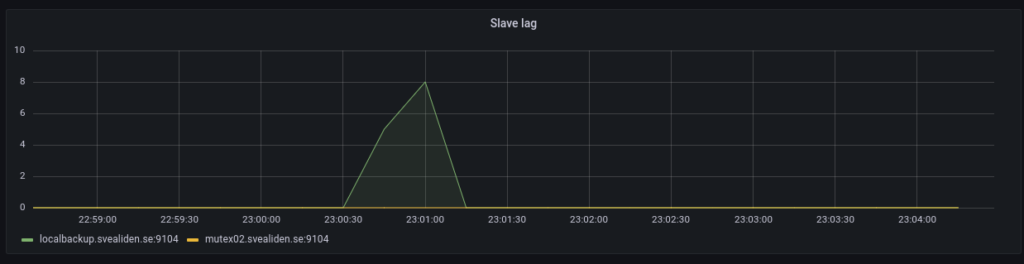
MariaDB slave lag

Just a few notes on MariaDB replication lag. My own backup program is an interesting generator of database traffic as we can see below:

But the slaves catch up in a very jerky fashion:

On the face of it both nodes suddenly fell 1800 seconds behind in a matter of 60 seconds. I argue this would only be possible if 1800 seconds of updates were suddenly sent to or acknowledged by the slaves. The sending theory isn’t entirely unreasonable based on this graph:

Commits on the master are relatively evenly spaced:

And Inserts spread out over the whole intensive period:

I suspect this sudden lag increase is a result of changes being grouped together in “replication transactions”:

Global transaction ID introduces a new event attached to each event group in the binlog. (An event group is a collection of events that are always applied as a unit. They are best thought of as a “transaction”,[…]

Let’s check the relay log on mutex02 to see if this intuition is correct. Beginning of relevant segment:

#211215  2:31:06 server id 11  end_log_pos 674282324 CRC32 0xddf8eb3a   GTID 1-11-35599776 trans
/*!100001 SET @@session.gtid_seq_no=35599776*//*!*/;
START TRANSACTION
/*!*/;
# at 674282625
#211215  2:01:54 server id 11  end_log_pos 674282356 CRC32 0x8e673045   Intvar
SET INSERT_ID=22263313/*!*/;
# at 674282657
#211215  2:01:54 server id 11  end_log_pos 674282679 CRC32 0x9c098efd   Query   thread_id=517313        exec_time=0     error_code=0    xid=0
use `backuptool`/*!*/;
SET TIMESTAMP=1639530114/*!*/;
SET @@session.sql_mode=1411383304/*!*/;
/*!\C utf8mb4 *//*!*/;
SET @@session.character_set_client=224,@@session.collation_connection=224,@@session.collation_server=8/*!*/;
insert into FileObservation (hashsum, indexJob_id, mtime, path, size) values ('e182c2a36d73098ca92aed5a39206de151190a047befb14d2eb9e7992ea8e324', 284, '2018-06-08 22:21:16.638', '/srv/storage/Backup/2018-06-08-20-img-win7-laptop/Info-dmi.txt', 21828)

Ending with:

SET INSERT_ID=22458203/*!*/;
# at 761931263
#211215  2:31:05 server id 11  end_log_pos 761931294 CRC32 0x54704ba3   Query   thread_id=517313        exec_time=0     error_code=0    xid=0
SET TIMESTAMP=1639531865/*!*/;
insert into FileObservation (hashsum, indexJob_id, mtime, path, size) values ('e9b3dc7dac6e9f8098444a5a57cb55ac9e97b20162924cda9d292b10e6949482', 284, '202
1-12-14 08:28:00.23', '/srv/storage/Backup/Lenovo/Path/LENOVO/Configuration/Catalog1.edb', 23076864)
/*!*/;
# at 761931595
#211215  2:31:05 server id 11  end_log_pos 761931326 CRC32 0x584a7652   Intvar
SET INSERT_ID=22458204/*!*/;
# at 761931627
#211215  2:31:05 server id 11  end_log_pos 761931659 CRC32 0x6a9c8f8a   Query   thread_id=517313        exec_time=0     error_code=0    xid=0
SET TIMESTAMP=1639531865/*!*/;
insert into FileObservation (hashsum, indexJob_id, mtime, path, size) values ('84be690c4ff5aaa07adc052b15e814598ba4aad57ff819f58f34ee2e8d61b8a5', 284, '202
1-12-14 08:30:58.372', '/srv/storage/Backup/Lenovo/Path/LENOVO/Configuration/Catalog2.edb', 23076864)
/*!*/;
# at 761931960
#211215  2:31:06 server id 11  end_log_pos 761931690 CRC32 0x98e12680   Xid = 27234912
COMMIT/*!*/;
# at 761931991
#211215  2:31:06 server id 11  end_log_pos 761931734 CRC32 0x90f792f6   GTID 1-11-35599777 cid=27722058 trans
/*!100001 SET @@session.gtid_seq_no=35599777*//*!*/;

So it seems like 1-11-35599776 stretches from 02:01:54 to 2:31:06 and it’s somewhat reasonable for mutex02 to suddenly report a lag of 30 minutes. I wonder what that means for actual data transfer. Could I query intermediate results from 1-11-35599776 before 02:31? :thinking_face:

Bonus:

The tiny slave lag caused on the localbackup node when this is run:

 mysql -e "STOP SLAVE;" && sleep 8 && cd $SCRIPT_PATH && source bin/activate && python snapshots.py hourly >> hourly.log && mysql -e "START SLAVE;"

It’s a really hacky way to let the localbackup process any processing of the relay log before making a Btrfs snapshot. Seems to work. Technically you can make snapshots while MariaDB is running full tilt but this seems a bit nicer. Have had some very rare lockups of unknown origin on these kinds of Btrfs snapshot-nodes for database backups.

Disaster recovery for small companies

Disaster recovery is a huge topic and if you’re General Electric or even a huge successful company then it’s really complicated. On the one hand you have so much data in so many places that needs to be preserved but just telling people to put in on their personal Dropbox is neither reliable nor secure. It’s a bit easier for smaller businesses since they have one web site and ten laptops to consider.

This is going to focus on the internet-related part, so web sites and email. For the love of God, please make backups of your laptops as well. It’s just not the point of this… well, whatever this is. Windows has good built-in backups nowadays so you only need a NAS and that’ll set you back like a few hundred Kajiggers even if you buy a pretty good one with multiple disks.

What I describe are tools which are readily available but not necessarily easy to use. One-click solutions to Disaster Recovery are expensive and often sketchy*. Unless you know how it works and why it will work even in a disaster, don’t trust it.

* Wow! I see Cloudflare has stopped offering a 1000% uptime guarantee for Enterprise Plans. Now it’s 100% with a 25x penalty-thing. I’m almost sad to see it go, it was such a great example of promising things that you know you can’t deliver but which you know you can afford to pay penalties for.

Web sites

So how to safeguard a web site? If you have your web site with a hosting company then they probably make backups but you had best check that. Don’t just ask them if they make backups. Test the backups. Download them and see if you can get your website up and running somewhere else. This serves multiple purposes:

  • Verifies that backup are in fact made.
  • Verifies that backups are available.
  • Makes sure you know what to do with them in an emergency.

Note that you shouldn’t rely entirely on the backups made by your hosting company even if everything checks out. Disaster recovery isn’t about surviving a broken hard drive somewhere, that’s just your average monday. A company being unable to get their entire storage system to work properly for weeks is where we need DR. There are quite a few companies in Sweden as I’m writing this that have been waiting to access their email accounts for weeks. It took that provider a week just to get their customers back to the point where they could send and receive emails again.

My personal favorites are legal problems. Like a group of people not bothering to transfer assets of a bankrupt company(by buying it from the estate) but instead keep operating them saying simply “Hey, we got all the login credentials we need to run this stuff. Why would be go all out of our way to make sure it’s owned by the right legal entity?”. Yeah, that doesn’t work out too well for their customers in the end. If you are told that the next step for you to get your ecommerce site back online is to contact the retired lawyer who precided over a bankruptcy case several years ago, you’re looking at a serious piece of downtime.

So don’t just have backups with the same company that hosts your web site. Keep stuff off site as well. If you get FTP or SSH access to your hosting account then you could script it, as demonstrated in this post that shows how to get all the data necessary to run a web site over from a hosting account to a virtual server so that downtime can be minutes rather than 17 weeks of legal wrangling.

If you don’t want to spend money on a virtual server 365 days a year just to have a backup that you can switch over to super-fast then downloading the information locally and making sure your know roughly how to bring a site back online is a way to go. Disaster recovery can be allowed to take time because disasters are not expected to happen often. It’s about getting things back in less than weeks or months or about getting things back at all.

Email

The IMAP protocol is great as it allows us to access email from multiple devices simultaneously. If configured correctly you can even see which emails have been sent from an account on a smart phone even when accessed from a different device(folder mapping can be kind of wonky out of the box though). It is however very much an online system, IMAP. If the email server goes down you may not even be able to read the old emails in your inbox. That depends on how much your email client is storing locally.

What can really be a kick in the pants when there’s a big failure for an email provider is that if your email clients can connect to the server using the IMAP protocol and the server is empty, IMAP will dutifully empty your inbox. Yeah, that’s not great but would your rather have old copies of deleted emails lying around on various devices just so that you can avoid this corner-case in a disaster recovery situation?

Anyway, what I do is use Imapsync to keep a set of local copies of important email accounts. Note that I have Google Workspace as my email provider and that I don’t trust them enough with my completely unimportant emails to let them be the only safeguard against data loss. Of course Imapsync is kind of not-so-user-friendly. It’s meant for situations where you need to move thousands of email accounts between providers or when making automated backups.

I run this once a day:

/usr/bin/imapsync --host1 imap.gmail.com --user1 my-gmail-address --password1 SUPERSECRETAPPPASSWORD --host2 localhost --user2 myemailbackup --password2 SUPERSECRETLOCALPASSWORD --maxbytespersecond 300000 --gmail1

Since I have a virtual machine doing backup tasks generally I installed Dovecot on it so as to not have to pay someone to hold my email backups that are just there for disaster recovery situations. On Ubuntu it’s really easy:

apt install dovecot-imapd

Then create local users that will serve as destination email accounts:

useradd myemailbackup
useradd anotherbackup

I don’t like mbox or mdbox much, at least not for these applications and that was the one change I had to make to the default dovecot setup. Maildir is my kind of format:

mail_location = maildir:~/Maildir:LAYOUT=fs

Dovecot uses the local user’s home directory by default and accepts whatever password the user has for logging on to the computer.

Knocking it up a notch

I can’t get by without Btrfs snapshots. Like in the case of email backups for instance. The maildir folders mentioned above? Stored on a Btrfs partition on my backup server.

root@backup:~# ls -lh /srv/storage/Snapshots/myemailbackup/
drwxr-xr-x 1 myemailbackup myemailbackup 284 Dec 16 23:40 myemailbackup@auto-2020-12-16-2352_14d
drwxr-xr-x 1 myemailbackup myemailbackup 284 Dec 16 23:40 myemailbackup@auto-2020-12-17-0500_14d
drwxr-xr-x 1 myemailbackup myemailbackup 324 Dec 18 01:09 myemailbackup@auto-2020-12-18-0500_14d
drwxr-xr-x 1 myemailbackup myemailbackup 324 Dec 18 01:09 myemailbackup@auto-2020-12-19-0500_14d
drwxr-xr-x 1 myemailbackup myemailbackup 324 Dec 19 14:42 myemailbackup@auto-2020-12-20-0500_14d
drwxr-xr-x 1 myemailbackup myemailbackup 324 Dec 19 14:42 myemailbackup@auto-2020-12-20-0830_4w
drwxr-xr-x 1 myemailbackup myemailbackup 324 Dec 19 14:42 myemailbackup@auto-2020-12-21-0500_14d
drwxr-xr-x 1 myemailbackup myemailbackup 324 Dec 19 14:42 myemailbackup@auto-2020-12-22-0500_14d
drwxr-xr-x 1 myemailbackup myemailbackup 324 Dec 19 14:42 myemailbackup@auto-2020-12-23-0500_14d
drwxr-xr-x 1 myemailbackup myemailbackup 324 Dec 19 14:42 myemailbackup@auto-2020-12-24-0500_14d
drwxr-xr-x 1 myemailbackup myemailbackup 324 Dec 19 14:42 myemailbackup@auto-2020-12-25-0500_14d
drwxr-xr-x 1 myemailbackup myemailbackup 324 Dec 19 14:42 myemailbackup@auto-2020-12-26-0500_14d

This takes care of the scenario mentioned above, where you run IMAP against a server that thinks you have no email and all your local copies are deleted. Each snapshot shows the state of each account at that point but uses only the amount of storage necessary for the difference between other snapshots. To go completely off the rails I also send these snapshots to a secondary server. Mostly because I already coded that functionality into the script and that this is just a few gigabytes of data. My script is a horror that makes programmer’s intentionally blind themselves but there are better variants: https://ownyourbits.com/2017/12/27/schedule-btrfs-snapshots-with-btrfs-snp/

In either case, you have all your emails stored locally in case of disaster striking your email provider. You can get a new email provider and Imapsync your data from your local server up to their servers. In a couple of hours you’ll be back up and running and not having to worry about how long it will take your previous provider to sort out their problems. As mentioned earlier I’ve seen that take weeks for companies that I thankfully don’t work for.

Large scale data storage

Some web sites have huge amounts of data even though the company running it is quite small. News- and fashion sites seems to be keen on lots of high resolution pictures and video. It might not be viable to store that on your own network. Or maybe you simply want a safer storage solution. Amazon S3 is pretty great for these applications. While I use my own network as a sort of offsite backup location for email hosted externally, I can’t very well be the offsite backup location for my own house. Therefore I use Amazon S3 whenever that need arises.

You can get the aws command line tool for most operating system to easily copy data to S3(and access their other services):

curl "https://awscli.amazonaws.com/awscli-exe-linux-x86_64.zip" -o "awscliv2.zip"
unzip awscliv2.zip
cd aws/
less install
 # <-- Read what it does
./install

You will need to add some credentials that have access to the right S3 buckets in the aws config file:

root@samba01:~# cat .aws/credentials
[default]
aws_access_key_id = SECRETID
aws_secret_access_key = SECRETKEY

Then it’s just a matter of running aws s3:

aws s3 cp localfile.tar.gz s3://mybackupbucket/Documents/

What I really like is that I can assign life-cycle rules that push data out to their Glacier storage tier after a while:

I currently have some 1,4 TB of data in Amazon S3 with the vast majority being in Glacier. This costs me around $20 a month which is a very reasonable price for offsite backups. It’s easier than tapes and offsite is obviously way better than simple nearline(term used for not immediately accessible storage). I really like tapes but they are way more of a hassle so now that I have a 100 Mbit fiber connection I mostly use that. I got the bulk of data on tape anyway which will speed up restores. The only data I have to get from S3 in case of all my servers shorting out at the same time is the last few months.

The downside of Glacier is that it takes time to restore but consider – if you will – that you put a backup of your 5 GB database into S3 every day. Which SQL-dump are you most likely to need? One from the 7 days that are immediately available or one from the X backups that take a few hours to get? Either way, you get your data back and disaster recovery is successful.

By the way, I don’t trust Amazon’s encryption. Not their server-side encrypted, not their client-side encryption. I do the encryption using tools I have installed and that have nothing to do with Amazon:

gpg -v --batch --passphrase-file path_to_passphrase_file -c filename.tar.gz

This give me a filename.tar.gz.gpg file that can be sent to S3 as is. Note that this isn’t some specific gripe I have against Amazon, it’s the same with all American companies. Well, it would apply to Russian and Chinese companies as well but for obvious reasons they aren’t on the table. My data is not super sensitive but I’d rather encrypt it than not.

MySQL safeguards

As we saw in part 1 of this series, MySQL is pretty robust in the face of hard resets as long as you use InnoDB as the underlying engine rather than MyISAM. Heck, InnoDB even held together with the cache-setting “Writeback (unsafe)” in Proxmox chosen for the underlying disk. But an ib_logfile getting corrupted or going missing somehow leaves us in a pickle. Some percentage of tables are likely to be impossible to export if that happens. So we better set things up so that we have something to fall back on if that happens.

Let’s start with my favorite, Btrfs snapshots. Some background:Ext4 is pretty much the default file system for Linux today and it’s pretty darned good. I remember back in the day when we only had Ext2 and it was a big deal when Ext3 introduced journals that made recovery from crashes much faster. Now we’re at Ext4. Btrfs on the other hand is a completely new file system heavily inspired by ZFS. It’s Copy-on-Write amongst other things which is good for snapshots. So Ext4 is tried and tested and Btrfs feature-rich.

Let’s switch from Ext4 to Btrfs for a MySQL-deployment. Note that I’m completely wiping the data stored in MySQL here! This is a test-rig.

I’ll make cron run a script that makes snapshots of the MySQL data directory every five minutes. It could be done in a simpler way but my script cleans up old snapshots automatically based on an assigned lifespan which is handy. This is what we end up with after slightly less than an hour of running the standard workload-script and also taking snapshots every five minutes:

root@mysqlrecov1:/var/lib/mysql# ls -lh Snapshots/data 
total 0 
drwxr-xr-x 1 mysql mysql 388 Mar 21 22:54 data@auto-2020-03-21-2340_12h 
drwxr-xr-x 1 mysql mysql 388 Mar 21 22:54 data@auto-2020-03-21-2345_12h 
drwxr-xr-x 1 mysql mysql 388 Mar 21 22:54 data@auto-2020-03-21-2350_12h 
drwxr-xr-x 1 mysql mysql 388 Mar 21 22:54 data@auto-2020-03-21-2355_12h 
drwxr-xr-x 1 mysql mysql 388 Mar 21 22:54 data@auto-2020-03-22-0000_12h 
drwxr-xr-x 1 mysql mysql 388 Mar 21 22:54 data@auto-2020-03-22-0005_12h 
drwxr-xr-x 1 mysql mysql 388 Mar 21 22:54 data@auto-2020-03-22-0010_12h 
drwxr-xr-x 1 mysql mysql 388 Mar 21 22:54 data@auto-2020-03-22-0015_12h 
drwxr-xr-x 1 mysql mysql 388 Mar 21 22:54 data@auto-2020-03-22-0020_12h 
drwxr-xr-x 1 mysql mysql 388 Mar 21 22:54 data@auto-2020-03-22-0025_12h

So let’s say something bad happened after the last snapshot was taken and we want to get data out of it. Can we just start a MySQL-instance with the snapshot directory as the datadir? No.

I make all my snapshots read-only because they’re meant to be backups. The more immutable they are the better. MySQL can’t run against a read only copy. But all we need to do is to make a writable copy of the read-only snapshot we’re interested in.

I guess I could have run mysqlcheck to demonstrate that things were okey but they were just fine. We could have taken whichever of these snapshots we wanted and gone back to that point in time. As much as I like this setup I do recognize some weaknesses.

First, backups are necessarily part of the same filesystem as the original. So file system corruption can leave us completely boned. There is a mechanism for sending snapshots from one Btrfs file system to another – even on another server – which can remedy that situation to some extent. But Btrfs snapshots are not great to write to tape however you twist and turn things.

Second, we’re not actually saving snapshots that MySQL gives guarantees for. MySQL has to do a sort of crash recovery process when starting up these snapshots because they look just like what you would get if the server had crashed unexpectedly and left lots of databases open.

One way to remedy this is to use a backuptool like xtrabackup. There’s a version for MariaDB called mariabackup that’s basically the same. I’ll use xtrabackup in this case. We’ll make three snapshots, consisting of one full backup and two incremental backups. Then we’ll do a restore by applying each incremental backup to the full backup and then moving the result into the place MySQL expects data to be.

This has the benefit of saving cleaner snapshots and you get them in distinct files that are easier to save to tape or backup to some external storage provider.

Now let’s try something a bit more robust, replication! I have that set up for my own databases but with an older method of keeping the various copies in sync. I’d like to try out GTID. I wonder if it’s enabled by default on this version of MySQL?

mysql> SHOW GLOBAL VARIABLES LIKE '%gtid%'; 
+----------------------------------+-------+ 
| Variable_name                    | Value | 
+----------------------------------+-------+ 
| binlog_gtid_simple_recovery      | ON    | 
| enforce_gtid_consistency         | OFF   | 
| gtid_executed                    |       | 
| gtid_executed_compression_period | 1000  | 
| gtid_mode                        | OFF   | 
| gtid_owned                       |       | 
| gtid_purged                      |       | 
| session_track_gtids              | OFF   | 
+----------------------------------+-------+ 
8 rows in set (0.00 sec)

Nope. Okey, I wonder if I can add it after the fact? Well activating the feature after the fact can obviously be done, but will it work? Will slaves only see the modifications that happened after GTID was activated? We can test it. Let’s enable GTID and create a replication user.

Now for a tricky move. It’s not strictly necessary since we know writes aren’t going on but for the sake of doing things by the book, we flush all table and lock them in one terminal window and then dump all databases in another. As long as the “FLUSH TABLES WITH READ LOCK;”-session is open in MySQL the lock is held and the dump is consistent.

Then we copy the dump to mysqlrecov2 where we import it into a blank setup. Then we configure that server for replication with it’s own server-id. Then we set up the replication and run a test to see if it works. We should be able to run our testscript and find that the maximum id in the Purchase-table(for instance) is the same for mysqlrecov1 and mysqlrecov2.

That seems to work fine. Let’s level this up one more notch. I’ll schedule snapshots to be made of the /var/lib/mysql/data directory every five minutes just like on mysqlrecov1 before. This will be a variant of what we did before. So the testscript is running against mysqlrecov1 for a while and mysqlrecov2 is replicating all the changes in real time. Snapshots are being stored in /var/lib/mysql/Snapshots/data/ on mysqlrecov2. There are actually good reasons for not storing snapshots on mysqlrecov1 which we can get to later. For now, let’s just note that the relay-log from mysqlrecov1 is ticking up nicely on mysqlrecov2:

Now let’s simulate a bonehead mistake. Something like deleting all customers in the database with an id below 5000? That should leave people quite sad. As we saw before we can restore from a Btrfs snapshot but we can lose up to 5 minutes of transactions. In fact, if we don’t recognize our bonehead mistake immediately and take MySQL down on mysqlrecov1 we could rack up even more transactions that will be lost when we go back to our earlier state.

Replication worked just as advertised. Within milliseconds of me deleting a bunch of customers at random on mysqlrecov1, mysqlrecov2 followed suit. As SHOW SLAVE STATUS illustrated at the end, I kept the testscript running for a while longer so more and more gtid_sets were stored on mysqlrecov2 full of legitimate transactions.

The test script started printing a lot more error messages after some random customers got deleted but kept running anyway. So what are we going to do now? Well restoring the last Btrfs snapshot from before the deletion is a good start. We’ll turn off mysqlrecov1 and set mysqlrecov2 so that it can only be reached from the server itself, to keep people from tinkering with the data while we’re working on it.

Seems I chose the right snapshot. We have customer with ids below 5000. Now let’s check in the relay-log from the data_borked directory. We don’t want MySQL to use that directory any more because the data in ib_logdata-files and the sysbench-directory reflects the state where thousands of customers are missing. But the relay-log file is still very valuable. If we run mysqlbinlog –verbose /var/lib/mysql/data_borked/mysqlrecov1-relay-log.00005 we see all the changes made to the database since replication began. This data gets rotated out eventually but here neither time nor space-constraints led any of the changes to be lost before the “mistake” was discovered. We only really need the changes made from the point the latest good snapshot is from to make this work though.

So how does the binlog look?

SET @@SESSION.GTID_NEXT= 'b6efad3f-6c71-11ea-9af3-eaa32fa23308:1586'/*!*/; 
# at 472 
#200328 22:41:23 server id 1  end_log_pos 337 CRC32 0x633797ec  Query   thread_id=3     exec_time=0     error_code=0 
SET TIMESTAMP=1585435283/*!*/; 
SET @@session.pseudo_thread_id=3/*!*/; 
SET @@session.foreign_key_checks=1, @@session.sql_auto_is_null=0, @@session.unique_checks=1, @@session.autocommit=1/*!*/; 
SET @@session.sql_mode=1436549152/*!*/; 
SET @@session.auto_increment_increment=1, @@session.auto_increment_offset=1/*!*/; 
/*!\C utf8 *//*!*/; 
SET @@session.character_set_client=33,@@session.collation_connection=33,@@session.collation_server=8/*!*/; 
SET @@session.lc_time_names=0/*!*/; 
SET @@session.collation_database=DEFAULT/*!*/; 
BEGIN 
/*!*/; 
# at 550 
#200328 22:41:23 server id 1  end_log_pos 399 CRC32 0x2b1e9803  Table_map: `sysbench`.`Customer` mapped to number 108 
# at 612 
#200328 22:41:23 server id 1  end_log_pos 480 CRC32 0xc9c162b2  Write_rows: table id 108 flags: STMT_END_F 
 
BINLOG ' 
k9J/XhMBAAAAPgAAAI8BAAAAAGwAAAAAAAMACHN5c2JlbmNoAAhDdXN0b21lcgAEAw8DDwT/AP8A 
CAOYHis= 
k9J/Xh4BAAAAUQAAAOABAAAAAGwAAAAAAAEAAgAE//CF4AMAFGNiZnVkbmJmbWxtd2h1YWptbHht 
AAAAAA94c3dqZnh1ZmhwZ3NpbWGyYsHJ 
'/*!*/; 
### INSERT INTO `sysbench`.`Customer`
 ### SET 
###   @1=254085 
###   @2='cbfudnbfmlmwhuajmlxm' 
###   @3=0 
###   @4='xswjfxufhpgsima' 
# at 693 
#200328 22:41:23 server id 1  end_log_pos 511 CRC32 0x0a071603  Xid = 46 
COMMIT/*!*/; 
# at 724 
#200328 22:41:24 server id 1  end_log_pos 576 CRC32 0x05680f0e  GTID    last_committed=1        sequence_number=2       rbr_only=yes 
/*!50718 SET TRANSACTION ISOLATION LEVEL READ COMMITTED*//*!*/; 
SET @@SESSION.GTID_NEXT= 'b6efad3f-6c71-11ea-9af3-eaa32fa23308:1587'/*!*/; 
# at 789 
#200328 22:41:24 server id 1  end_log_pos 654 CRC32 0x79a206c9  Query   thread_id=12    exec_time=0     error_code=0 
SET TIMESTAMP=1585435284/*!*/; 
BEGIN 
/*!*/; 
# at 867 
#200328 22:41:24 server id 1  end_log_pos 716 CRC32 0xa2bb0bb0  Table_map: `sysbench`.`Customer` mapped to number 108 
# at 929 
#200328 22:41:24 server id 1  end_log_pos 797 CRC32 0xf9f2cb8b  Write_rows: table id 108 flags: STMT_END_F
<...>

Okey, slightly obscure. Can we find our DELETE FROM Customer WHERE id < 5000? No. We only find thousands of these:

SET @@SESSION.GTID_NEXT= ‘b6efad3f-6c71-11ea-9af3-eaa32fa23308:26067’/*!*/;
# at 14852899
#200328 23:02:33 server id 1  end_log_pos 14852762 CRC32 0xb87efd39     Query   thread_id=4     exec_time=0     error_code=0
SET TIMESTAMP=1585436553/*!*/;
BEGIN
/*!*/;
# at 14852975
#200328 23:02:33 server id 1  end_log_pos 14852825 CRC32 0x6a5f0dd7     Table_map: `sysbench`.`Purchase_list` mapped to number 110
# at 14853038
#200328 23:02:33 server id 1  end_log_pos 14852894 CRC32 0x53b1b9b6     Delete_rows: table id 110 flags: STMT_END_F

BINLOG ‘
idd/XhMBAAAAPwAAANmi4gAAAG4AAAAAAAEACHN5c2JlbmNoAA1QdXJjaGFzZV9saXN0AAQDAwMD
AADXDV9q
idd/XiABAAAARQAAAB6j4gAAAG4AAAAAAAEAAgAE//Dw5AEAlMQAAKJQAAAEAAAA8PLkAQCUxAAA
n3MAAAYAAAC2ubFT
‘/*!*/;
### DELETE FROM `sysbench`.`Purchase_list`
### WHERE
###   @1=124144
###   @2=50324
###   @3=20642
###   @4=4
### DELETE FROM `sysbench`.`Purchase_list`

So what is the latest transaction before the first of these thousands of DELETE-operations? Well, I know approximately what time we’re interested in. Then we can just look for DELETE FROM `sysbench`.`Customer`-statements.

So this probably contains the data we’re interested in:

###   @2='trirwseikshnmaeuqgzr' 
###   @3=3522 
###   @4='peahbpigywdapfo' 
# at 14574860 
#200328 23:01:06 server id 1  end_log_pos 14574678 CRC32 0xab48065f     Xid = 758546 
COMMIT/*!*/;
# at 14574891 
#200328 23:01:07 server id 1  end_log_pos 14574743 CRC32 0x18eab10c     GTID    last_committed=24333    sequence_number=24334   rbr_only=yes 
/*!50718 SET TRANSACTION ISOLATION LEVEL READ COMMITTED*//*!*/; 
SET @@SESSION.GTID_NEXT= 'b6efad3f-6c71-11ea-9af3-eaa32fa23308:25919'/*!*/; 
# at 14574956 
#200328 23:01:07 server id 1  end_log_pos 14574821 CRC32 0xe10dc87f     Query   thread_id=16    exec_time=0     error_code=0 
SET TIMESTAMP=1585436467/*!*/; 
SET @@session.foreign_key_checks=0/*!*/; 
BEGIN 
/*!*/; 
# at 14575034 
#200328 23:01:07 server id 1  end_log_pos 14574883 CRC32 0x6e71054b     Table_map: `sysbench`.`Customer` mapped to number 108 
# at 14575096 
#200328 23:01:07 server id 1  end_log_pos 14583060 CRC32 0x65200e62     Delete_rows: table id 108

All right, what is the last state found in the last good snapshot? SHOW SLAVE STATUS says that Read_Master_Log_Pos is 14507560. That’s a reasonable number given that we just found the marker “end_log_pos 14574678” just above where all the bad deletes started. It’s important to know if 14507560 is an end_log_pos or a start position. Searching through the binlog-output reveals that it is an end_pos:

###   @3=1682 
###   @4='vlntfrggrwhykju' 
# at 14507742 
#200328 23:00:00 server id 1  end_log_pos 14507560 CRC32 0x333e7f0b     Xid = 753352 
COMMIT/*!*/; 
# at 14507773

So we will want to replay from the start position 14507773 that comes directly after the number we found in SHOW SLAVE STATUS. And the final position to include is 14574678.

Okey, so we were able to apply parts of the binlog without running into “DUPLICATE KEY” errors or losing lots of customer data. Shall we try to apply the transactions after the erroneous deletes? Should be as simple as replaying the binlog from position 14766269 to the end.

root@mysqlrecov2:/var/lib/mysql/data_borked# mysqlbinlog --skip-gtids --start-position=14766269 mysqlrecov2-relay-bin.000005 > after_deletes.sql                                   
root@mysqlrecov2:/var/lib/mysql/data_borked# mysql < after_deletes.sql  
root@mysqlrecov2:/var/lib/mysql/data_borked#

Seems okey. According the output from the testscript one of the last transactions was a purchase registered to customer 8786 with a cost of 351.

root@mysqlrecov2:/var/lib/mysql/data_borked# mysql 
Welcome to the MySQL monitor.  Commands end with ; or \g. 
Your MySQL connection id is 9 
Server version: 5.7.29-0ubuntu0.18.04.1-log (Ubuntu) 
 
Copyright (c) 2000, 2020, Oracle and/or its affiliates. All rights reserved. 
 
Oracle is a registered trademark of Oracle Corporation and/or its 
affiliates. Other names may be trademarks of their respective 
owners. 
 
Type 'help;' or '\h' for help. Type '\c' to clear the current input statement. 
 
mysql> USE sysbench;        
Reading table information for completion of table and column names 
You can turn off this feature to get a quicker startup with -A 
 
Database changed 
mysql> SELECT * FROM Purchase WHERE customer_id = 8786; 
+-------+-------------+------+--------+ 
| id    | customer_id | cost | weight | 
+-------+-------------+------+--------+ 
| 58333 |        8786 |  351 |    745 | 
+-------+-------------+------+--------+ 
1 row in set (0.00 sec) 
 
mysql> 

If this had been a live system I would have been okey with bringing this online again. Since this was a small database a mysqldump and restore back on the master would work. For a bigger system maybe promoting the fixed slave is better and making the previous master into the new slave. Anyway, the testscript agrees that the data is correct:

cjp@kdemain:~/sysbench$ bin/python3.7 ownsysbench.py --hosts 192.168.1.155 --check true 
192.168.1.155 
Connection to 192.168.1.155: <mysql.connector.connection.MySQLConnection object at 0x7f05b26329d0> by X 
self.conn.in_transaction: False 
Checking correctness 
Numbers check out on a high level. Checking each customer.
cjp@kdemain:~/sysbench$

Oh right, I promised to get back to why we would want to avoid making Btrfs snapshots on the master server. Btrfs and ZFS are not considered ideal for database storage. See for instance the wonderfully titled blog post https://blog.pgaddict.com/posts/friends-dont-let-friends-use-btrfs-for-oltp

It’s a few years old by now but I don’t doubt that Btrfs is still terrible for your database storage if you want to maximize throughput. My real world databases sees maybe 10-20 queries per seconds. My backup software can peak at hundreds per second(I blame the Java ORM-layer, not the me the programmer) for short bursts. Btrfs doesn’t slow that down noticeably. If someone asks me to setup a system that sees sustained loads of 5000 transactions per second I’ll ditch Btrfs in an instant on the master and only use it on the slaves. Because slaves typically don’t do much work. They just stream the results that result from all the work done on the master.

Anyway, I think those are the building blocks for safeguarding MySQL databases. There are some additional tweaks like having one slave intentionally trail behind the master a certain number of minutes to make recovery from bonehead mistakes easier. There are also more synchronous solutions like Galera(I’ve used Percona’s XtraDB variant) to minimize the gap during which a write to a master might be lost because it hasn’t reached any slaves yet.

MySQL replication notes

NOTE! These are mostly for my reference working on this post.

root@mysqlrecov2:~# mysqlbinlog /var/lib/mysql/data/mysqlrecov2-relay-bin.000002 | less
<jibberish>

Well that didn’t produce very readable information. This turned out to be better for viewing:

root@mysqlrecov2:~# mysqlbinlog --verbose /var/lib/mysql/data/mysqlrecov2-relay-bin.000002 | less
#200322 21:14:57 server id 1  end_log_pos 894 CRC32 0x8df90820  Query   thread_id=9     exec_time=0     error_code=0 
SET TIMESTAMP=1584911697/*!*/; 
BEGIN 
/*!*/; 
# at 1107 
#200322 21:14:57 server id 1  end_log_pos 956 CRC32 0x18b0e814  Table_map: `sysbench`.`Customer` mapped to number 116 
# at 1169 
#200322 21:14:57 server id 1  end_log_pos 1037 CRC32 0xa46a830a         Write_rows: table id 116 flags: STMT_END_F  
BINLOG ' 
UdV3XhMBAAAAPgAAALwDAAAAAHQAAAAAAAMACHN5c2JlbmNoAAhDdXN0b21lcgAEAw8DDwT/AP8A 
CBTosBg= 
UdV3Xh4BAAAAUQAAAA0EAAAAAHQAAAAAAAEAAgAE//B64AMAFHZ5YmdveWd0bWhwdHd6eGd3bWZy 
AAAAAA9maWhmeW9sYndha21wYm0Kg2qk 
'/*!*/; 
### INSERT INTO `sysbench`.`Customer` 
### SET 
###   @1=254074 
###   @2='vybgoygtmhptwzxgwmfr' 
###   @3=0 
###   @4='fihfyolbwakmpbm' 
# at 1250

How to find current log position? Or some way of figuring which position in the bin log a specific file system snapshot matches. This?

mysql> SHOW MASTER STATUS; 
+------------------+----------+--------------+------------------+---------------------------------------------------------------------------------------+ 
| File             | Position | Binlog_Do_DB | Binlog_Ignore_DB | Executed_Gtid_Set                                                                     | 
+------------------+----------+--------------+------------------+---------------------------------------------------------------------------------------+ 
| mysql-bin.000001 |      786 |              |                  | 1176771d-6c7e-11ea-a68b-1a389890e7c2:1-3, 
b6efad3f-6c71-11ea-9af3-eaa32fa23308:1-2769 | 
+------------------+----------+--------------+------------------+---------------------------------------------------------------------------------------+ 
1 row in set (0.00 sec) 

But it says this at the end of mysqlrecov2-relay-bin.000002…

#200322 21:23:07 server id 1  end_log_pos 1739591 CRC32 0xa5d8a74e      Xid = 82080

So what’s all this about mysqlrecov2-relay-bin.000001? And position 786 is suspect. Well, I guess File and Position are separate from GTID. So I shouldn’t be looking at File and Position because I use GTID? But I can’t very well make out anything sequential from a GTID. They’re UUIDs.

Okey, okey. Now I get it. So we have a GTID for the data synced from the master, that’s _b6efad3f-6c71-11ea-9af3-eaa32fa23308:1-2769_ and we can find matching information in mysqlrecov2-relay-bin.000002. Indeed the last segment in that file reads:

last_committed=2766     sequence_number=2769

So that checks out. The other GTID refers to the local machine and so we find that information in /var/log/mysql/mysql-bin.000001 . Notice that this is not a binlog we replicated in from the master. So nothing relay about this file. This GTID set only contains the part where I added the sysbench user so that I could run the script against the slave to make sure it was consistent. I’m not replicating the mysql-database since I don’t know if that’s safe.

All right, let’s break the database and try to recover using a combination of snapshots and binlog.

mysql> SET FOREIGN_KEY_CHECKS=0; 
Query OK, 0 rows affected (0.00 sec) 
 
mysql> DROP FROM Customer WHERE id < 5000;                 
ERROR 1064 (42000): You have an error in your SQL syntax; check the manual that corresponds to your MySQL server version for the right syntax to use near 'FROM Customer WHERE id < 5000' at l
ine 1 
mysql> DELETE FROM Customer WHERE id < 5000;     
Query OK, 4285 rows affected (4.87 sec)

Let’s see what the sanity check says:

192.168.1.154 
Connection to 192.168.1.154: <mysql.connector.connection.MySQLConnection object at 0x7fa1487cf8d0> by X 
self.conn.in_transaction: False 
Checking correctness 
Sums of credit(753818484), costs(-20278036 and deposits(787452535) don't check out. Something is wrong. 
Credit exists for 1 but no such customer exists. 
Credit exists for 2 but no such customer exists. 
Credit exists for 4 but no such customer exists. 
Credit exists for 5 but no such customer exists. 
Credit exists for 6 but no such customer exists. 
Credit exists for 9 but no such customer exists. 
Credit exists for 10 but no such customer exists. 
Credit exists for 11 but no such customer exists. 
Credit exists for 14 but no such customer exists. 
Credit exists for 15 but no such customer exists.
 <...>

And so on for thousands of lines. Found the last bit before the big delete block:

### INSERT INTO `sysbench`.`Product` 
### SET 
###   @1=57331 
###   @2='awcioutbwumewtopjnhx' 
###   @3=54 
###   @4=9 
# at 15852327 
#200323 21:54:32 server id 1  end_log_pos 15852145 CRC32 0x4918e08a     Xid = 731899 
COMMIT/*!*/; 
# at 15852358 
#200323 21:54:27 server id 1  end_log_pos 15852210 CRC32 0x2b6858df     GTID    last_committed=32482    sequence_number=32483   rbr_only=yes 
/*!50718 SET TRANSACTION ISOLATION LEVEL READ COMMITTED*//*!*/; 
SET @@SESSION.GTID_NEXT= 'b6efad3f-6c71-11ea-9af3-eaa32fa23308:32483'/*!*/; 
# at 15852423 
#200323 21:54:27 server id 1  end_log_pos 15852288 CRC32 0xe0637123     Query   thread_id=93    exec_time=0     error_code=0 
SET TIMESTAMP=1585000467/*!*/; 
SET @@session.foreign_key_checks=0/*!*/; 
BEGIN 
/*!*/; 
# at 15852501

So the sequence number is 32483. So let’s try to start up the latest snapshot and see what the last sequence number was then.

mysql> SHOW MASTER STATUS; 
+------------------+----------+--------------+------------------+----------------------------------------------------------------------------------------+ 
| File             | Position | Binlog_Do_DB | Binlog_Ignore_DB | Executed_Gtid_Set                                                                      | 
+------------------+----------+--------------+------------------+----------------------------------------------------------------------------------------+ 
| mysql-bin.000003 |      194 |              |                  | 1176771d-6c7e-11ea-a68b-1a389890e7c2:1-3, 
b6efad3f-6c71-11ea-9af3-eaa32fa23308:1-19756 | 
+------------------+----------+--------------+------------------+----------------------------------------------------------------------------------------+ 
1 row in set (0.00 sec)

All right, between 19756 and 32483 is the koscher sequence to replay:

root@mysqlrecov2:/var/lib/mysql# mysqlbinlog --skip-gtids --start-position=19756 --stop-position=32483 /var/lib/mysql/data/mysqlrecov2-relay-bin.000002 > replay.sql 
ERROR: Error in Log_event::read_log_event(): 'read error', data_len: 2054581866, event_type: 103
ERROR: Could not read entry at offset 19756: Error in log format or read error.

Huh? Oh for the love of… I have to use log_pos instead of sequence number? All right, so 32483 has end_log_pos 15852288 and 19756 has an “# at 10105794:

# at 10105794 
#200323 21:50:01 server id 1  end_log_pos 10105646 CRC32 0x6ab793c0     GTID    last_committed=19751    sequence_number=19756   rbr_only=yes 
/*!50718 SET TRANSACTION ISOLATION LEVEL READ COMMITTED*//*!*/; 
SET @@SESSION.GTID_NEXT= 'b6efad3f-6c71-11ea-9af3-eaa32fa23308:19756'/*!*/;

Let’s try this again:

root@mysqlrecov2:/var/lib/mysql# mysqlbinlog --skip-gtids --start-position=10105794 --stop-position=15852288 /var/lib/mysql/data/mysqlrecov2-relay-bin.000002 > replay.sql

All right, let’s try it.

root@mysqlrecov2:/var/lib/mysql# mysql -S /tmp/mysqld2.sock < replay.sql  
ERROR 1062 (23000) at line 35: Duplicate entry '54389' for key 'PRIMARY'         

Okey, must have brought with us too many. Let’s see if I can find the next position:

root@mysqlrecov2:/var/lib/mysql# less replay.sql  
root@mysqlrecov2:/var/lib/mysql# mysqlbinlog --verbose /var/lib/mysql/data/mysqlrecov2-relay-bin.000002 | less  
root@mysqlrecov2:/var/lib/mysql# mysqlbinlog --skip-gtids --start-position=10106096 --stop-position=15852288 /var/lib/mysql/data/mysqlrecov2-relay-bin.000002 > replay2.sql      
root@mysqlrecov2:/var/lib/mysql# mysql -S /tmp/mysqld2.sock < replay2.sql 

Success! Maybe… Let’s try the sanity check:

cjp@kdemain:~/sysbench$ bin/python3.7 ownsysbench.py --hosts 192.168.1.155 --check true 
192.168.1.155 
Connection to 192.168.1.155: <mysql.connector.connection.MySQLConnection object at 0x7fb052407810> by X 
self.conn.in_transaction: False 
Checking correctness 
Numbers check out on a high level. Checking each customer.
cjp@kdemain:~/sysbench$ 

Aw, yeah! So let’s dump out what we got here as valid snapshot:

root@mysqlrecov2:/var/lib/mysql# mysqld --daemonize --log-error-verbosity=3 --pid-file=/tmp/mysqld2.pid --socket=/tmp/mysqld2.sock --datadir=/var/lib/mysql/backup --port=3306 
root@mysqlrecov2:/var/lib/mysql# mysqldump sysbench > after_bin1.sql 
mysqldump: Got error: 2002: Can't connect to local MySQL server through socket '/var/run/mysqld/mysqld.sock' (2) when trying to connect 
root@mysqlrecov2:/var/lib/mysql# mysqldump -S /tmp/mysqld2.sock sysbench > after_bin1.sql 
Warning: A partial dump from a server that has GTIDs will by default include the GTIDs of all transactions, even those that changed suppressed parts of the database. If you don't want to res
tore GTIDs, pass --set-gtid-purged=OFF. To make a complete dump, pass --all-databases --triggers --routines --events.  
root@mysqlrecov2:/var/lib/mysql# mysqldump --set-gtid-purged=OFF -S /tmp/mysqld2.sock sysbench > after_bin1_no_gtid.sql

Now let’s see if we can apply the events that followed after the “unfortunate” deletion of customers.

# at 16050579 
#200323 21:54:32 server id 1  end_log_pos 16050431 CRC32 0xd46e91ef     GTID    last_committed=32482    sequence_number=32484   rbr_only=yes 
/*!50718 SET TRANSACTION ISOLATION LEVEL READ COMMITTED*//*!*/; 
SET @@SESSION.GTID_NEXT= 'b6efad3f-6c71-11ea-9af3-eaa32fa23308:32484'/*!*/; 
# at 16050644 
#200323 21:54:32 server id 1  end_log_pos 16050509 CRC32 0x6f245997     Query   thread_id=66    exec_time=0     error_code=0 
SET TIMESTAMP=1585000472/*!*/; 
SET @@session.foreign_key_checks=1/*!*/;

Okey, so we only need start-position this time since we want everything from the end of the DELETE block:

root@mysqlrecov2:/var/lib/mysql# mysqlbinlog --skip-gtids --start-position=16050579 /var/lib/mysql/data/mysqlrecov2-relay-bin.000002 > replay_last.sql                                    
root@mysqlrecov2:/var/lib/mysql# mysql -S /tmp/mysqld2.sock < replay_last.sql  
root@mysqlrecov2:/var/lib/mysql#

And is this consistent?

cjp@kdemain:~/sysbench$ bin/python3.7 ownsysbench.py --hosts 192.168.1.155 --check true 
192.168.1.155 
Connection to 192.168.1.155: <mysql.connector.connection.MySQLConnection object at 0x7fb1bd586710> by X 
self.conn.in_transaction: False 
Checking correctness 
Numbers check out on a high level. Checking each customer. 
cjp@kdemain:~/sysbench$

The last legit operations(after I did the big “accidental” delete but just before I brought down the database master to contain the damage) were:

Purchase: Deducted 958 from customer 218820 landing at 1442 
Deleted (83708,) 
Credit id 270922: Added 6224 to 261395 
Deleted (98105,) 
Credit id 270952: Added 7045 to 261281 
Purchase: Deducted 630 from customer 91130 landing at 2144

So is that last purchase now in the restored copy?

mysql> SELECT * FROM Purchase WHERE customer_id = 91130; 
+-------+-------------+------+--------+
| id    | customer_id | cost | weight |
+-------+-------------+------+--------+
| 55193 |       91130 |  630 |    550 |
+-------+-------------+------+--------+
1 row in set (0.00 sec)

And do we have customers with an ID below 5000?

mysql> SELECT COUNT(*) FROM Customer WHERE id < 5000;  
+----------+
| COUNT(*) |
+----------+
|     4285 |
+----------+
1 row in set (0.00 sec)

Indeed we do! So we have successfully cut out a particular disastrous sequence of operations, piecing together a coherent view of customers, purchases, credits etc. And it only took me an hour and a half. Probably not the response time considered ideal by a trader seeing 100 or so purchases per second.

Note that there’s no guarantee that this method will work out this well in practice. Indeed I may well have lost purchases by doing this but in the interest of un-screwing things it would probably have been the best way forward. So don’t view snapshots and binlogs as a license to clown around with a production database.

On a personal note: would it not be beneficial to have less brittle data structures than this? In a relational database we might have the state of Texas as a row in the table States and if it goes missing then every row representing customers from Texas will generate an error on read. Foreign key constraint error presumably. Maybe MongoDB is going too far in the other direction but DUPLICATE KEY and FOREIGN KEY CONSTRAINT errors make relational databases so sensitive. I guess this is a struggle each IT department has to have with their respective accounting departments.

Offsite backup solution

I want an offsite backup solution, specifically one that can upload to Amazon S3 so that I can put stuff in Amazon Glacier using that Life cycle management tool. So Duplicati? Uhm… It’s built on C# for CLR ported to Linux and… Just look at the dependencies when installing it! So that’s not happening. I tried but it filled up my disk with cached files and things were just terrible.

So maybe Bacula? Would have been great but I couldn’t quite set it up. There are commercial tools but that’s not my style. I wrote a Python script but that fell apart. Let’s not get into the details but the fact that I can’t write proper software without Java-style constraints and type checking may have played a part.

So I rewrote it using Java and Hibernate to be able to store the data in an SQL database. Because that’s my style. It leaves something to be desired in terms off efficiency. See if you can spot the moment where I started two consecutive runs of the offsite backup software.

And now I got this:

Exception in thread “main” java.lang.OutOfMemoryError: Java heap space

Oh, ffs… I ran the VM with 1 GB of RAM. That probably wasn’t a good move. 3 GB should be okey though. Yes! That worked.

So the neat thing about this solution is that it has great disaster recovery properties. All you need to get your data back is access to the files stored in Glacier, the encryption password and the tar and gpg utilities. No custom storage formats. There’s a file in each tar.gz that lists which files that had been deleted between the current backup run and the one previously. So it’s not hard to bring back the data to exactly the state it was in when a backup ran(deletions included) or to recover every single file that has ever been present in the backups.

Downsides? Well, making a MySQL instance struggle to keep up with all the queries and inserts is not a plus. It stores data on an SSD after all. And the fact that the code is a horrendous mess also has some drawbacks. There’s no facility for compaction of snapshots… Well, it’s not for everyone.

One additional benefit though is that it is very straight forward to verify that chunks of backups can be restored to exactly the format they had when indexed. Because there’s a hashsum stored for each file for every indexing run(new hashsums are only generated for new and modified files or my computers would run hot all day long). I’ll have to get around to implementing that verification feature one of these days.

MariaDB snapshots and recovery

Update 2019-11-02: Yep, I iz dumb! I was apparently working with a snapshot that itself contained a set of crashed tables. So yeah… Btrfs snapshots of MariaDB data directories are just fine backups if you make sure the databases are themselves valid. You can check this for arbitrary snapshots like this:

# cd /var/lib/mysql
# btrfs sub snap Snapshots/sveahadb/sveahadb@auto-2019-08-01-0745_6m/ copy
# /usr/bin/mysqld_safe --defaults-file=/etc/mysql/my.cnf --pid-file=/var/run/mysqld/mysqltestd.pid --socket=/var/run/mysqld/mysqldtest.sock --datadir=/var/lib/mysql/copy --log-error=/var/log/mysql/test.log --user=mysql --bind-address=127.0.0.1 --log-bin=mysqld-bin --port 3307 --skip-slave-start
# mysqlcheck -h localhost -P 3307 --all-databases

So the original mess is below:


I was thinking of renaming this article to “Wait, I iz dumb” but I’m not sure exactly where the boundaries of my dumbness lie so I’ll have to postpone that. First things first: my colleagues at work showed me that it is indeed possible to just run a MySQL instance from a snapshot of files in /var/lib/mysql. What I was missing was that the data needed for a specific database isn’t just kept in /var/lib/mysql/dbname but also in /var/lib/mysql/mysql, /var/lib/mysql/performance_schema and the /var/lib/mysql/ib*-files.

“Oh, silly me!” I said and went home and copied over the entire /var/lib/mysql /Snapshots/snapname folder contents to my dbvm testbed. And… same problem! Google provided me with some clues that the fact that the files come from a replicated setup could cause problems and should be deleted: https://dba.stackexchange.com/questions/111616/innodb-error-table-mysql-innodb-table-stats-not-found/111617

But wait, what about those innodb_* files? They seem like they would be important. What happens if I rsync a snapshot from the DB master? Hmm, same. Well the replication files have different names but the innodb-tables still have to be deleted. Wait, they’re just stats? Well nuts to them then!

But this lead to a new interesting problem, presumably because this snapshot was made from the master which isn’t just committing transactions to disk based on a log – like a slave does – but also decides if and how a transaction can be committed:

InnoDB: Transaction 17653441 was in the XA prepared state.
InnoDB: 1 transaction(s) which must be rolled back or cleaned up
InnoDB: in total 0 row operations to undo
InnoDB: Trx id counter is 17654272
2019-09-06 21:29:19 140285946666112 [Note] InnoDB: 128 rollback segment(s) are active.
2019-09-06 21:29:19 140285380126464 [Note] InnoDB: Starting in background the rollback of recovered transactions
2019-09-06 21:29:19 140285380126464 [Note] InnoDB: Rollback of non-prepared transactions completed
2019-09-06 21:29:19 140285946666112 [Note] InnoDB: Waiting for purge to start
2019-09-06 21:29:19 140285946666112 [Note] InnoDB: Percona XtraDB (http://www.percona.com) 5.6.44-86.0 started; log sequence number 21897778133
2019-09-06 21:29:19 140285275272960 [Note] InnoDB: Dumping buffer pool(s) not yet started
2019-09-06 21:29:19 140285946666112 [Note] Plugin ‘FEEDBACK’ is disabled.
2019-09-06 21:29:19 7f96de049c80 InnoDB: Starting recovery for XA transactions…
2019-09-06 21:29:19 7f96de049c80 InnoDB: Transaction 17653441 in prepared state after recovery
2019-09-06 21:29:19 7f96de049c80 InnoDB: Transaction contains changes to 1 rows
2019-09-06 21:29:19 7f96de049c80 InnoDB: 1 transactions in prepared state after recovery
2019-09-06 21:29:19 140285946666112 [Note] Found 1 prepared transaction(s) in InnoDB
2019-09-06 21:29:19 140285946666112 [ERROR] Found 1 prepared transactions! It means that mysqld was not shut down properly last time and critical recovery information (
last binlog or tc.log file) was manually deleted after a crash. You have to start mysqld with –tc-heuristic-recover switch to commit or rollback pending transactions.
2019-09-06 21:29:19 140285946666112 [ERROR] Aborting

Fair enough… Though I’m curious why this never happens at work. I guess R1Soft might do something different from what a Btrfs snapshot does? Well, I guess it’s kind of obvious that it’s a different technology than a CoW file system but beyond that I think R1Soft might make sure it only stores logs that need no recovery/replay. Strange if that’s the case given how they don’t mind saving completely broken tables in backups… Anyway, let’s just do this the proscribed way:

mysqld_safe --defaults-file=/etc/mysql/my.cnf --basedir=/usr --datadir=/var/lib/mysql/sveatest3/
--user=mysql --bind-address=127.0.0.1 --tc-heuristic-recover=COMMIT
190906 21:30:58 mysqld_safe Logging to syslog.
190906 21:30:58 mysqld_safe Starting mysqld daemon with databases from /var/lib/mysql/sveatest3/

I then stopped the instance and restarted the systemd service. mysqlcheck then verified that all tables were OK. Maybe this approach is more “lossy” than using innodb_force_recovery but it seems like I have asked MySQL to make fewer exceptions this way.

  • Ignore replication because this is recovery on a single node.
  • Ignore the innodb table statistics.
  • Commit any unfinished transactions.

Below tells the story of my first adventures into restoring data from a Btrfs snapshot, not knowing that ibdata and ib_logfile were kind of important:


I’ve been using my Btrfs snapshot-script to take snapshots of my MariaDB databases. This serves merely as what I call Oops-protection. “DROP DATABASE bacula;” kind of sucks after all. But to my dismay data is not stored on disk in a consistent state. This turns out to be an error in my expectations rather than an error on the part of MariaDB. The tables are in a sense stored in a consistent state but ongoing transactions are also stored on disk. So trying to start a database up from files copied from a Btrfs snapshot leads to MariaDB worrying about all the ongoing stuff that it was supposed to do:

2019-07-26 21:07:59 140629359316096 [Note] InnoDB: Starting crash recovery from checkpoint LSN=1795910239

2019-07-26 21:07:59 140629359316096 [ERROR] InnoDB: Attempted to open a previously opened tablespace. Previous tablespace mysql/innodb_table_stats uses space ID: 1 at filepath: ./mysql/i

Innodb_table_stats.ibd. Cannot open tablespace zabbix/acknowledges which uses space ID: 1 at filepath: ./zabbix/acknowledges.ibd

2019-07-26 21:07:59 7fe6d301cc80  InnoDB: Operating system error number 2 in a file operation.

The error means the system cannot find the path specified.
If you are installing InnoDB, remember that you must create
directories yourself, InnoDB does not create them.
Error: could not open single-table tablespace file ./zabbix/acknowledges.ibd
We do not continue the crash recovery, because the table may become
corrupt if we cannot apply the log records in the InnoDB log to it.
To fix the problem and start mysqld:
1) If there is a permission problem in the file and mysqld cannot
open the file, you should modify the permissions.
2) If the table is not needed, or you can restore it from a backup,
then you can remove the .ibd file, and InnoDB will do a normal
crash recovery and ignore that table.
3) If the file system or the disk is broken, and you cannot remove
the .ibd file, you can set innodb_force_recovery > 0 in my.cnf
and force InnoDB to continue crash recovery here

So adding the following to MariaDB’s configuration allows us to start up in recovery mode:

[mysqld]
 innodb_force_recovery=1

Both the mysql and zabbix databases are seriously broken:

root@dbvm:/var/lib/mysql/sveatest# mysqlcheck -A
...
mysql.func                                         OK
 mysql.gtid_slave_pos
 Error    : Table 'mysql.gtid_slave_pos' doesn't exist in engine
 status   : Operation failed
 mysql.help_category                                OK
 mysql.help_keyword                                 OK
 mysql.help_relation                                OK
 mysql.help_topic                                   OK
 mysql.host                                         OK
 mysql.index_stats                                  OK
 mysql.innodb_index_stats
 Error    : Table 'mysql.innodb_index_stats' doesn't exist in engine
 status   : Operation failed
 mysql.innodb_table_stats
 Error    : Table 'mysql.innodb_table_stats' doesn't exist in engine
 status   : Operation failed
 mysql.plugin                                       OK
 mysql.proc                                         OK
...
zabbix.history
 Warning  : InnoDB: Index 'history_1' contains 3058508 entries, should be 3058449.
 error    : Corrupt
 zabbix.history_log                                 OK
 mysqlcheck: Got error: 2013: Lost connection to MySQL server during query when executing 'CHECK TABLE … '

But we can actually dump the data from zabbix which is the one that is interesting here.

mysqldump zabbix > zabbix.sql

Since the mysql-table isn’t interesting here I can just move it out from the MariaDB data directory and install a blank one:

root@dbvm:/var/lib/mysql/sveatest# mysql_install_db                  
Installing MariaDB/MySQL system tables in '/var/lib/mysql/sveatest' …
2019-07-26 21:33:16 140100875676800 [Note] /usr/sbin/mysqld (mysqld 10.1.40-MariaDB-0ubuntu0.18.04.1) starting as process 14528 …

OK                                                                                                                         

Filling help tables…                                                                
2019-07-26 21:33:20 139659493420160 [Note] /usr/sbin/mysqld (mysqld 10.1.40-MariaDB-0ubuntu0.18.04.1) starting as process 14558 …                                                       

OK                                                                                                                        

Creating OpenGIS required SP-s…                                                                                        
2019-07-26 21:33:23 140389584972928 [Note] /usr/sbin/mysqld (mysqld 10.1.40-MariaDB-0ubuntu0.18.04.1) starting as process 14587 …

OK

After dropping the broken zabbix database and disabling innodb_force_recovery the raw SQL can be imported:

mysql -u root zabbix  < zabbix.sql

And we run mysqlcheck -A again:

 zabbix.history_log                                 OK
 zabbix.history_str                                 OK
 zabbix.history_text                                OK
 mysqlcheck: Got error: 2013: Lost connection to MySQL server during query when executing 'CHECK TABLE … '

Wait… What? So it starts without objection but can’t pass a mysqlcheck? I’ll drop the database and import again.

MariaDB [(none)]> DROP DATABASE zabbix;
 ERROR 2013 (HY000): Lost connection to MySQL server during query

Oh, for the love of… Fine. Let’s go nuclear then.

root@dbvm:/var/lib/mysql/sveatest# systemctl stop mysql
root@dbvm:/var/lib/mysql/sveatest# rm -rf zabbix
root@dbvm:/var/lib/mysql/sveatest# systemctl start mysql
# Log in and create empty database zabbix
root@dbvm:/var/lib/mysql/sveatest# mysql zabbix < /root/zabbix.sql

Now what? Table operations not LOCKED with…? What?! So the import won’t work now. What if I drop the database and recreate it and rerun the import?

root@dbvm:/var/lib/mysql/sveatest# mysql zabbix < /root/zabbix.sql
root@dbvm:/var/lib/mysql/sveatest# mysqlcheck -A     
 bacula.BaseFiles                                   OK
 bacula.CDImages                                    OK
 bacula.Client                                      OK
...
 zabbix.users_groups                                OK
 zabbix.usrgrp                                      OK
 zabbix.valuemaps                                   OK
 zabbix.widget                                      OK
 zabbix.widget_field                                OK

Phew, now it worked. Well, this was just a dry run but if importing an SQL-dump doesn’t get you back to where you need to be that would be bad news.

So the points here are:

  • Filesystem snapshots of MariaDB/MySQL data directories do not give you a database snapshot that you can just run.
  • “Recovering” from what is essentially what you would be left if the server crashed can be done but it’s not as easy as running mysqlrepair and then things just work.
  • Backups of databases should be made using database engine-aware software like mysqldump or fancy stuff like xtrabackup or the MariaDB-version of that tool: mariabackup.

Bacula

I got Bacula up and running again. Now also with the Baculum web GUI:

It runs once a day while I’m at work. Well… It runs once a day on weekends as well. Each job runs a script that wakes the nearline server via Wake-on-LAN. The server is wonky like you wouldn’t believe. When the server is started via Wake-on-LAN it can’t be shutdown permanently by calling “shutdown”. It just restarts after a few seconds. But by first calling “reboot” and then “shutdown” it stays off. So I had to create a script and a cron job and it was a whole project.

It works well now and I intend to create some Zabbix tie-in to keep track of how Bacula is doing. Something like “Time since last error free Bacula run” for each job. If the time exceeds 48 hours or something that should trigger an alert. Worst case scenario I’ll have to do it in a separate script on my Banana Pi monitoring machine.