I plan to use Ubuntu Server 24.04 as the base for my network. They will be virtual machines running on Proxmox. Most will be unreachable from the internet and so I argue that they only need a baseline security level. Two nodes will however be directly accessible via the internet and so have to be hardened a few steps beyond the baseline. Let’s first make our own profile for Ubuntu 24.04!
cjp@fedora$ git clone https://github.com/ComplianceAsCode/content.git
cjp@fedora$ cd content
cjp@fedora$ python3 -m venv .
cjp@fedora$ vim products/ubunt2404/profiles/joholo_baseline.profile
Now what – pray tell – is in this baseline profile?
documentation_complete: false

title: 'Johan baseline profile'

description: |-
    A baseline profile for VMs based on Ubuntu 24.04.
    Meant for servers that aren't directly reachable from the internet
    and so are not required to be hardened as much as those that are.

selections:
    - var_password_pam_minlen=10
    - partition_for_boot
    - partition_for_home
    - partition_for_usr
    - partition_for_opt
    - partition_for_var
    - partition_for_var_log
    - partition_for_var_log_audit
    - accounts_no_uid_except_zero
    - accounts_root_gid_zero
    - accounts_password_all_shadowed
    - accounts_password_pam_minlen
    - accounts_password_pam_pwquality_enabled
    - accounts_umask_etc_bashrc
    - accounts_umask_etc_login_defs
    - accounts_umask_etc_profile
    - accounts_umask_root
    - no_duplicate_uids
    - file_permissions_etc_audit_auditd
    - file_permissions_etc_audit_rules
    - file_permissions_etc_audit_rulesd
    - grub2_audit_argument
    - package_audit_installed
    - service_auditd_enabled
    - audit_sudo_log_events
    - ensure_root_access_controlled
    - ensure_shadow_group_empty
    - check_ufw_active
    - ufw_rules_for_open_ports
    - disable_host_auth
    - chronyd_configure_pool_and_server
    - chronyd_run_as_chrony_user
    - ntp_single_service_active
    - sudo_require_authentication
    - sudo_remove_no_authenticate
    - directory_permissions_var_log_audit
    - sshd_use_strong_kex
    - sshd_disable_gssapi_auth
    - sshd_disable_kerb_auth
    - sshd_do_not_permit_user_env
    - sshd_use_directory_configuration
    - sshd_disable_empty_passwords
    - file_permissions_var_log
    - dir_permissions_binary_dirs
    - file_permissions_binary_dirs
    - file_permissions_system_journal
    - file_permissions_journalctl
Wait, no documentation? Okey… I think there are more pressing unanswered questions, but sure. There’s no documentation for this profile. I just scrambled it together from more or less random pieces I found in other profiles. All this means is that when we do a build we have to supply the --debug flag.
The rules mentioned in “selections” can be inspected. For instance accounts_umask_root can be found defined in (drawing in breath) linux_os/guide/system/accounts/accounts-session/user_umask/accounts_umask_root (breathes heavily).
To build this, one executes:
cjp@fedora$ ./build_product --debug ubuntu2404This generates lots of output about all the steps but if everything completes it’s not instructive(but it something I had to dig into when things didn’t work).
But this generates a DS(data-stream) that we can use:
cjp@fedora$ oscap-ssh root@template.incandescent.tech 22 xccdf eval --fetch-remote-resources --profile xccdf_org.ssgproject.content_profile_joholo_baseline --results-arf arf_$(date +%s).xml --report report_$(date +%s).html build/ssg-ubuntu2404-ds.xmlWhich initially shows that we have some things to fix:
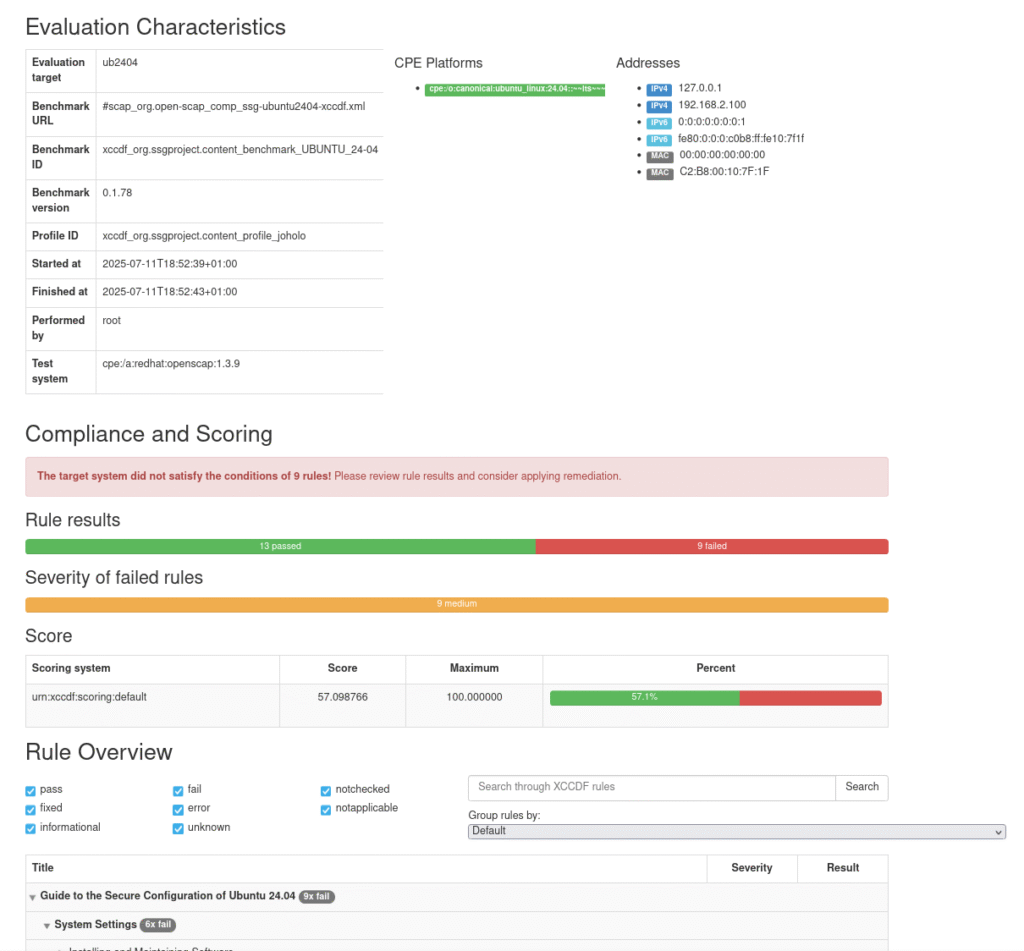
So let’s try to fix this!
Remediation
Most rules (but not all) offer a semi-automatic remeditation to be performed. In the most recent case I did this:
oscap-ssh root@192.168.2.115 22 xccdf generate fix --fetch-remote-resources --profile xccdf_org.ssgproject.content_profile_joholo_experimental --template urn:xccdf:fix:script:ansible build/ssg-ubuntu2404-ds.xml | tee fix_experimental_hardened.ymlNow, you need to modify the oscap-ssh binary as I described last year(presented below as diff format):
161a162,163
elif [ "$1 $2" == "xccdf generate" ]; then
    true
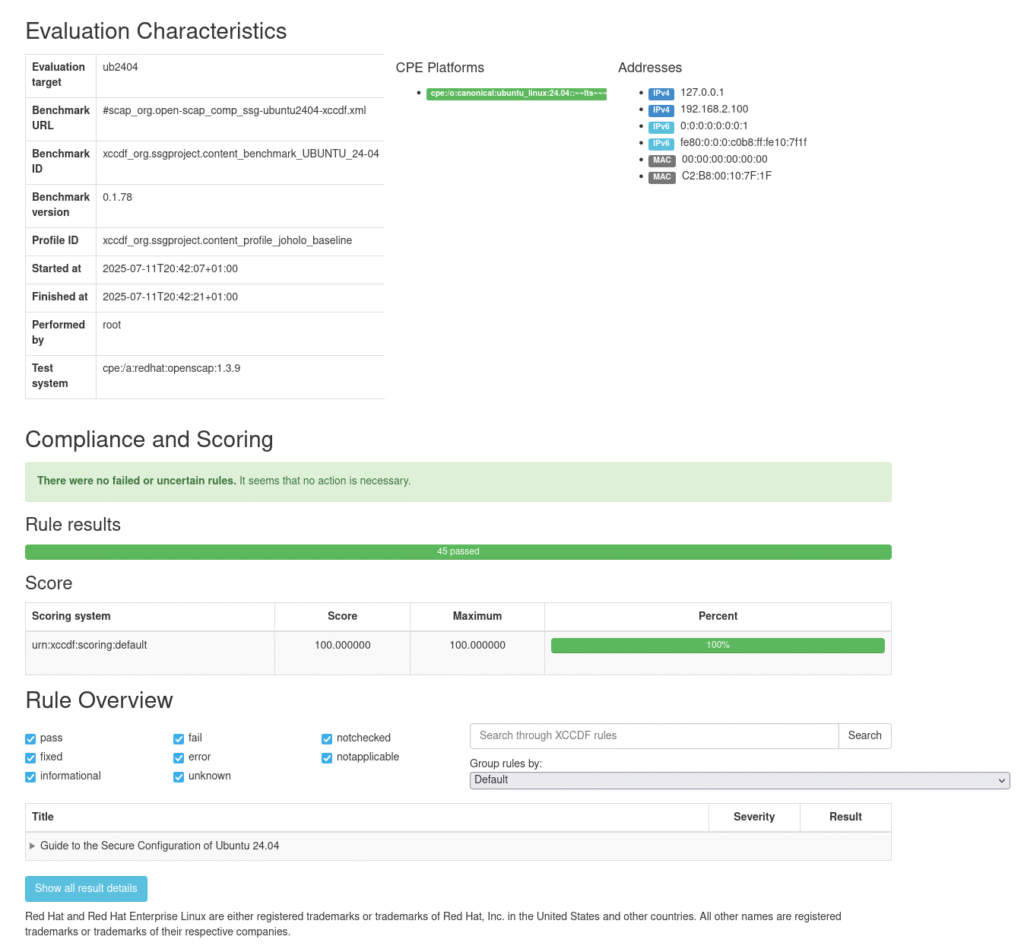
The produced playbook needs to be slightly edited to make it valid YAML but otherwise it’s just something to try running with Ansible as per usual. Sometimes the execution stops because… well… Sometimes a remeditation is a bit buggy and tries to introduce a key exchange algorithm for SSHD that isn’t valid, but you can just comment out the stuff already done to speed things along for subsequent executions. In the end you end up with something correct:
Modifications
So I don’t order off the menu in these situations. I don’t have to adhere to FIPS and I don’t want to keep root from logging in directly, only ensure that we don’t allow passwords for logging in as root. For instance I don’t care much for AIDE because as far as I can tell it only acts as a tripwire-defence to tell you if files have changed. OSSEC does that and various other things. So I need to create my own rules. For instance, is ossec-hids-agent installed? In linux_os/guide/system/software/integrity/software-integrity/ossec/server_ip_in_ossec_conf/rule.yml:
documentation_complete: false


title: 'OSSEC clients should report to a given OSSEC server by IP'

description: |-
    OSSEC clients should report to a given OSSEC server by IP.

rationale: |-
    It is the role of the OSSEC server to decide on active rewsponses
    which may be relevant to perform on _all_ servers even if the cause
    is found only on one server.

severity: medium
This is just a sort of wrapper to linux_os/guide/system/software/integrity/software-integrity/ossec/server_ip_in_ossec_conf/oval/shared.xml:
<def-group>
  <definition class="compliance" id="server_ip_in_ossec_conf" version="1">
    {{{ oval_metadata("Check if OSSEC is set to communicate with correct server", rule_title="server_ip_in_ossec_conf") }}}
  <criteria operator="AND">
    <criterion comment="Ensure server-ip is set correctly" test_ref="test_server_ip_set_value" />
  </criteria>
  </definition>

  <ind:xmlfilecontent_test check="all" comment="Server IP is correctly defined for OSSEC" id="test_server_ip_set_value" version="1">
    <ind:object object_ref="object_ossec_conf" />
    <ind:state state_ref="state_ossec_conf" />
  </ind:xmlfilecontent_test>

  <ind:xmlfilecontent_object id="object_ossec_conf" version="1">
    <ind:filepath>/var/ossec/etc/ossec.conf</ind:filepath>
    <ind:xpath>/ossec_config/client/server-ip/text()</ind:xpath>
  </ind:xmlfilecontent_object>

  <ind:xmlfilecontent_state id="state_ossec_conf" version="1">
    <ind:value_of datatype="string" entity_check="at least one">192.168.2.120</ind:value_of>
  </ind:xmlfilecontent_state>

</def-group>
This might look fairly straight forward but this is not brilliantly documented and I ended up reading some C-code and introducing my own debug-statements in /usr/lib64/python3.13/xml/etree/ElementTree.py to figure it out.

I finally got things to build and then it was “only” solving the issue of oscap not actually comparing things to the right values:

It took a few more tries to get it right:
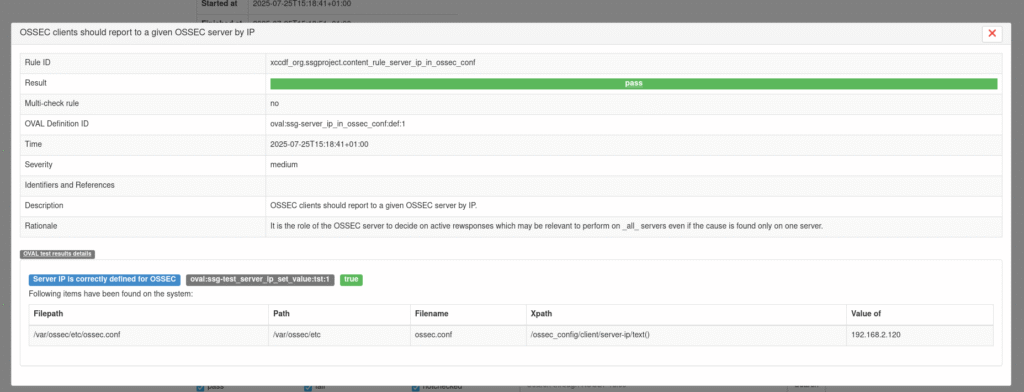
linux_os/guide/system/network/network-firewalld/ruleset_modifications/configure_firewalld_rate_limiting/oval/shared.xml was a gift from the gods in trying to get this to work.
Yes, yes… I am aware I hard-coded the IP-address in the linux_os-definition and it should be a variable. I’ll fix that. Eventually… The OSSEC config-file is in XML so this ought to allow me to enforce various requirements for the ossec client and server.
The hardened profile tested above is this:
documentation_complete: false

title: Johan experimental hardened profile

description: |-
    This profile is meant for servers reachable from the internet and therefore
    needs hardering.

selections:
    - accounts_no_uid_except_zero
    - accounts_root_gid_zero
    - accounts_root_path_dirs_no_write
    - accounts_password_pam_pwquality_enabled
    - accounts_umask_etc_bashrc
    - accounts_umask_etc_login_defs
    - accounts_umask_etc_profile
    - accounts_umask_root
    - accounts_user_dot_group_ownership
    - accounts_user_dot_user_ownership
    - accounts_user_interactive_home_directory_exists
    - account_unique_id
    - account_unique_name
    - accounts_password_last_change_is_in_past
    - audit_sudo_log_events
    - audit_rules_sudoers
    - audit_rules_sudoers_d
    - audit_rules_dac_modification_chmod
    - audit_rules_dac_modification_chown
    - audit_rules_dac_modification_fchmod
    - audit_rules_dac_modification_fchmodat
    - audit_rules_dac_modification_fchown
    - audit_rules_dac_modification_fchownat
    - audit_rules_dac_modification_fremovexattr
    - audit_rules_dac_modification_fsetxattr
    - audit_rules_dac_modification_lchown
    - audit_rules_dac_modification_lremovexattr
    - audit_rules_dac_modification_lsetxattr
    - audit_rules_dac_modification_removexattr
    - audit_rules_dac_modification_setxattr
    - audit_rules_execution_chacl
    - audit_rules_execution_chcon
    - audit_rules_execution_setfacl
    - audit_rules_file_deletion_events_rename
    - audit_rules_file_deletion_events_renameat
    - audit_rules_file_deletion_events_unlink
    - audit_rules_file_deletion_events_unlinkat
    - audit_rules_immutable
    - audit_rules_kernel_module_loading_delete
    - audit_rules_kernel_module_loading_init
    - audit_rules_login_events_faillock
    - audit_rules_login_events_lastlog
    - audit_rules_mac_modification_etc_apparmor
    - audit_rules_mac_modification_etc_apparmor_d
    - audit_rules_media_export
    - audit_rules_networkconfig_modification
    - audit_rules_privileged_commands
    - audit_rules_privileged_commands_insmod
    - audit_rules_privileged_commands_modprobe
    - audit_rules_privileged_commands_rmmod
    - audit_rules_privileged_commands_usermod
    - audit_rules_session_events
    - audit_rules_suid_privilege_function
    - audit_rules_sysadmin_actions
    - audit_rules_time_adjtimex
    - audit_rules_time_clock_settime
    - audit_rules_time_settimeofday
    - audit_rules_time_watch_localtime
    - audit_rules_unsuccessful_file_modification_creat
    - audit_rules_unsuccessful_file_modification_ftruncate
    - audit_rules_unsuccessful_file_modification_open
    - audit_rules_unsuccessful_file_modification_openat
    - audit_rules_unsuccessful_file_modification_truncate
    - audit_rules_usergroup_modification_group
    - audit_rules_usergroup_modification_gshadow
    - audit_rules_usergroup_modification_nsswitch_conf
    - audit_rules_usergroup_modification_opasswd
    - audit_rules_usergroup_modification_pam_conf
    - audit_rules_usergroup_modification_pamd
    - audit_rules_usergroup_modification_passwd
    - audit_rules_usergroup_modification_shadow
    - chronyd_configure_pool_and_server
    - chronyd_run_as_chrony_user
    - disable_host_auth
    - file_owner_etc_group
    - file_owner_etc_gshadow
    - file_owner_etc_issue
    - file_owner_etc_issue_net
    - file_owner_etc_motd
    - file_owner_etc_passwd
    - file_owner_etc_security_opasswd
    - file_owner_etc_security_opasswd_old
    - file_owner_etc_shadow
    - file_owner_etc_shells
    - file_owner_grub2_cfg
    - file_ownership_audit_binaries
    - file_ownership_audit_configuration
    - file_ownership_home_directories
    - file_owner_sshd_config
    - file_permissions_etc_audit_auditd
    - file_permissions_etc_audit_rules
    - file_permissions_etc_audit_rulesd
    - file_permissions_etc_group
    - file_permissions_etc_gshadow
    - file_permissions_etc_issue
    - file_permissions_etc_issue_net
    - file_permissions_etc_motd
    - file_permissions_etc_passwd
    - file_permissions_etc_security_opasswd
    - file_permissions_etc_security_opasswd_old
    - file_permissions_etc_shadow
    - file_permissions_etc_shells
    - file_permissions_grub2_cfg
    - file_permissions_home_directories
    - file_permissions_sshd_config
    - file_permissions_sshd_private_key
    - file_permissions_sshd_pub_key
    - kernel_module_cramfs_disabled
    - kernel_module_dccp_disabled
    - kernel_module_freevxfs_disabled
    - kernel_module_hfs_disabled
    - kernel_module_hfsplus_disabled
    - kernel_module_jffs2_disabled
    - kernel_module_overlayfs_disabled
    - kernel_module_rds_disabled
    - kernel_module_sctp_disabled
    - kernel_module_squashfs_disabled
    - kernel_module_tipc_disabled
    - kernel_module_udf_disabled
    - kernel_module_usb-storage_disabled
    - mount_option_dev_shm_nodev
    - mount_option_dev_shm_noexec
    - mount_option_dev_shm_nosuid
    - mount_option_home_nodev
    - mount_option_home_nosuid
    - mount_option_tmp_nodev
    - mount_option_tmp_noexec
    - mount_option_tmp_nosuid
    - mount_option_var_log_audit_nodev
    - mount_option_var_log_audit_noexec
    - mount_option_var_log_audit_nosuid
    - mount_option_var_log_nodev
    - mount_option_var_log_noexec
    - mount_option_var_log_nosuid
    - mount_option_var_nodev
    - mount_option_var_nosuid
    - mount_option_var_tmp_nodev
    - mount_option_var_tmp_noexec
    - mount_option_var_tmp_nosuid
    - no_rsh_trust_files
    - no_duplicate_uids
    - package_ossec_agent_installed
    - server_ip_in_ossec_conf
    - package_audit_installed
    - partition_for_home
    - partition_for_var
    - partition_for_var_log
    - partition_for_var_log_audit
    - partition_for_var_tmp
    - service_auditd_enabled
    - service_tftp_disabled
    - service_vsftpd_disabled
    - service_xinetd_disabled
    - service_ypserv_disabled
    - sshd_disable_empty_passwords
    - sshd_disable_forwarding
    - sshd_disable_gssapi_auth
    - sshd_disable_rhosts
    - sshd_do_not_permit_user_env
    - sshd_enable_pam
    - sshd_limit_user_access
    - sshd_set_idle_timeout
    - sshd_set_keepalive
    - sshd_set_login_grace_time
    - sshd_set_loglevel_info
    - sshd_set_max_auth_tries
    - sshd_set_max_sessions
    - sshd_set_maxstartups
    - sshd_use_strong_ciphers
    - sshd_use_strong_kex
    - sshd_use_strong_macs
    - sysctl_kernel_randomize_va_space
    - sudo_remove_no_authenticate
    - sudo_require_authentication
This has been slightly modified since I use alloy to feed data to Loki and Mimir(well, it’s currently Cortex metrics but I intended to replace that with Mimir) and some other things that have caused issues when I’ve rolled out these changes.
I would like some rules in place for IPset and iptables rules, but I’ll have to think about to implement those. Ah, content/linux_os/guide/system/network/network-iptables/iptables_ruleset_modifications/set_iptables_default_rule_forward/bash/shared.sh looks like a good lead.
Metrics
OpenSCAP results don’t lend themselves to metrics directly but if you have 500 servers and want to know that things are secured according to your own profile all you really need is to turn each report into a JSON file that is then
oscap-report -f JSON < arf_1751820778.xml > test.jsonAnd then extract how many pass and how many fail you got:
cjp@fedora:~/content$ cat test.json | jq '.rules | to_entries[].value | select(.result=="pass") | .title' | wc -l
97
cjp@fedora:~/content$ cat test.json | jq '.rules | to_entries[].value | select(.result=="fail") | .title' | wc -l
6
These can be added up and you get a metric suitable for Prometheus. If all of a sudden fail goes from 0 to 50, then you have something to fix. You could of course have 500 metrics – well 1000 technically – to see which servers are causing an issue but you should store ARF files anyway because you don’t know ahead of time what you might want to dig out. Me naming ARF-files with just a timestamp is sensible in my test case but it should include hostname as well for production.